> ## Documentation Index
> Fetch the complete documentation index at: https://docs.fire.rest/llms.txt
> Use this file to discover all available pages before exploring further.
# Raw replay
> Find a real order from FIRE or your stored samples and re-inject it into any environment.
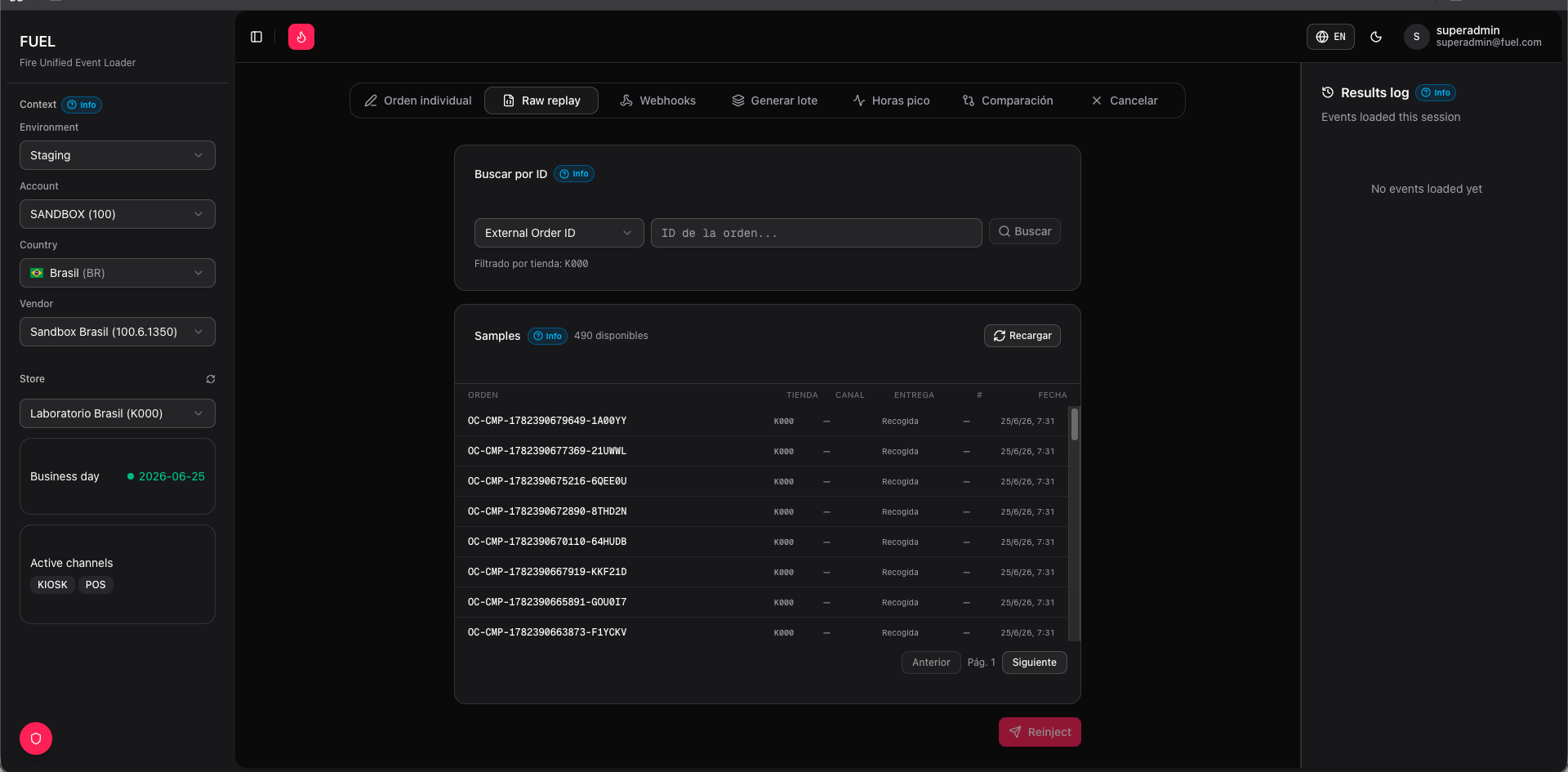
Raw replay lets you take an existing order payload — either pulled live from FIRE or retrieved from FUEL's local sample library — load it into an editor, and fire it again. This is the fastest way to reproduce a bug with a real payload or to retest an integration without having to rebuild the order from scratch.
 ## Source modes
Query the FIRE platform directly by **External Order ID**, **Order Code**, or internal **Order ID**. FUEL fetches the original payload and loads it into the editor.
Browse order samples stored in FUEL's own database. The list is paginated; use filters to narrow by store or date. Samples are saved when you inject orders through FUEL or sync them manually.
## Replaying an order
Switch between **Search in FIRE** and **Samples** using the tabs at the top of the panel. Run your search or browse the sample list until you find the order you want.
Click the order row. Its full JSON loads into the editor on the right. You can read the original payload before making any changes.
Click **Regenerate IDs**. FUEL replaces `orderId` and `orderCode` with fresh UUIDs. This step is essential — FIRE rejects requests that reuse an `external_order_id` it has already processed, returning a `409 Conflict`.
Always regenerate IDs before replaying. Skipping this step is the most common reason a replay fails with a duplicate-order error.
The editor is fully writable. Adjust any field — channel, products, payment status, client data — directly in the JSON before sending.
The operating context (environment, vendor, store) set in the sidebar determines where the order is sent. Make sure you have the correct environment selected before replaying.
Click **Replay**. FUEL posts the payload to `POST /v1/orders` in the selected environment and displays the raw response in the **Response** card below the editor.
## Reading the response
The **Response** card shows the full HTTP response from FIRE: status code, order ID assigned by FIRE, and any error details. A green status means the order was accepted; any `4xx` or `5xx` status includes the error body so you can diagnose the failure immediately.
Replaying into a production environment injects a real order. Always verify the selected environment in the sidebar before clicking **Replay**.
## Related pages
* [Single order](/en/fuel/single-order) — build an order from scratch with full field control
* [Batch](/en/fuel/batch) — replay or generate orders at scale
## Source modes
Query the FIRE platform directly by **External Order ID**, **Order Code**, or internal **Order ID**. FUEL fetches the original payload and loads it into the editor.
Browse order samples stored in FUEL's own database. The list is paginated; use filters to narrow by store or date. Samples are saved when you inject orders through FUEL or sync them manually.
## Replaying an order
Switch between **Search in FIRE** and **Samples** using the tabs at the top of the panel. Run your search or browse the sample list until you find the order you want.
Click the order row. Its full JSON loads into the editor on the right. You can read the original payload before making any changes.
Click **Regenerate IDs**. FUEL replaces `orderId` and `orderCode` with fresh UUIDs. This step is essential — FIRE rejects requests that reuse an `external_order_id` it has already processed, returning a `409 Conflict`.
Always regenerate IDs before replaying. Skipping this step is the most common reason a replay fails with a duplicate-order error.
The editor is fully writable. Adjust any field — channel, products, payment status, client data — directly in the JSON before sending.
The operating context (environment, vendor, store) set in the sidebar determines where the order is sent. Make sure you have the correct environment selected before replaying.
Click **Replay**. FUEL posts the payload to `POST /v1/orders` in the selected environment and displays the raw response in the **Response** card below the editor.
## Reading the response
The **Response** card shows the full HTTP response from FIRE: status code, order ID assigned by FIRE, and any error details. A green status means the order was accepted; any `4xx` or `5xx` status includes the error body so you can diagnose the failure immediately.
Replaying into a production environment injects a real order. Always verify the selected environment in the sidebar before clicking **Replay**.
## Related pages
* [Single order](/en/fuel/single-order) — build an order from scratch with full field control
* [Batch](/en/fuel/batch) — replay or generate orders at scale