> ## Documentation Index
> Fetch the complete documentation index at: https://docs.fire.rest/llms.txt
> Use this file to discover all available pages before exploring further.
# Webhooks
> Send webhook events to FIRE, manage mock endpoints, and inspect incoming event traffic.
The **Webhooks** tab lets you simulate the full webhook lifecycle around FIRE: push events to FIRE's inbound endpoints (KDS callbacks, fiscal responses), spin up mock HTTP servers that external services can call, and inspect every event FIRE sends back to FUEL.
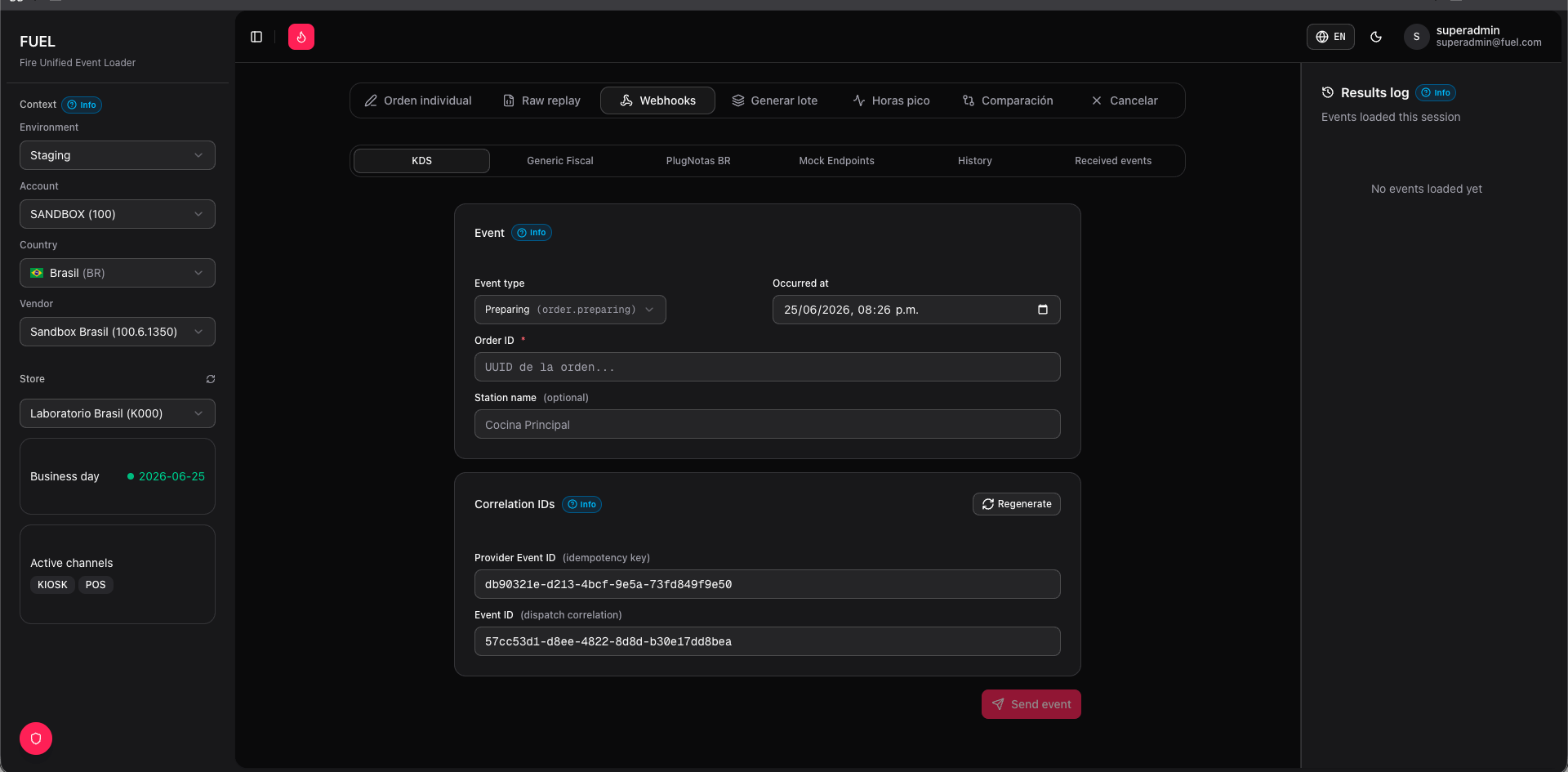 ## KDS
Use this sub-tab to send Kitchen Display System lifecycle events for an existing order.
**Fields**
| Field | Description |
| ----------------- | ------------------------------------------------------------------------------ |
| External Order ID | The external identifier of the order you want to update |
| Event type | One of `order.preparing`, `order.ready`, `order.dispatched`, `order.cancelled` |
Click **Send KDS Event** to POST the event to FIRE's KDS webhook endpoint. FUEL displays the HTTP response status and body inline.
Use `order.preparing` immediately after injecting an order to trigger kitchen flow, then advance through `order.ready` and `order.dispatched` to walk the full state machine.
## Fiscal generic
Send fiscal authorization callbacks to FIRE for any supported country. FIRE uses these callbacks to update an order's fiscal document status.
**Fields**
* **Country** — selects the country-specific document template (BR, MX, CO, PE, EC, CL, AR).
* **Status** — one of `fiscal_graphic`, `authorized`, `cancelled`, `rejected`, `denied`, `error`. `fiscal_graphic` delivers the printable representation and is not an approval.
* **Document JSON** — pre-filled template for the selected country. Edit any field before sending.
* **Error code / Error message** — optional; include when simulating rejection or error flows.
Each country template includes the minimum required fields for that fiscal system. Expand or modify the JSON to test edge cases such as missing fields or malformed document keys.
## PlugNotas BR
Dedicated sub-tab for Brazilian NFC-e and NFS-e webhooks delivered through the PlugNotas gateway.
The document JSON is pre-filled with SEFAZ-specific fields including `chave_de_acesso`, `numero`, `serie`, `data_emissao`, and `protocolo`. Set the **Status** to `CONCLUIDO` for a successful issuance or `REJEITADO` to simulate a SEFAZ rejection.
Click **Send** to forward the payload to FIRE's PlugNotas callback endpoint.
## Mock endpoints
Create lightweight HTTP endpoints hosted by FUEL that simulate external services — delivery providers, fiscal gateways, ERP callbacks, and more.
Click **New endpoint**, enter a URL path (e.g. `/mock/fiscal/callback`), select the HTTP method (`GET`, `POST`, `PUT`, `PATCH`, `DELETE`), and choose an auth type.
Enter the JSON response body and HTTP status code you want FUEL to return. Use one of the four behavior presets for common scenarios:
| Preset | Status | Notes |
| --------- | ------ | ---------------------------- |
| Normal | `200` | Success response |
| Error 400 | `400` | Bad request |
| Error 500 | `500` | Server error |
| Offline | — | Connection refused / timeout |
Click **Copy URL** to get the full endpoint URL. Paste it into the external system or FIRE configuration you are testing against.
Each endpoint has a **Request log** panel that shows every inbound request: timestamp, headers, body, and the response FUEL returned.
Mock endpoints are shared across all users in your environment. Avoid storing sensitive production data in response bodies.
## Events log
Displays all webhook events that FIRE has sent **to** FUEL, in reverse-chronological order.
Each row shows the event type, source order ID, payload preview, timestamp, and **HMAC verification status** — a green badge means the signature matched FUEL's configured webhook secret; a red badge means it did not.
If HMAC validation is failing, verify that the webhook secret configured in FUEL's environment settings matches the secret registered on the FIRE side.
## History
A paginated table of every outbound webhook send initiated from FUEL across all sub-tabs. Columns include sub-tab (KDS, Fiscal, PlugNotas), event type, target order ID, HTTP status, and timestamp. Use this log to audit test runs or reproduce a specific send sequence.
## KDS
Use this sub-tab to send Kitchen Display System lifecycle events for an existing order.
**Fields**
| Field | Description |
| ----------------- | ------------------------------------------------------------------------------ |
| External Order ID | The external identifier of the order you want to update |
| Event type | One of `order.preparing`, `order.ready`, `order.dispatched`, `order.cancelled` |
Click **Send KDS Event** to POST the event to FIRE's KDS webhook endpoint. FUEL displays the HTTP response status and body inline.
Use `order.preparing` immediately after injecting an order to trigger kitchen flow, then advance through `order.ready` and `order.dispatched` to walk the full state machine.
## Fiscal generic
Send fiscal authorization callbacks to FIRE for any supported country. FIRE uses these callbacks to update an order's fiscal document status.
**Fields**
* **Country** — selects the country-specific document template (BR, MX, CO, PE, EC, CL, AR).
* **Status** — one of `fiscal_graphic`, `authorized`, `cancelled`, `rejected`, `denied`, `error`. `fiscal_graphic` delivers the printable representation and is not an approval.
* **Document JSON** — pre-filled template for the selected country. Edit any field before sending.
* **Error code / Error message** — optional; include when simulating rejection or error flows.
Each country template includes the minimum required fields for that fiscal system. Expand or modify the JSON to test edge cases such as missing fields or malformed document keys.
## PlugNotas BR
Dedicated sub-tab for Brazilian NFC-e and NFS-e webhooks delivered through the PlugNotas gateway.
The document JSON is pre-filled with SEFAZ-specific fields including `chave_de_acesso`, `numero`, `serie`, `data_emissao`, and `protocolo`. Set the **Status** to `CONCLUIDO` for a successful issuance or `REJEITADO` to simulate a SEFAZ rejection.
Click **Send** to forward the payload to FIRE's PlugNotas callback endpoint.
## Mock endpoints
Create lightweight HTTP endpoints hosted by FUEL that simulate external services — delivery providers, fiscal gateways, ERP callbacks, and more.
Click **New endpoint**, enter a URL path (e.g. `/mock/fiscal/callback`), select the HTTP method (`GET`, `POST`, `PUT`, `PATCH`, `DELETE`), and choose an auth type.
Enter the JSON response body and HTTP status code you want FUEL to return. Use one of the four behavior presets for common scenarios:
| Preset | Status | Notes |
| --------- | ------ | ---------------------------- |
| Normal | `200` | Success response |
| Error 400 | `400` | Bad request |
| Error 500 | `500` | Server error |
| Offline | — | Connection refused / timeout |
Click **Copy URL** to get the full endpoint URL. Paste it into the external system or FIRE configuration you are testing against.
Each endpoint has a **Request log** panel that shows every inbound request: timestamp, headers, body, and the response FUEL returned.
Mock endpoints are shared across all users in your environment. Avoid storing sensitive production data in response bodies.
## Events log
Displays all webhook events that FIRE has sent **to** FUEL, in reverse-chronological order.
Each row shows the event type, source order ID, payload preview, timestamp, and **HMAC verification status** — a green badge means the signature matched FUEL's configured webhook secret; a red badge means it did not.
If HMAC validation is failing, verify that the webhook secret configured in FUEL's environment settings matches the secret registered on the FIRE side.
## History
A paginated table of every outbound webhook send initiated from FUEL across all sub-tabs. Columns include sub-tab (KDS, Fiscal, PlugNotas), event type, target order ID, HTTP status, and timestamp. Use this log to audit test runs or reproduce a specific send sequence.