> ## Documentation Index
> Fetch the complete documentation index at: https://docs.fire.rest/llms.txt
> Use this file to discover all available pages before exploring further.
# Menu assignment
> Decide which menu and which price list each store uses on each channel, and push the menu to the channel from one place.
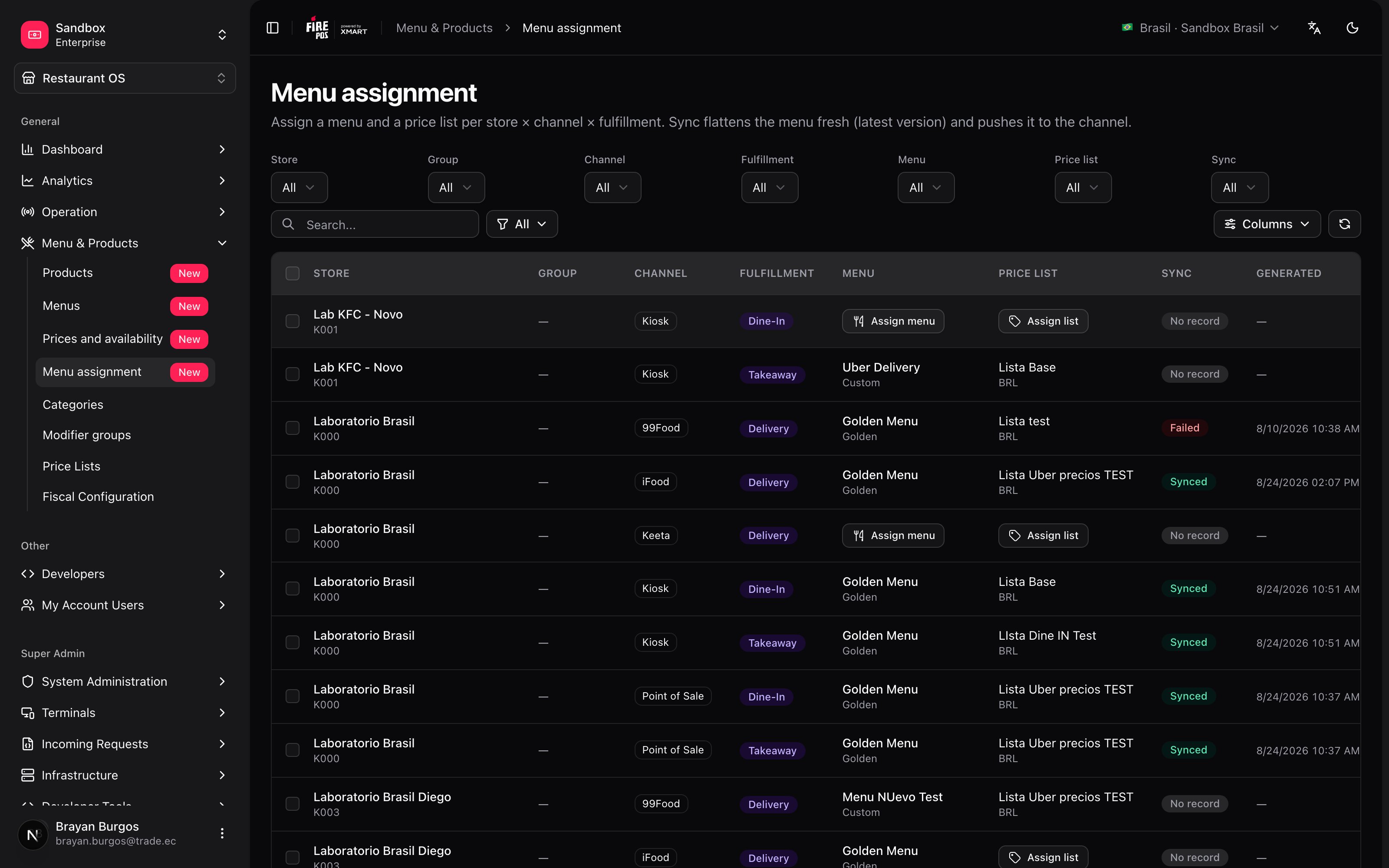
You have the [menu](/en/manuals/backoffice/menus) built and the [price list](/en/manuals/backoffice/price-lists) ready. None of that sells yet: what's missing is saying **which store, which channel and which fulfillment type** they're used for. That decision is this screen, and it's also where you press the button that pushes the menu to the channel.
Go to **Restaurant OS → Menu and Products → Menu assignment**.
 ***
## The minimum you need to know
**1. The unit is the row: store × channel × fulfillment.** One row per possible combination. The same store appears several times, once per channel and fulfillment type it serves.
**2. A row needs a menu *and* a price list.** With only one of them it can't be synced: the button stays disabled.
**3. Assigning does not publish. Publishing is Sync.** And **Sync** sends what exists **at that moment**, not what existed when you assigned.
***
## The simple path
You opened a new store and it needs to start selling:
1. Filter by that store with the **Store** selector.
2. On each row you care about, **Assign menu**.
3. On the same row, **Assign list**.
4. Select the rows and **Sync**.
The status turns **Pending**, and when the channel confirms it settles on **Synced**. That's it.
If your operation is one store and one channel, you're done. The rest of the manual is for when it's forty stores and they all have to change on the same day.
***
## The matrix: one row per combination
Each row is a real selling destination. These are its columns:
| Column | What it tells you |
| --------------- | ------------------------------------------------------------------------------------------- |
| **Store** | The store, with its code underneath. |
| **Group** | Which store groups it belongs to, as colored chips. |
| **Channel** | Web, app, kiosk, aggregator… |
| **Fulfillment** | Delivery, pickup, dine-in… |
| **Menu** | Which menu it uses. If it has none, an **Assign menu** button. |
| **Price list** | Which list it's priced with. If it has none, **Assign list**. |
| **Sync** | **No record** · **Pending** · **Synced** · **Failed**, plus the warnings if there were any. |
| **Generated** | When the menu was last flattened for this destination. |
At the top there are seven filters — store, group, channel, fulfillment, menu, list and sync status — and a search that matches store, menu and channel names. With forty stores and five channels the matrix has two hundred rows: the filters are not decoration.
**What store groups are for.** A group lets you filter every store in a region, a brand or a format at once, and assign them the same menu in a single operation. Without groups, changing a region's delivery menu means ticking stores by hand and missing one.
***
## Assigning in bulk
Tick several rows with the checkboxes and the bulk action bar appears: **Assign menu**, **Assign list** and **Sync**, with the count of what's selected.
***
## The minimum you need to know
**1. The unit is the row: store × channel × fulfillment.** One row per possible combination. The same store appears several times, once per channel and fulfillment type it serves.
**2. A row needs a menu *and* a price list.** With only one of them it can't be synced: the button stays disabled.
**3. Assigning does not publish. Publishing is Sync.** And **Sync** sends what exists **at that moment**, not what existed when you assigned.
***
## The simple path
You opened a new store and it needs to start selling:
1. Filter by that store with the **Store** selector.
2. On each row you care about, **Assign menu**.
3. On the same row, **Assign list**.
4. Select the rows and **Sync**.
The status turns **Pending**, and when the channel confirms it settles on **Synced**. That's it.
If your operation is one store and one channel, you're done. The rest of the manual is for when it's forty stores and they all have to change on the same day.
***
## The matrix: one row per combination
Each row is a real selling destination. These are its columns:
| Column | What it tells you |
| --------------- | ------------------------------------------------------------------------------------------- |
| **Store** | The store, with its code underneath. |
| **Group** | Which store groups it belongs to, as colored chips. |
| **Channel** | Web, app, kiosk, aggregator… |
| **Fulfillment** | Delivery, pickup, dine-in… |
| **Menu** | Which menu it uses. If it has none, an **Assign menu** button. |
| **Price list** | Which list it's priced with. If it has none, **Assign list**. |
| **Sync** | **No record** · **Pending** · **Synced** · **Failed**, plus the warnings if there were any. |
| **Generated** | When the menu was last flattened for this destination. |
At the top there are seven filters — store, group, channel, fulfillment, menu, list and sync status — and a search that matches store, menu and channel names. With forty stores and five channels the matrix has two hundred rows: the filters are not decoration.
**What store groups are for.** A group lets you filter every store in a region, a brand or a format at once, and assign them the same menu in a single operation. Without groups, changing a region's delivery menu means ticking stores by hand and missing one.
***
## Assigning in bulk
Tick several rows with the checkboxes and the bulk action bar appears: **Assign menu**, **Assign list** and **Sync**, with the count of what's selected.
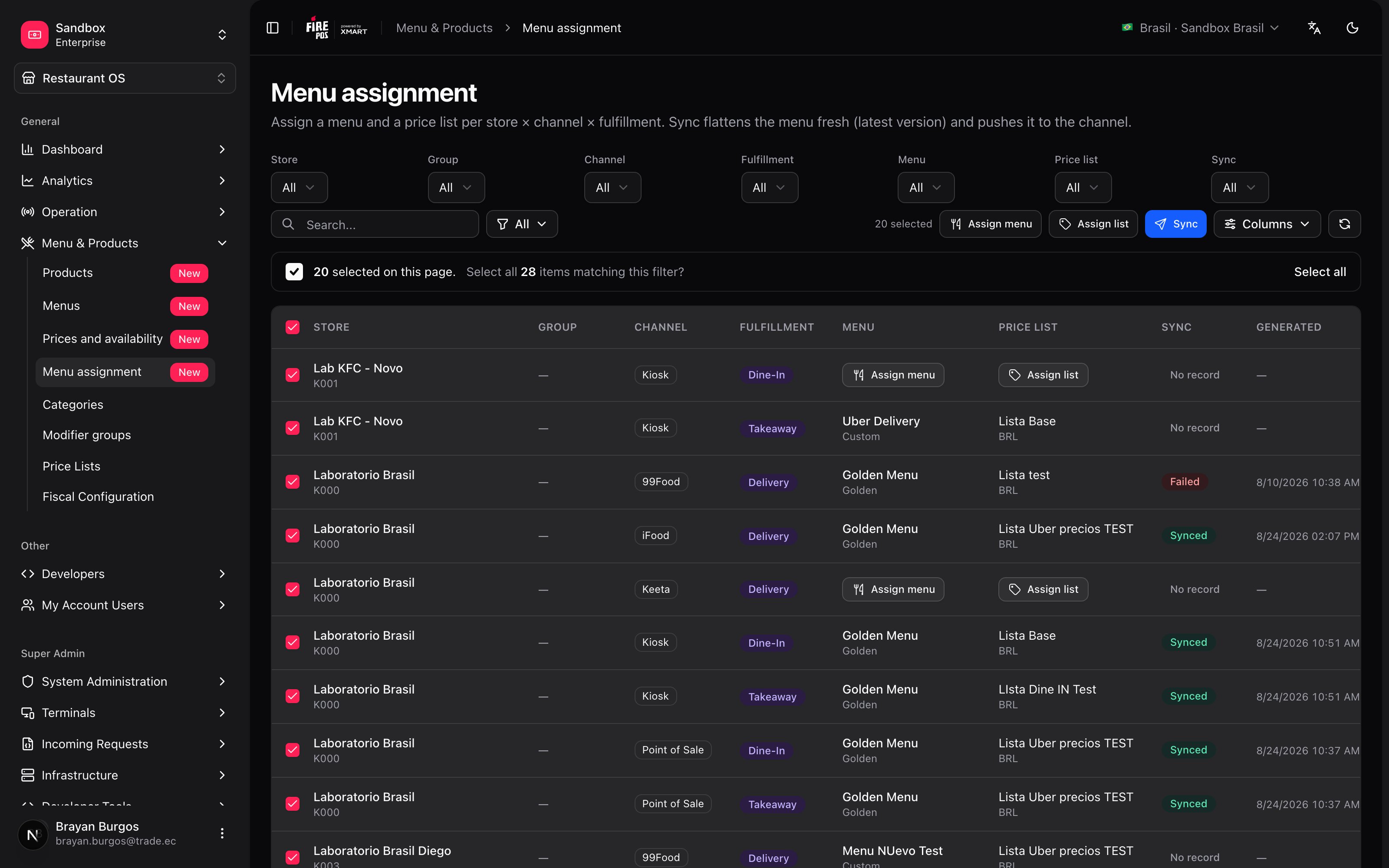 The dialog always states how many combinations the change will apply to before you confirm.
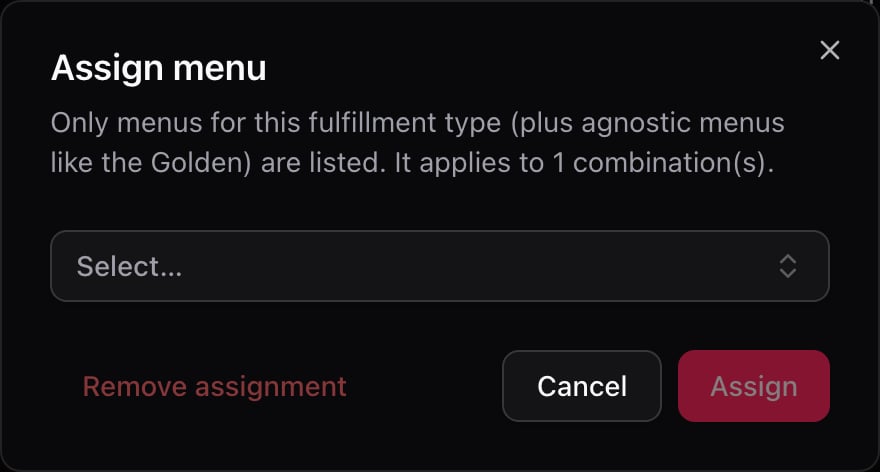 It also works the other way round: **Remove assignment** takes the menu or the list off the selected rows. A row without a menu can no longer be synced, but it keeps the last snapshot it already sent.
Up to **200 combinations** can be touched in one go.
***
## The fulfillment rule
The assign-menu dialog **does not show you every menu**. Only the ones serving that row's fulfillment type, plus the agnostic ones — the Golden, which serves them all.
It's the same criterion that makes a menu's fulfillment type final: a delivery menu on a dine-in row means nothing.
**If you selected rows with mixed fulfillment types, all you'll see is the Golden.** The screen says so: *"The selection mixes fulfillment types: only agnostic menus (Golden) can be assigned."*
It isn't a screen error: it's that no custom menu serves two fulfillment types. If you meant to assign your delivery menu, filter by **Fulfillment** first and work one type at a time.
***
## Sync: what actually happens
**Sync** does three things, in this order:
1. **It flattens the menu.** It takes the menu's structure, applies the assigned list's prices, and builds a flat menu with no inheritance and no formulas: the literal list of what is sold and for how much.
2. **It sends it to the channel.** The status turns **Pending**.
3. **It waits for confirmation.** The channel answers later, on its own time, and the status settles on **Synced** or **Failed**.
It also works the other way round: **Remove assignment** takes the menu or the list off the selected rows. A row without a menu can no longer be synced, but it keeps the last snapshot it already sent.
Up to **200 combinations** can be touched in one go.
***
## The fulfillment rule
The assign-menu dialog **does not show you every menu**. Only the ones serving that row's fulfillment type, plus the agnostic ones — the Golden, which serves them all.
It's the same criterion that makes a menu's fulfillment type final: a delivery menu on a dine-in row means nothing.
**If you selected rows with mixed fulfillment types, all you'll see is the Golden.** The screen says so: *"The selection mixes fulfillment types: only agnostic menus (Golden) can be assigned."*
It isn't a screen error: it's that no custom menu serves two fulfillment types. If you meant to assign your delivery menu, filter by **Fulfillment** first and work one type at a time.
***
## Sync: what actually happens
**Sync** does three things, in this order:
1. **It flattens the menu.** It takes the menu's structure, applies the assigned list's prices, and builds a flat menu with no inheritance and no formulas: the literal list of what is sold and for how much.
2. **It sends it to the channel.** The status turns **Pending**.
3. **It waits for confirmation.** The channel answers later, on its own time, and the status settles on **Synced** or **Failed**.
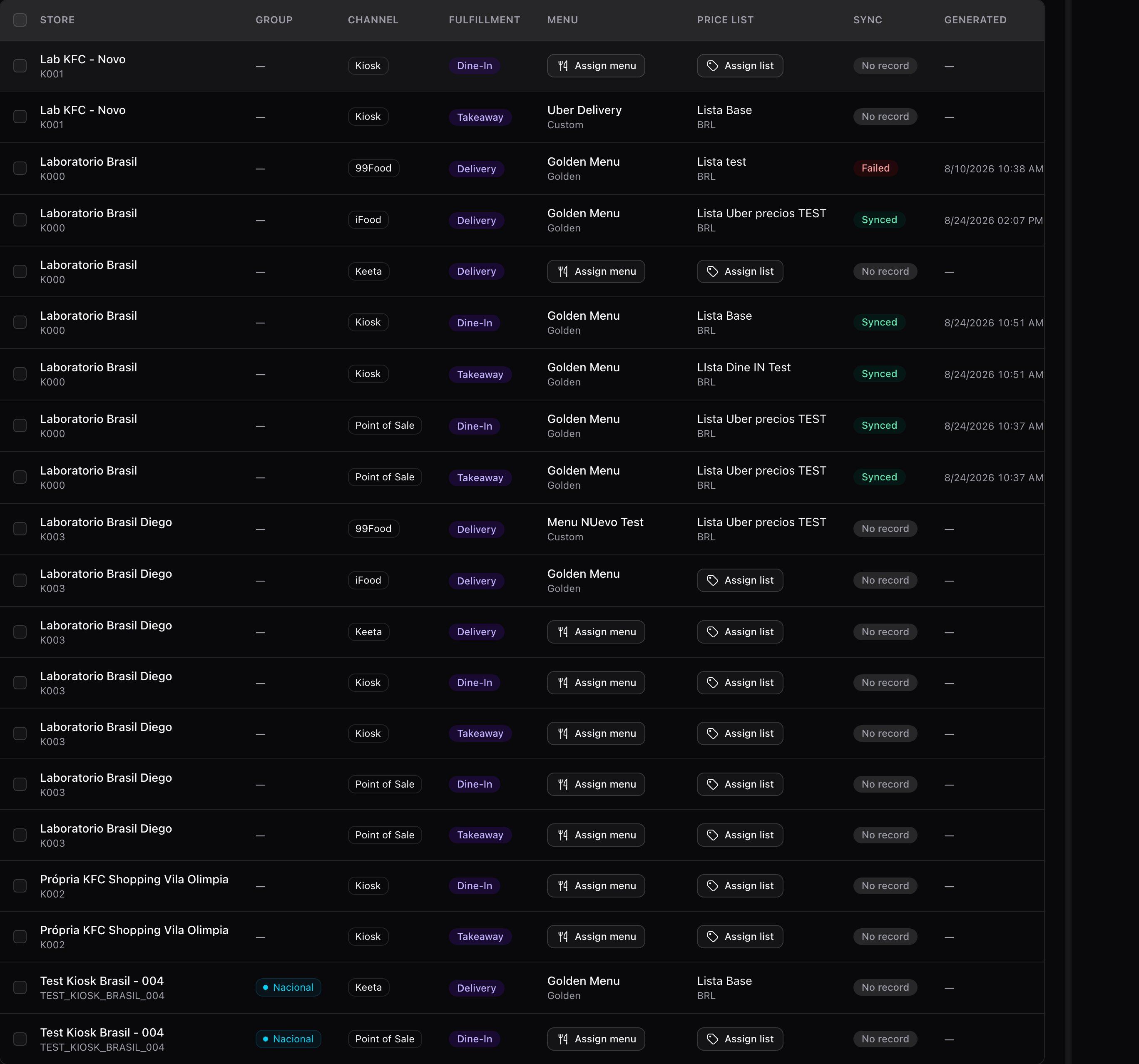 | Status | What it means |
| ------------- | ------------------------------------------------ |
| **No record** | This combination was never synced. |
| **Pending** | It was sent and the channel hasn't answered yet. |
| **Synced** | The channel received and accepted it. |
| **Failed** | The channel rejected it. |
While there are rows in **Pending**, the screen **refreshes itself every fifteen seconds**. No need to reload or sit watching: you can walk away and come back.
The button stays disabled — *"Assign a menu and a price list first"* — while the row is missing the menu or the list. That's on purpose: without a list, every price would go out at zero.
***
## The snapshot is from now, not from yesterday
**There are no versions. Sync sends the current state.** It takes the menu and the list exactly as they are saved in that second. There is no "publish Monday's version" and no going back to an earlier snapshot.
That has a practical consequence worth keeping in mind: **if somebody left the menu half-edited, that's what goes out.** Before syncing in bulk, it's worth confirming the menu is in the state it should be.
The reverse is also true, and that's the comfortable part: you don't need to "republish the menu" after changing a price. That row's next sync already carries the new price, because it reads the list at that moment.
***
## It synced, but something was left out
A row can end up **Synced** and still have dropped things along the way. When that happens, a warnings chip appears in the **Sync** column.
| Warning | What happened |
| ---------------------------------------------- | --------------------------------------------------------------------------------------------------------------- |
| **Product with no price in the assigned list** | The product **was not sent**. Had it been sent, it would have been published at **0**. |
| **Suggestions outside this menu** | The product suggests an upselling or cross-selling item that isn't on this menu. The suggestion doesn't travel. |
| **Unresolved modifier groups** | A modifier group couldn't be built and was left out of the menu. |
**The first one is the one that costs sales in silence.** The sync says **Synced**, the menu reached the channel, and that product is simply not on the menu the customer sees. Nobody gets an error: you have to open the warnings to find out.
It's fixed by giving the product a price in the list assigned to that row and syncing again.
***
## Batches: 50 at a time, one at a time
You can select as many rows as you like, but **each dispatch processes at most 50**. If you selected 120, the first 50 go out and the screen tells you: *"Syncing the first 50 rows; 70 left for the next round"*.
On top of that, **the channel processes one batch per vendor at a time**. If a dispatch is in flight, the next one waits.
It isn't an arbitrary limit: flattening a menu is expensive, and sending two hundred menus at once ends in timeouts and half-finished syncs, which is worse than going in batches.
If you're going to sync many rows, do it in tidy batches — by region, by channel — instead of selecting everything. When something fails you'll know exactly which group to check.
Selected rows missing a menu or a list **are skipped automatically**, and the screen tells you how many.
***
## Seeing exactly what was sent
The eye button, **View sync preview**, opens that row's last snapshot. It's the only way to answer *"what did the channel receive?"* with certainty.
| Status | What it means |
| ------------- | ------------------------------------------------ |
| **No record** | This combination was never synced. |
| **Pending** | It was sent and the channel hasn't answered yet. |
| **Synced** | The channel received and accepted it. |
| **Failed** | The channel rejected it. |
While there are rows in **Pending**, the screen **refreshes itself every fifteen seconds**. No need to reload or sit watching: you can walk away and come back.
The button stays disabled — *"Assign a menu and a price list first"* — while the row is missing the menu or the list. That's on purpose: without a list, every price would go out at zero.
***
## The snapshot is from now, not from yesterday
**There are no versions. Sync sends the current state.** It takes the menu and the list exactly as they are saved in that second. There is no "publish Monday's version" and no going back to an earlier snapshot.
That has a practical consequence worth keeping in mind: **if somebody left the menu half-edited, that's what goes out.** Before syncing in bulk, it's worth confirming the menu is in the state it should be.
The reverse is also true, and that's the comfortable part: you don't need to "republish the menu" after changing a price. That row's next sync already carries the new price, because it reads the list at that moment.
***
## It synced, but something was left out
A row can end up **Synced** and still have dropped things along the way. When that happens, a warnings chip appears in the **Sync** column.
| Warning | What happened |
| ---------------------------------------------- | --------------------------------------------------------------------------------------------------------------- |
| **Product with no price in the assigned list** | The product **was not sent**. Had it been sent, it would have been published at **0**. |
| **Suggestions outside this menu** | The product suggests an upselling or cross-selling item that isn't on this menu. The suggestion doesn't travel. |
| **Unresolved modifier groups** | A modifier group couldn't be built and was left out of the menu. |
**The first one is the one that costs sales in silence.** The sync says **Synced**, the menu reached the channel, and that product is simply not on the menu the customer sees. Nobody gets an error: you have to open the warnings to find out.
It's fixed by giving the product a price in the list assigned to that row and syncing again.
***
## Batches: 50 at a time, one at a time
You can select as many rows as you like, but **each dispatch processes at most 50**. If you selected 120, the first 50 go out and the screen tells you: *"Syncing the first 50 rows; 70 left for the next round"*.
On top of that, **the channel processes one batch per vendor at a time**. If a dispatch is in flight, the next one waits.
It isn't an arbitrary limit: flattening a menu is expensive, and sending two hundred menus at once ends in timeouts and half-finished syncs, which is worse than going in batches.
If you're going to sync many rows, do it in tidy batches — by region, by channel — instead of selecting everything. When something fails you'll know exactly which group to check.
Selected rows missing a menu or a list **are skipped automatically**, and the screen tells you how many.
***
## Seeing exactly what was sent
The eye button, **View sync preview**, opens that row's last snapshot. It's the only way to answer *"what did the channel receive?"* with certainty.
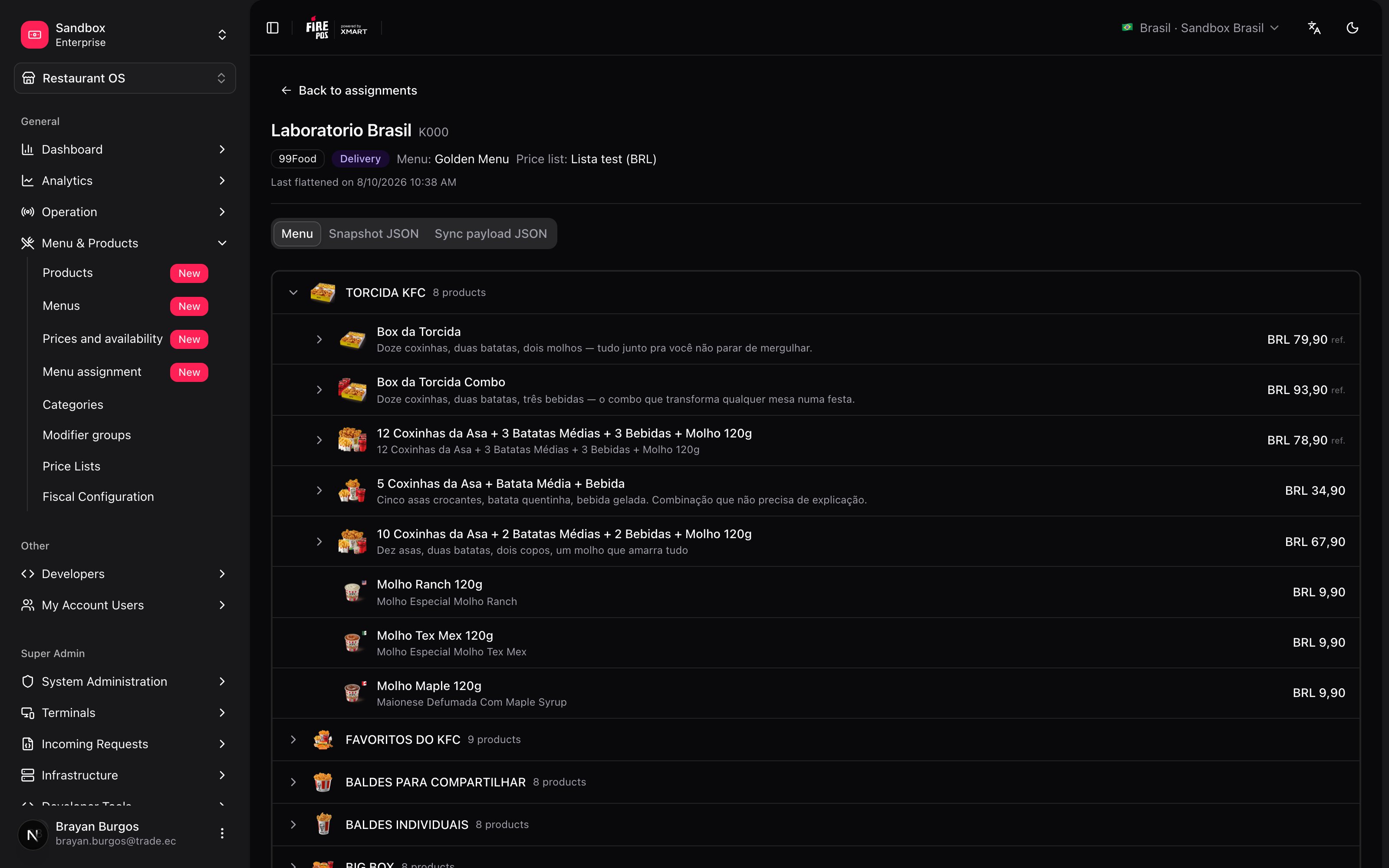 It has three tabs:
* **Menu** — the menu as it ended up: categories, products, prices and modifiers.
* **Snapshot JSON** — the same menu, raw.
* **Sync payload JSON** — exactly what was sent to the channel.
The top line says when it was generated. If the row was never synced, the button is disabled: *"No snapshot generated yet"*.
For an argument with a channel — *"this never reached me"* — the last two tabs are the evidence.
***
## Changing the price for a single destination
There's a separate screen, **Prices and availability**, for adjusting prices and visibility on **one specific destination** without opening the whole menu or the whole list. It works on the rows that already have a menu and a list assigned from here.
Its rule is worth knowing, because it isn't obvious:
* The **price** you change there lives in **the list**, and that list may be shared by several destinations.
* **Visibility** lives in **the menu**, which may also be in use across several destinations.
* But saving **syncs only that one row**. The other destinations pick the change up on their next Sync.
In other words: the change is already saved for everyone, but only one of them published it. The screen says so in a banner before you save.
***
## Recipes: how the real cases get solved
1. Filter by the store with the **Store** selector. Its rows will appear, one per channel and fulfillment type.
2. Select all the ones that store will serve.
3. **Assign list** with the list that belongs to it.
4. **Assign menu** — remember to filter by **Fulfillment** and do it one type at a time, or the Golden will be all you can assign.
5. Select everything again and **Sync**.
6. Wait for the statuses to go from **Pending** to **Synced**, and check whether any row came back with warnings.
1. Filter by **Group** with that region's group, and by **Fulfillment** on delivery.
2. Select every row.
3. **Assign menu** with the new menu. The dialog confirms how many combinations it applies to.
4. **Sync**. If it's more than 50, go in batches: the screen tells you how many are left.
The price list is untouched: changing the menu doesn't change what things cost.
1. Filter by that **Channel**.
2. Select the rows.
3. **Assign menu → Remove assignment**.
The rows are left without a menu and can no longer be synced. Careful: **this does not delete from the channel what was already sent** — that gets turned off on the channel. What you achieve is that no future change reaches it.
After saving the increase in the [price list](/en/manuals/backoffice/price-lists):
1. Filter by **Price list** with the list you touched. Every row using it comes up.
2. Select all of them.
3. **Sync**, in batches of 50.
No menu needs to be opened: the flattening reads the list at that moment and carries the new prices.
Walk it in this order, which goes from the most common to the rarest:
1. **Is the row Synced?** If it's **Failed**, that's where the trip ended.
2. **Are there warnings?** If the product has no price in the assigned list, it wasn't sent — that's the most frequent cause.
3. **Open View sync preview → Menu tab.** If the product isn't there, it never left Fire.
4. **Open the assigned [menu](/en/manuals/backoffice/menus).** Check whether it's removed (**Removed**) or hidden (**Hidden**).
5. **Check [Out of stock](/en/manuals/backoffice/out-of-stock).** It may be turned off by the day's operation.
If it does appear in the preview and still isn't visible in the app, the problem is no longer in Fire.
***
## A price change, followed end to end
You raised a product from **10.90** to **11.99** on the *Delivery* list. This is what happens at each link:
| Where | What happens | Anything to do? |
| -------------- | ---------------------------------------------------------------------------- | --------------- |
| **Price list** | You save 11.99 | Done |
| **Menu** | It doesn't find out, and doesn't need to: the menu stores no prices | Nothing |
| **Assignment** | The rows using that list still show **Synced**, with the old price published | **Yes: sync** |
| **Sync** | Flattens the menu with the list *as it is now* → 11.99 | — |
| **Channel** | Confirms, the row settles on **Synced**, and the customer sees 11.99 | — |
The row to watch is the third one: **a Synced status doesn't mean what's published is current**, it means the last sync went through. If you changed prices after that dispatch, the channel is still on the old ones until the next.
***
## Mistakes that cost money
**Changing the menu or the list and not syncing.** The assignment is saved and the channel keeps selling with the previous one. **Synced** refers to the last dispatch, not to what's in the menu today.
**Ignoring the warnings chip.** The sync goes through and products still never reached the channel. The most expensive one is the product with no price in the assigned list: it drops out of the dispatch without anyone getting an error.
**Syncing 200 rows and assuming they all went.** They go 50 at a time. The screen says how many are left, but the notice goes away: if you don't look again, half the stores are stuck on the old menu.
**Syncing with the menu half-edited.** Sync sends what is saved at that moment, with no versions. A menu somebody left half done gets published half done.
**Removing the assignment thinking it pulls the menu off the channel.** Removing it stops new changes from reaching it, but the last thing sent stays published on the channel's side.
***
## Glossary
| Term | What it means |
| ----------------------------------------- | ----------------------------------------------------------------------------------------------------- |
| **Row** *(store × channel × fulfillment)* | The combination that is the unit of everything that happens here. |
| **Assign** | Saying which menu and which list a row uses. It publishes nothing. |
| **Sync** | Flattening the menu with its list and sending it to the channel. This one does publish. |
| **Snapshot** | The flat menu that comes out of crossing the menu with the list, with no inheritance and no formulas. |
| **Sync payload** | What was actually sent to the channel. Visible in the preview. |
| **Warning** | Something left out of the dispatch without making it fail. |
| **Store group** | A label that groups stores so they can be filtered and assigned in bulk. |
| **Pending** | It was sent and the channel hasn't confirmed yet. |
***
## Frequently asked questions
The sync is missing. Assigning only records which menu that row uses; the channel finds out when somebody presses **Sync**.
The row is missing the menu or the price list. Both are needed: without a list, every price would be published at zero. The tooltip says it: *"Assign a menu and a price list first"*.
You selected rows with mixed fulfillment types. A custom menu serves a single fulfillment type, so in a mixed selection the Golden is the only assignable one. Filter by **Fulfillment** and do it one type at a time.
The channel rejected the dispatch. Check that the menu has products and the list has prices, and sync that row on its own to see whether the error repeats. On the menu you'll also see the *"Sync failed — menu snapshot is outdated"* banner.
No. There is no versioning: every Sync flattens the menu and the list exactly as they are at that moment. To go back, you undo the change on the menu or the list and sync again.
***
## What's coming
* **Versioned snapshots**, so an earlier state can be republished without undoing changes by hand.
* **Aggregator channel status**: today aggregators receive their events, but the outcome isn't reflected in the sync status you see here.
* **Bigger batches**: the 50-per-dispatch cap is a defense against timeouts, not a goal.
It has three tabs:
* **Menu** — the menu as it ended up: categories, products, prices and modifiers.
* **Snapshot JSON** — the same menu, raw.
* **Sync payload JSON** — exactly what was sent to the channel.
The top line says when it was generated. If the row was never synced, the button is disabled: *"No snapshot generated yet"*.
For an argument with a channel — *"this never reached me"* — the last two tabs are the evidence.
***
## Changing the price for a single destination
There's a separate screen, **Prices and availability**, for adjusting prices and visibility on **one specific destination** without opening the whole menu or the whole list. It works on the rows that already have a menu and a list assigned from here.
Its rule is worth knowing, because it isn't obvious:
* The **price** you change there lives in **the list**, and that list may be shared by several destinations.
* **Visibility** lives in **the menu**, which may also be in use across several destinations.
* But saving **syncs only that one row**. The other destinations pick the change up on their next Sync.
In other words: the change is already saved for everyone, but only one of them published it. The screen says so in a banner before you save.
***
## Recipes: how the real cases get solved
1. Filter by the store with the **Store** selector. Its rows will appear, one per channel and fulfillment type.
2. Select all the ones that store will serve.
3. **Assign list** with the list that belongs to it.
4. **Assign menu** — remember to filter by **Fulfillment** and do it one type at a time, or the Golden will be all you can assign.
5. Select everything again and **Sync**.
6. Wait for the statuses to go from **Pending** to **Synced**, and check whether any row came back with warnings.
1. Filter by **Group** with that region's group, and by **Fulfillment** on delivery.
2. Select every row.
3. **Assign menu** with the new menu. The dialog confirms how many combinations it applies to.
4. **Sync**. If it's more than 50, go in batches: the screen tells you how many are left.
The price list is untouched: changing the menu doesn't change what things cost.
1. Filter by that **Channel**.
2. Select the rows.
3. **Assign menu → Remove assignment**.
The rows are left without a menu and can no longer be synced. Careful: **this does not delete from the channel what was already sent** — that gets turned off on the channel. What you achieve is that no future change reaches it.
After saving the increase in the [price list](/en/manuals/backoffice/price-lists):
1. Filter by **Price list** with the list you touched. Every row using it comes up.
2. Select all of them.
3. **Sync**, in batches of 50.
No menu needs to be opened: the flattening reads the list at that moment and carries the new prices.
Walk it in this order, which goes from the most common to the rarest:
1. **Is the row Synced?** If it's **Failed**, that's where the trip ended.
2. **Are there warnings?** If the product has no price in the assigned list, it wasn't sent — that's the most frequent cause.
3. **Open View sync preview → Menu tab.** If the product isn't there, it never left Fire.
4. **Open the assigned [menu](/en/manuals/backoffice/menus).** Check whether it's removed (**Removed**) or hidden (**Hidden**).
5. **Check [Out of stock](/en/manuals/backoffice/out-of-stock).** It may be turned off by the day's operation.
If it does appear in the preview and still isn't visible in the app, the problem is no longer in Fire.
***
## A price change, followed end to end
You raised a product from **10.90** to **11.99** on the *Delivery* list. This is what happens at each link:
| Where | What happens | Anything to do? |
| -------------- | ---------------------------------------------------------------------------- | --------------- |
| **Price list** | You save 11.99 | Done |
| **Menu** | It doesn't find out, and doesn't need to: the menu stores no prices | Nothing |
| **Assignment** | The rows using that list still show **Synced**, with the old price published | **Yes: sync** |
| **Sync** | Flattens the menu with the list *as it is now* → 11.99 | — |
| **Channel** | Confirms, the row settles on **Synced**, and the customer sees 11.99 | — |
The row to watch is the third one: **a Synced status doesn't mean what's published is current**, it means the last sync went through. If you changed prices after that dispatch, the channel is still on the old ones until the next.
***
## Mistakes that cost money
**Changing the menu or the list and not syncing.** The assignment is saved and the channel keeps selling with the previous one. **Synced** refers to the last dispatch, not to what's in the menu today.
**Ignoring the warnings chip.** The sync goes through and products still never reached the channel. The most expensive one is the product with no price in the assigned list: it drops out of the dispatch without anyone getting an error.
**Syncing 200 rows and assuming they all went.** They go 50 at a time. The screen says how many are left, but the notice goes away: if you don't look again, half the stores are stuck on the old menu.
**Syncing with the menu half-edited.** Sync sends what is saved at that moment, with no versions. A menu somebody left half done gets published half done.
**Removing the assignment thinking it pulls the menu off the channel.** Removing it stops new changes from reaching it, but the last thing sent stays published on the channel's side.
***
## Glossary
| Term | What it means |
| ----------------------------------------- | ----------------------------------------------------------------------------------------------------- |
| **Row** *(store × channel × fulfillment)* | The combination that is the unit of everything that happens here. |
| **Assign** | Saying which menu and which list a row uses. It publishes nothing. |
| **Sync** | Flattening the menu with its list and sending it to the channel. This one does publish. |
| **Snapshot** | The flat menu that comes out of crossing the menu with the list, with no inheritance and no formulas. |
| **Sync payload** | What was actually sent to the channel. Visible in the preview. |
| **Warning** | Something left out of the dispatch without making it fail. |
| **Store group** | A label that groups stores so they can be filtered and assigned in bulk. |
| **Pending** | It was sent and the channel hasn't confirmed yet. |
***
## Frequently asked questions
The sync is missing. Assigning only records which menu that row uses; the channel finds out when somebody presses **Sync**.
The row is missing the menu or the price list. Both are needed: without a list, every price would be published at zero. The tooltip says it: *"Assign a menu and a price list first"*.
You selected rows with mixed fulfillment types. A custom menu serves a single fulfillment type, so in a mixed selection the Golden is the only assignable one. Filter by **Fulfillment** and do it one type at a time.
The channel rejected the dispatch. Check that the menu has products and the list has prices, and sync that row on its own to see whether the error repeats. On the menu you'll also see the *"Sync failed — menu snapshot is outdated"* banner.
No. There is no versioning: every Sync flattens the menu and the list exactly as they are at that moment. To go back, you undo the change on the menu or the list and sync again.
***
## What's coming
* **Versioned snapshots**, so an earlier state can be republished without undoing changes by hand.
* **Aggregator channel status**: today aggregators receive their events, but the outcome isn't reflected in the sync status you see here.
* **Bigger batches**: the 50-per-dispatch cap is a defense against timeouts, not a goal.