> ## Documentation Index
> Fetch the complete documentation index at: https://docs.fire.rest/llms.txt
> Use this file to discover all available pages before exploring further.
# Products
> The catalog everything else comes from: what you sell, what it costs, how it's customized and where it can appear.
The product is the piece everything else hangs off. A menu invents nothing: it just picks products from the catalog and orders them. A price list creates nothing: it puts a price on products that already exist. Neither does a modifier group: its options **are** products.
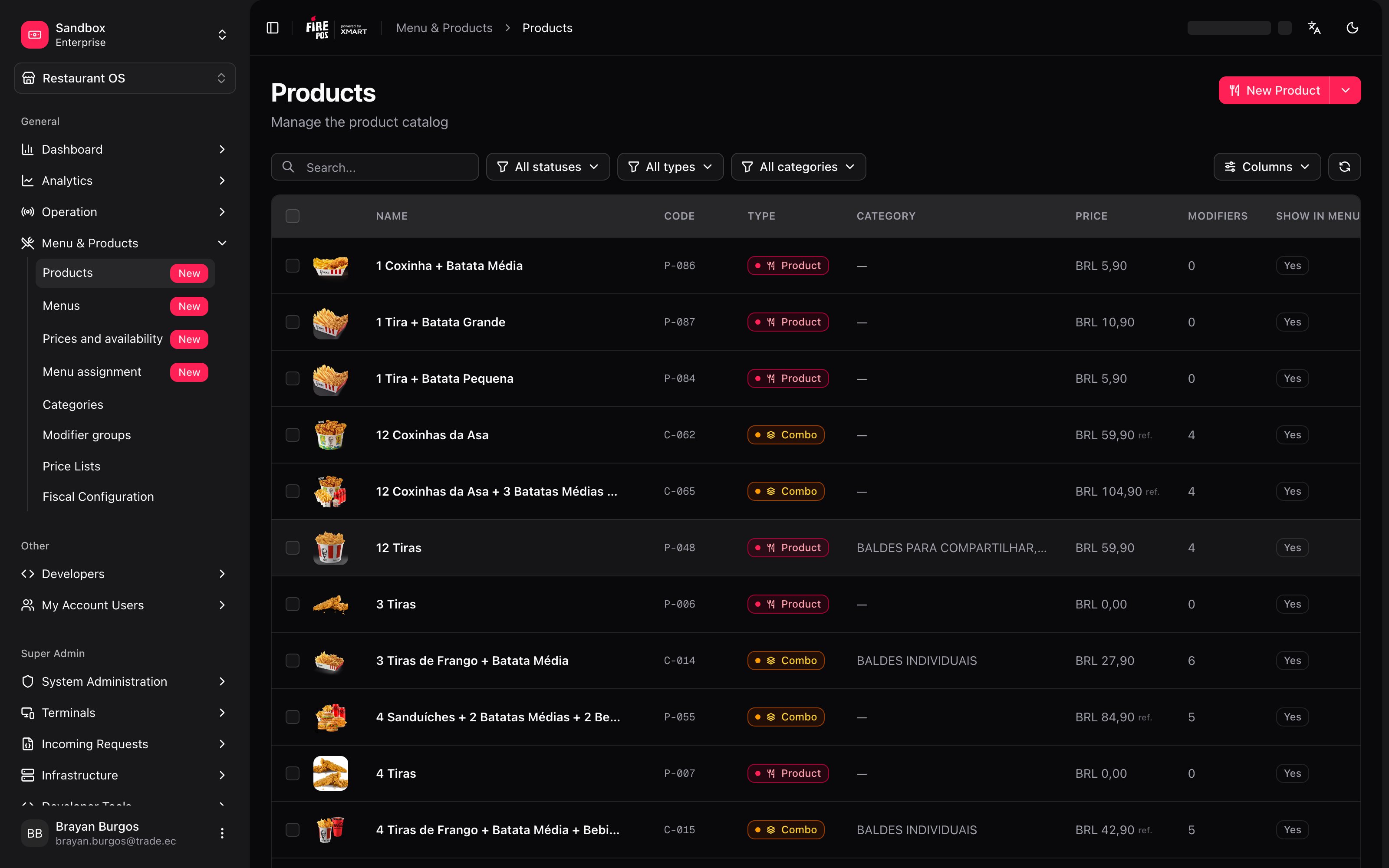
That's why this screen is the starting point. Go to **Restaurant OS → Menu and Products → Products**.
 ***
## The minimum you need to know
**1. The type is chosen when you create the product.** Product, Combo, Modifier or Packaging. The first three can be swapped later from the record's header; **Packaging is final**.
**2. Turning off "Show in menu" does not disable the product.** It stops appearing on the menu, but it keeps working inside combos and as a modifier option.
**3. Creating the product does not put it on sale.** It has to be in a menu, and that menu has to be synced.
***
## The simple path
**New product**, name and code, save. With that the product exists and enters the Golden Menu.
Then, on the **Pricing** tab, you give it a price. And it can be sold as soon as the menu holding it is synced.
If you sell standalone dishes with no customization, the **General** and **Pricing** tabs are all you need. The rest of the manual is for combos, modifiers and per-channel prices.
***
## The four product types
The **New Product** button creates a product directly; the caret next to it offers the other three types. The difference matters from day one.
***
## The minimum you need to know
**1. The type is chosen when you create the product.** Product, Combo, Modifier or Packaging. The first three can be swapped later from the record's header; **Packaging is final**.
**2. Turning off "Show in menu" does not disable the product.** It stops appearing on the menu, but it keeps working inside combos and as a modifier option.
**3. Creating the product does not put it on sale.** It has to be in a menu, and that menu has to be synced.
***
## The simple path
**New product**, name and code, save. With that the product exists and enters the Golden Menu.
Then, on the **Pricing** tab, you give it a price. And it can be sold as soon as the menu holding it is synced.
If you sell standalone dishes with no customization, the **General** and **Pricing** tabs are all you need. The rest of the manual is for combos, modifiers and per-channel prices.
***
## The four product types
The **New Product** button creates a product directly; the caret next to it offers the other three types. The difference matters from day one.
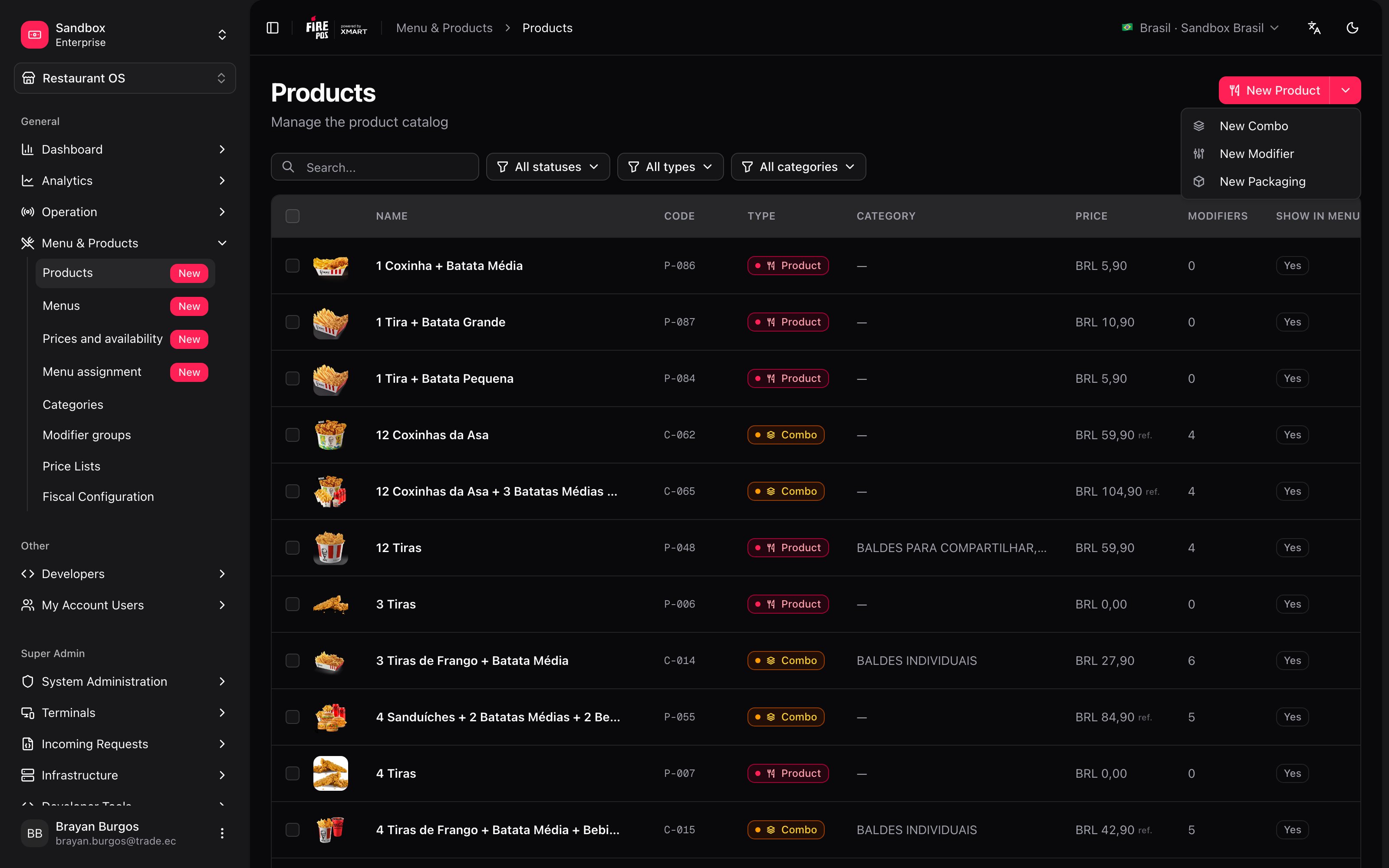 | Type | What it is | Example |
| ------------- | ---------------------------------------- | ----------------------------- |
| **Product** | An item sold directly. | A burger, a soft drink. |
| **Combo** | A bundle made up of several products. | *2 Strips + Fries + Drink*. |
| **Modifier** | An option that modifies another product. | *Extra cheese*, *Large size*. |
| **Packaging** | The container associated with a product. | A box, a cup. |
In the record's header there's a selector with three pills — **Modifier**, **Product**, **Combo** — to move between them later. **Packaging** isn't there: that one is final, and if you get it wrong you have to create the product again.
**Changing type isn't free.** Switching to **Combo** **deletes the prices** the product had. Switching to **Modifier** **removes its modifier groups**, because a modifier is an answer and can't have questions hanging off it; the screen asks you before doing it.
The change stays pending — with the **Unsaved** mark — until you save.
***
## What the list tells you
| Column | What to look at |
| ------------------- | ------------------------------------------------------------------------ |
| **Code** | The point-of-sale operational code (PLU). |
| **Name** · **Type** | Name and type, with its colored chip. |
| **Category** | Which categories it's in. |
| **Price** | The base price. On combos it shows as **ref.** — a calculated reference. |
| **VAT** | The tax applied. |
| **Status** | **Draft** · **Published** · **Partial** · **Archived**. |
| **Sync** | **Synced** · **Pending** · **Error**. |
| **Modifiers** | How many modifier groups it has. |
| **Exclusive** | Whether it's outside the Golden Menu. |
At the top there's search and three filters: status, type and category.
***
## The product record
The editor is split into tabs, and several are locked until you save for the first time: *"Save the product first to access this section"*.
| Type | What it is | Example |
| ------------- | ---------------------------------------- | ----------------------------- |
| **Product** | An item sold directly. | A burger, a soft drink. |
| **Combo** | A bundle made up of several products. | *2 Strips + Fries + Drink*. |
| **Modifier** | An option that modifies another product. | *Extra cheese*, *Large size*. |
| **Packaging** | The container associated with a product. | A box, a cup. |
In the record's header there's a selector with three pills — **Modifier**, **Product**, **Combo** — to move between them later. **Packaging** isn't there: that one is final, and if you get it wrong you have to create the product again.
**Changing type isn't free.** Switching to **Combo** **deletes the prices** the product had. Switching to **Modifier** **removes its modifier groups**, because a modifier is an answer and can't have questions hanging off it; the screen asks you before doing it.
The change stays pending — with the **Unsaved** mark — until you save.
***
## What the list tells you
| Column | What to look at |
| ------------------- | ------------------------------------------------------------------------ |
| **Code** | The point-of-sale operational code (PLU). |
| **Name** · **Type** | Name and type, with its colored chip. |
| **Category** | Which categories it's in. |
| **Price** | The base price. On combos it shows as **ref.** — a calculated reference. |
| **VAT** | The tax applied. |
| **Status** | **Draft** · **Published** · **Partial** · **Archived**. |
| **Sync** | **Synced** · **Pending** · **Error**. |
| **Modifiers** | How many modifier groups it has. |
| **Exclusive** | Whether it's outside the Golden Menu. |
At the top there's search and three filters: status, type and category.
***
## The product record
The editor is split into tabs, and several are locked until you save for the first time: *"Save the product first to access this section"*.
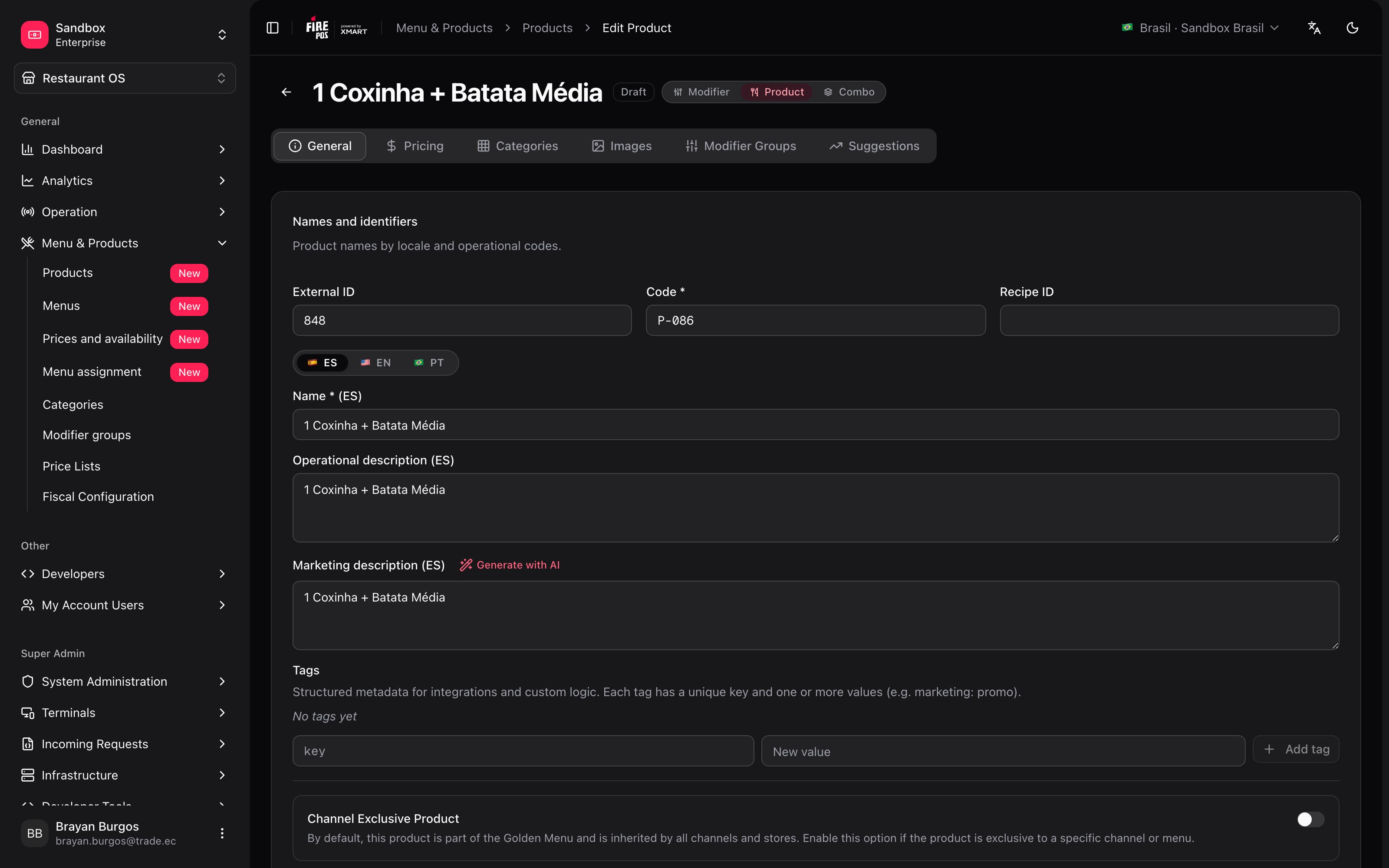 | Tab | What for |
| ------------------- | -------------------------------------------------------------------------------------------------- |
| **General** | Names in three languages, codes, classification, and the status, visibility and schedule switches. |
| **Pricing** | Base price, taxes, discounts and price by service type. |
| **Categories** | Which categories it's in. It can be in several. |
| **Images** | The photos, with the option of assigning them per service type. |
| **Modifier Groups** | The questions the customer is asked when ordering it. |
| **Suggestions** | Upselling and cross-selling. |
### Not every tab is always there
Which ones you see depends on the type, and that says a good deal about what each type is:
| Type | Tabs |
| ------------- | ----------------------------------------------------------------------- |
| **Product** | General · Pricing · Categories · Images · Modifier Groups · Suggestions |
| **Combo** | General · Categories · Images · **Composition** · Suggestions |
| **Modifier** | General · Pricing · Categories · Images |
| **Packaging** | General · Pricing · Categories · Images · Modifier Groups |
Three things that table tells you:
* **A combo has no pricing tab.** It isn't an oversight: a combo's price doesn't live on the product, it comes from the destination's price list.
* **Composition is the Modifier Groups tab, renamed.** A combo is built with the same mechanics of groups and options: each group is a decision — *pick your drink* — and the minimum says how many are included.
* **A Modifier has neither groups nor suggestions.** It's an answer, not a question, and it isn't sold as its own order line.
### The two descriptions
As with categories, there's an **operational description** — internal, for your team — and a **marketing description**, which is the one that gets published and read by the customer. Don't mix them up.
The marketing one has a **Generate with AI** button: it proposes three versions per language and **applies nothing until you choose**. The screen says so explicitly.
***
## The three switches that decide whether it sells
They look alike and do different things. This is where people get it wrong most often.
| Switch | What it does |
| -------------------------------------- | ---------------------------------------------------------------------------------------------- |
| **Product status** *(active/inactive)* | Inactive: **excluded from every menu and cannot be sold**. |
| **Show in menu** | Off: doesn't appear on the menu, **but keeps working inside combos and as a modifier option**. |
| **Out of stock** | Temporarily unavailable. May show greyed out on the menu. |
**"Show in menu" being off is what makes modifiers possible.** An *extra cheese* product shouldn't appear on the menu as a dish, but it does have to be available when somebody customizes a burger. Turning visibility off while leaving the product active is exactly that combination.
### The commercial state isn't editable
On the **General** tab, next to those switches, there's a **commercial state** — **Available**, **Out of stock** or **Not sellable** — that **the system calculates** by combining all of the above. The screen spells it out: *"Automatically calculated by the snapshot engine. Not editable."*
It's the traffic light for what's really going on with a product without having to check switch by switch.
***
## Channel-exclusive product
The same switch that exists on categories. By default the product **is part of the Golden Menu** and every channel and store inherits it. Turning it on takes it out of the Golden Menu, and it only exists in the menus where somebody adds it by hand.
If its **category** is already exclusive, the product inherits that exclusivity without you marking it. See [Categories](/en/manuals/backoffice/categories).
***
## Price
| Tab | What for |
| ------------------- | -------------------------------------------------------------------------------------------------- |
| **General** | Names in three languages, codes, classification, and the status, visibility and schedule switches. |
| **Pricing** | Base price, taxes, discounts and price by service type. |
| **Categories** | Which categories it's in. It can be in several. |
| **Images** | The photos, with the option of assigning them per service type. |
| **Modifier Groups** | The questions the customer is asked when ordering it. |
| **Suggestions** | Upselling and cross-selling. |
### Not every tab is always there
Which ones you see depends on the type, and that says a good deal about what each type is:
| Type | Tabs |
| ------------- | ----------------------------------------------------------------------- |
| **Product** | General · Pricing · Categories · Images · Modifier Groups · Suggestions |
| **Combo** | General · Categories · Images · **Composition** · Suggestions |
| **Modifier** | General · Pricing · Categories · Images |
| **Packaging** | General · Pricing · Categories · Images · Modifier Groups |
Three things that table tells you:
* **A combo has no pricing tab.** It isn't an oversight: a combo's price doesn't live on the product, it comes from the destination's price list.
* **Composition is the Modifier Groups tab, renamed.** A combo is built with the same mechanics of groups and options: each group is a decision — *pick your drink* — and the minimum says how many are included.
* **A Modifier has neither groups nor suggestions.** It's an answer, not a question, and it isn't sold as its own order line.
### The two descriptions
As with categories, there's an **operational description** — internal, for your team — and a **marketing description**, which is the one that gets published and read by the customer. Don't mix them up.
The marketing one has a **Generate with AI** button: it proposes three versions per language and **applies nothing until you choose**. The screen says so explicitly.
***
## The three switches that decide whether it sells
They look alike and do different things. This is where people get it wrong most often.
| Switch | What it does |
| -------------------------------------- | ---------------------------------------------------------------------------------------------- |
| **Product status** *(active/inactive)* | Inactive: **excluded from every menu and cannot be sold**. |
| **Show in menu** | Off: doesn't appear on the menu, **but keeps working inside combos and as a modifier option**. |
| **Out of stock** | Temporarily unavailable. May show greyed out on the menu. |
**"Show in menu" being off is what makes modifiers possible.** An *extra cheese* product shouldn't appear on the menu as a dish, but it does have to be available when somebody customizes a burger. Turning visibility off while leaving the product active is exactly that combination.
### The commercial state isn't editable
On the **General** tab, next to those switches, there's a **commercial state** — **Available**, **Out of stock** or **Not sellable** — that **the system calculates** by combining all of the above. The screen spells it out: *"Automatically calculated by the snapshot engine. Not editable."*
It's the traffic light for what's really going on with a product without having to check switch by switch.
***
## Channel-exclusive product
The same switch that exists on categories. By default the product **is part of the Golden Menu** and every channel and store inherits it. Turning it on takes it out of the Golden Menu, and it only exists in the menus where somebody adds it by hand.
If its **category** is already exclusive, the product inherits that exclusivity without you marking it. See [Categories](/en/manuals/backoffice/categories).
***
## Price
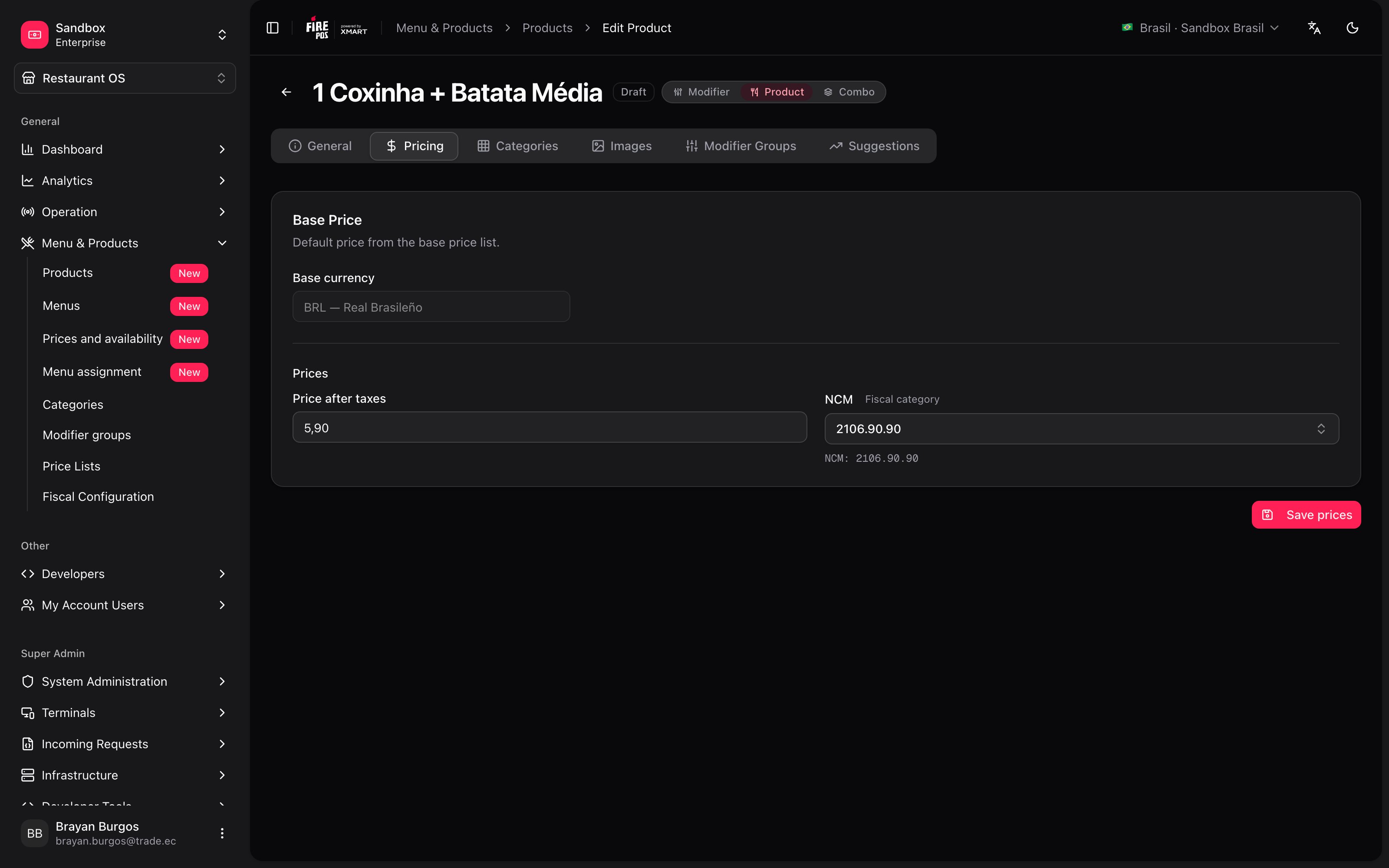 The **base price** is the one from the catalog's base list: *"Default price from the base price list"*.
**This tab doesn't look the same in every country.** In **Brazil** it's deliberately simplified: only the currency, the **Price after taxes** — the final price, taxes included — and the **fiscal category (NCM)**.
In countries where that simplification doesn't apply you also get the **Net amount** (without taxes), the **tax** breakdown, **discounts** and **additional currencies**. If you follow an instruction and can't find a field, that's probably why, not an error.
Where both price fields are present, the screen explains which one wins: *"Enter Net Amount to auto-calculate Gross from taxes. Or enter Gross directly — it takes priority."* In other words: if you type the gross by hand, it beats the calculation.
### Prices by service type
When it's enabled — and **only on products**, not combos — a card appears for giving one service its own price: delivery pricier than dine-in, for example. Services you don't touch are marked **Inherits base price**; the ones you do, **Customized**.
**This is the catalog price, not the only price that exists.** What each store charges on each channel comes from the price list assigned to that destination. What you set here lands in the base list and is the starting point the others hang off. See [Price lists](/en/manuals/backoffice/price-lists).
***
## Modifiers: what gets adjusted per product
On the **Modifier Groups** tab you add the groups you already defined in [Modifier Groups](/en/manuals/backoffice/modifier-groups). And here — for this product only — you can depart from the group:
The **base price** is the one from the catalog's base list: *"Default price from the base price list"*.
**This tab doesn't look the same in every country.** In **Brazil** it's deliberately simplified: only the currency, the **Price after taxes** — the final price, taxes included — and the **fiscal category (NCM)**.
In countries where that simplification doesn't apply you also get the **Net amount** (without taxes), the **tax** breakdown, **discounts** and **additional currencies**. If you follow an instruction and can't find a field, that's probably why, not an error.
Where both price fields are present, the screen explains which one wins: *"Enter Net Amount to auto-calculate Gross from taxes. Or enter Gross directly — it takes priority."* In other words: if you type the gross by hand, it beats the calculation.
### Prices by service type
When it's enabled — and **only on products**, not combos — a card appears for giving one service its own price: delivery pricier than dine-in, for example. Services you don't touch are marked **Inherits base price**; the ones you do, **Customized**.
**This is the catalog price, not the only price that exists.** What each store charges on each channel comes from the price list assigned to that destination. What you set here lands in the base list and is the starting point the others hang off. See [Price lists](/en/manuals/backoffice/price-lists).
***
## Modifiers: what gets adjusted per product
On the **Modifier Groups** tab you add the groups you already defined in [Modifier Groups](/en/manuals/backoffice/modifier-groups). And here — for this product only — you can depart from the group:
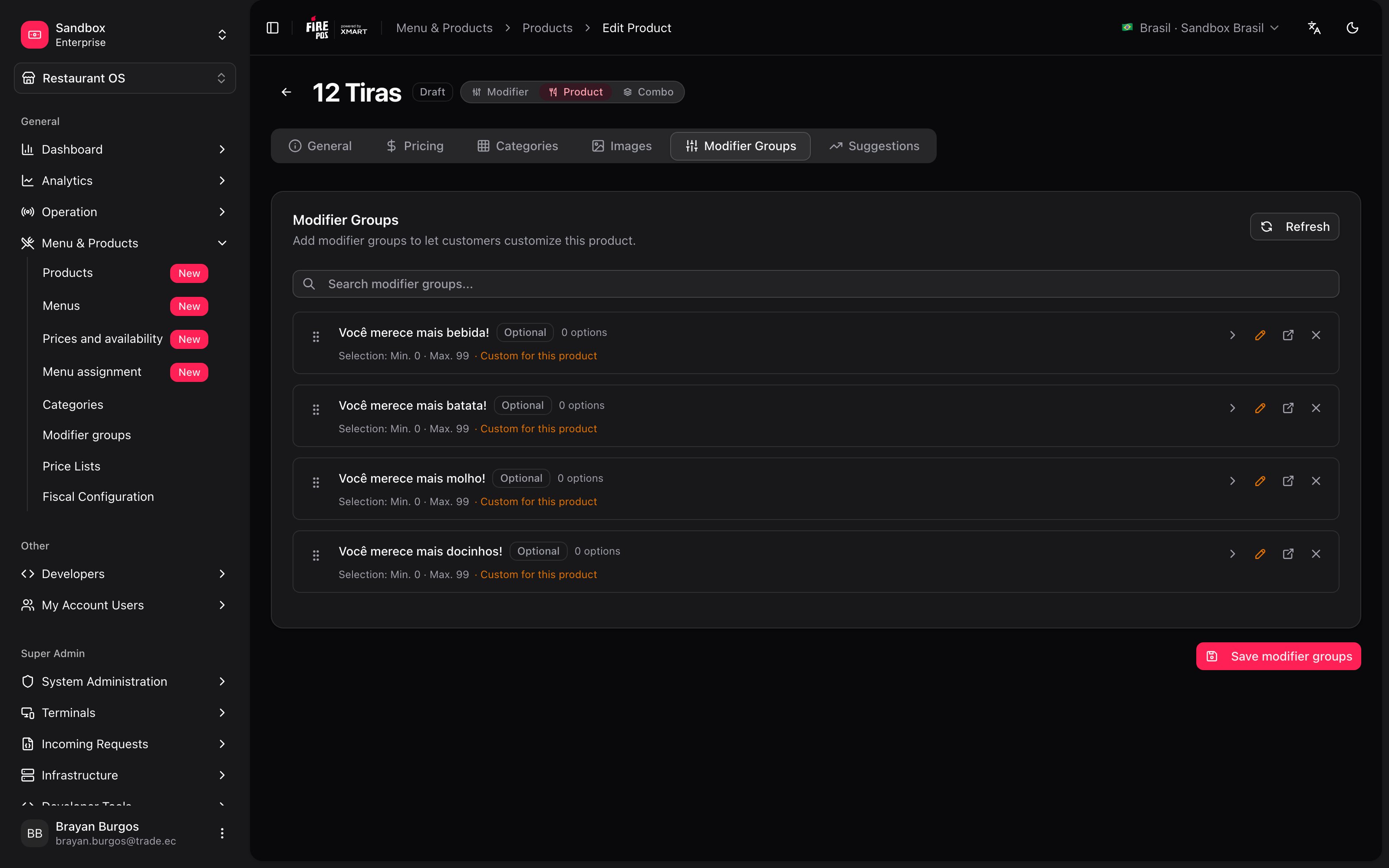 * The **title** the group is shown with.
* The **minimum** and the **maximum**.
* The **price of each option** inside this product.
Whatever you leave at the group's value is inherited; whatever you change is marked **Custom for this product**. The screen sums it up: *"Leave a field as the group default to inherit"*.
***
## Combos: what they hold and what they're worth
A combo is built on the **Composition** tab, grouping the products that make it up. It's the **Modifier Groups** tab under another name: each group is a decision in the combo — *pick your drink*, *pick your side* — and each group's minimum says how many units are included.
A combo **has no pricing tab**, and that's on purpose.
**The price a combo shows is a reference, not what you charge.** It appears with the **ref.** tag and is calculated as *the sum of the first items of each group up to its minimum selection*. It's there to orient you while you build the combo.
What actually gets charged comes from the destination's price list. See [Price lists](/en/manuals/backoffice/price-lists).
***
## Suggestions: upselling and cross-selling
Two different things, and the difference is what happens to the order:
| | What it does |
| ----------------- | ----------------------------------------------- |
| **Upselling** | **Replaces** the order line. *"Want it large?"* |
| **Cross-selling** | **Adds** a new line. *"Add fries?"* |
**A suggestion that isn't on the menu doesn't travel.** On sync, if the suggested product isn't part of that menu, the suggestion drops out of the dispatch and gets noted in the warnings. See [Menu assignment](/en/manuals/backoffice/menu-assignments).
***
## Images
**WebP, JPEG or PNG, up to 5 MB.** One image is the primary one, and that's the one used when there's no specific one.
The interesting part is that images can be **tagged per service type**: one photo for the kiosk, another for the app. The screen explains it and includes a preview of which image shows for each service. The primary one is the fallback for every service without its own.
***
## Recipes: how the real cases get solved
1. **New product → New Product**. Name, code and save.
2. **Categories** tab: assign its category.
3. **Pricing** tab: the base price.
4. **Images** tab: the photo, marked as primary.
5. Go to [Menu assignment](/en/manuals/backoffice/menu-assignments) and sync the rows of the menu holding it.
If the menu is the Golden and it was already assigned, the product goes in on its own: all that's missing is the sync.
1. **New product → New Modifier**. Name it *Extra cheese*, with its price.
2. In **General**, turn off **Show in menu**. The product stays active.
3. Go to [Modifier Groups](/en/manuals/backoffice/modifier-groups) and add it as an option of the *Extras* group.
It doesn't appear as a dish, but it does when the customer customizes.
1. **New product → New Combo**.
2. **Composition** tab: group the products that make it up and define how many are picked from each group.
3. Look at the **Reference price** to orient yourself, but set the real price on the [price list](/en/manuals/backoffice/price-lists).
If you converted an existing product into a combo, careful: switching to Combo deletes the prices it had.
There are two paths and they aren't interchangeable:
* **One specific product**: if your account has prices by service type enabled, give delivery its own price on the **Pricing** tab. It ends up **Customized**.
* **The whole menu**: don't do it product by product. Create a [price list](/en/manuals/backoffice/price-lists) linked to the base one with a formula, and assign it to the delivery rows.
The second path is the one that scales and maintains itself.
It depends how long for:
* **Today, because it ran out**: [Out of stock](/en/manuals/backoffice/out-of-stock). It comes back on its own at closing.
* **This season**: turn off **Show in menu**. It stays available inside combos.
* **For good**: set the product **inactive**, which takes it out of every menu. Deleting is permanent and cannot be undone.
***
## Mistakes that cost money
**Changing the type without looking at the cost.** Switching to **Combo** deletes the product's prices and switching to **Modifier** removes its groups. And with **Packaging** there's no way back: it isn't in the selector.
**Leaving a modifier with "Show in menu" on.** *Extra cheese* appears on the menu as if it were a dish.
**Setting the price here and expecting it to reach the channel.** This is the catalog price. What each destination charges comes from its price list, and it reaches nowhere until the row is synced.
**Writing internal notes in the marketing description.** That text gets published and the customer reads it.
**Suggesting a product that isn't on the menu.** The suggestion drops out of the dispatch silently: it's only noted in the sync warnings.
***
## Glossary
| Term | What it means |
| ----------------------------- | ------------------------------------------------------------------------------------------------- |
| **Product** | An item sold directly. |
| **Combo** | A bundle made up of several products. |
| **Modifier** | A product that exists to be another one's option. |
| **Packaging** | The container associated with a product. |
| **Code / PLU** | The point-of-sale operational code. |
| **Show in menu** | Whether it appears on the menu. Off, it keeps working in combos and modifiers. |
| **Commercial state** | **Available**, **Out of stock** or **Not sellable**. The system calculates it; it isn't editable. |
| **Channel Exclusive** | The product leaves the Golden Menu and only exists where you add it by hand. |
| **Reference price** *(ref.)* | On a combo, the indicative sum of its components. Not what gets charged. |
| **Upselling / Cross-selling** | Replacing the order line, or adding a new one. |
***
## Frequently asked questions
Walk it in order: is it active with **Show in menu** on? is it in a visible category? is it in the menu assigned to that store and channel? was that row synced after you created it? The last step is the one most often forgotten — see [Menu assignment](/en/manuals/backoffice/menu-assignments).
Because it isn't what you charge: it's the indicative sum of its components, calculated by taking the first items of each group up to its minimum selection. The real price comes from the destination's price list.
With the selector in the record's header, if it's between **Modifier**, **Product** and **Combo**. Mind the cost: switching to Combo deletes the prices and switching to Modifier removes the modifier groups.
If you got it wrong with **Packaging**, there's no selector: you have to create the product again.
You still have to save. Until then the product doesn't exist: *"Save the product first to access this section"*.
**Inactive** takes it out of every menu and it cannot be sold. **Hidden** (**Show in menu** off) takes it off the menu but leaves it available inside combos and modifiers. **Out of stock** is temporary and may show greyed out. For something that ran out mid-service, the right move is [Out of stock](/en/manuals/backoffice/out-of-stock), which comes back on its own.
***
## What's coming
* **Variants**: creating child products by size or flavor. It's planned, but there's no screen yet.
* **Price lists from the record**: today the pricing tab works on the base list and the rest is handled in [Price lists](/en/manuals/backoffice/price-lists).
* The **title** the group is shown with.
* The **minimum** and the **maximum**.
* The **price of each option** inside this product.
Whatever you leave at the group's value is inherited; whatever you change is marked **Custom for this product**. The screen sums it up: *"Leave a field as the group default to inherit"*.
***
## Combos: what they hold and what they're worth
A combo is built on the **Composition** tab, grouping the products that make it up. It's the **Modifier Groups** tab under another name: each group is a decision in the combo — *pick your drink*, *pick your side* — and each group's minimum says how many units are included.
A combo **has no pricing tab**, and that's on purpose.
**The price a combo shows is a reference, not what you charge.** It appears with the **ref.** tag and is calculated as *the sum of the first items of each group up to its minimum selection*. It's there to orient you while you build the combo.
What actually gets charged comes from the destination's price list. See [Price lists](/en/manuals/backoffice/price-lists).
***
## Suggestions: upselling and cross-selling
Two different things, and the difference is what happens to the order:
| | What it does |
| ----------------- | ----------------------------------------------- |
| **Upselling** | **Replaces** the order line. *"Want it large?"* |
| **Cross-selling** | **Adds** a new line. *"Add fries?"* |
**A suggestion that isn't on the menu doesn't travel.** On sync, if the suggested product isn't part of that menu, the suggestion drops out of the dispatch and gets noted in the warnings. See [Menu assignment](/en/manuals/backoffice/menu-assignments).
***
## Images
**WebP, JPEG or PNG, up to 5 MB.** One image is the primary one, and that's the one used when there's no specific one.
The interesting part is that images can be **tagged per service type**: one photo for the kiosk, another for the app. The screen explains it and includes a preview of which image shows for each service. The primary one is the fallback for every service without its own.
***
## Recipes: how the real cases get solved
1. **New product → New Product**. Name, code and save.
2. **Categories** tab: assign its category.
3. **Pricing** tab: the base price.
4. **Images** tab: the photo, marked as primary.
5. Go to [Menu assignment](/en/manuals/backoffice/menu-assignments) and sync the rows of the menu holding it.
If the menu is the Golden and it was already assigned, the product goes in on its own: all that's missing is the sync.
1. **New product → New Modifier**. Name it *Extra cheese*, with its price.
2. In **General**, turn off **Show in menu**. The product stays active.
3. Go to [Modifier Groups](/en/manuals/backoffice/modifier-groups) and add it as an option of the *Extras* group.
It doesn't appear as a dish, but it does when the customer customizes.
1. **New product → New Combo**.
2. **Composition** tab: group the products that make it up and define how many are picked from each group.
3. Look at the **Reference price** to orient yourself, but set the real price on the [price list](/en/manuals/backoffice/price-lists).
If you converted an existing product into a combo, careful: switching to Combo deletes the prices it had.
There are two paths and they aren't interchangeable:
* **One specific product**: if your account has prices by service type enabled, give delivery its own price on the **Pricing** tab. It ends up **Customized**.
* **The whole menu**: don't do it product by product. Create a [price list](/en/manuals/backoffice/price-lists) linked to the base one with a formula, and assign it to the delivery rows.
The second path is the one that scales and maintains itself.
It depends how long for:
* **Today, because it ran out**: [Out of stock](/en/manuals/backoffice/out-of-stock). It comes back on its own at closing.
* **This season**: turn off **Show in menu**. It stays available inside combos.
* **For good**: set the product **inactive**, which takes it out of every menu. Deleting is permanent and cannot be undone.
***
## Mistakes that cost money
**Changing the type without looking at the cost.** Switching to **Combo** deletes the product's prices and switching to **Modifier** removes its groups. And with **Packaging** there's no way back: it isn't in the selector.
**Leaving a modifier with "Show in menu" on.** *Extra cheese* appears on the menu as if it were a dish.
**Setting the price here and expecting it to reach the channel.** This is the catalog price. What each destination charges comes from its price list, and it reaches nowhere until the row is synced.
**Writing internal notes in the marketing description.** That text gets published and the customer reads it.
**Suggesting a product that isn't on the menu.** The suggestion drops out of the dispatch silently: it's only noted in the sync warnings.
***
## Glossary
| Term | What it means |
| ----------------------------- | ------------------------------------------------------------------------------------------------- |
| **Product** | An item sold directly. |
| **Combo** | A bundle made up of several products. |
| **Modifier** | A product that exists to be another one's option. |
| **Packaging** | The container associated with a product. |
| **Code / PLU** | The point-of-sale operational code. |
| **Show in menu** | Whether it appears on the menu. Off, it keeps working in combos and modifiers. |
| **Commercial state** | **Available**, **Out of stock** or **Not sellable**. The system calculates it; it isn't editable. |
| **Channel Exclusive** | The product leaves the Golden Menu and only exists where you add it by hand. |
| **Reference price** *(ref.)* | On a combo, the indicative sum of its components. Not what gets charged. |
| **Upselling / Cross-selling** | Replacing the order line, or adding a new one. |
***
## Frequently asked questions
Walk it in order: is it active with **Show in menu** on? is it in a visible category? is it in the menu assigned to that store and channel? was that row synced after you created it? The last step is the one most often forgotten — see [Menu assignment](/en/manuals/backoffice/menu-assignments).
Because it isn't what you charge: it's the indicative sum of its components, calculated by taking the first items of each group up to its minimum selection. The real price comes from the destination's price list.
With the selector in the record's header, if it's between **Modifier**, **Product** and **Combo**. Mind the cost: switching to Combo deletes the prices and switching to Modifier removes the modifier groups.
If you got it wrong with **Packaging**, there's no selector: you have to create the product again.
You still have to save. Until then the product doesn't exist: *"Save the product first to access this section"*.
**Inactive** takes it out of every menu and it cannot be sold. **Hidden** (**Show in menu** off) takes it off the menu but leaves it available inside combos and modifiers. **Out of stock** is temporary and may show greyed out. For something that ran out mid-service, the right move is [Out of stock](/en/manuals/backoffice/out-of-stock), which comes back on its own.
***
## What's coming
* **Variants**: creating child products by size or flavor. It's planned, but there's no screen yet.
* **Price lists from the record**: today the pricing tab works on the base list and the rest is handled in [Price lists](/en/manuals/backoffice/price-lists).