> ## Documentation Index
> Fetch the complete documentation index at: https://docs.fire.rest/llms.txt
> Use this file to discover all available pages before exploring further.
# Receipts and returns
> Record goods receipts that bring stock into inventory, link them to purchase orders, and return merchandise to suppliers.
The **goods receipt** is the document that brings stock **into** inventory — it is the entry point of everything you later cook, count, or waste. The **supplier return** is its counterpart: stock that leaves because you send it back.
**Where you work:** **BOH → Movements** — **Goods receipts** (`/boh/admin/operations/goods-receipts`) and **Supplier returns** (`/boh/admin/operations/supplier-returns`).
## Goods receipts
When merchandise arrives, record a receipt with the supplier, the store, and one line per item received: quantity, unit, and unit cost. Confirming the receipt creates the stock and its **lots** (one per line), which later feed FIFO/FEFO consumption.
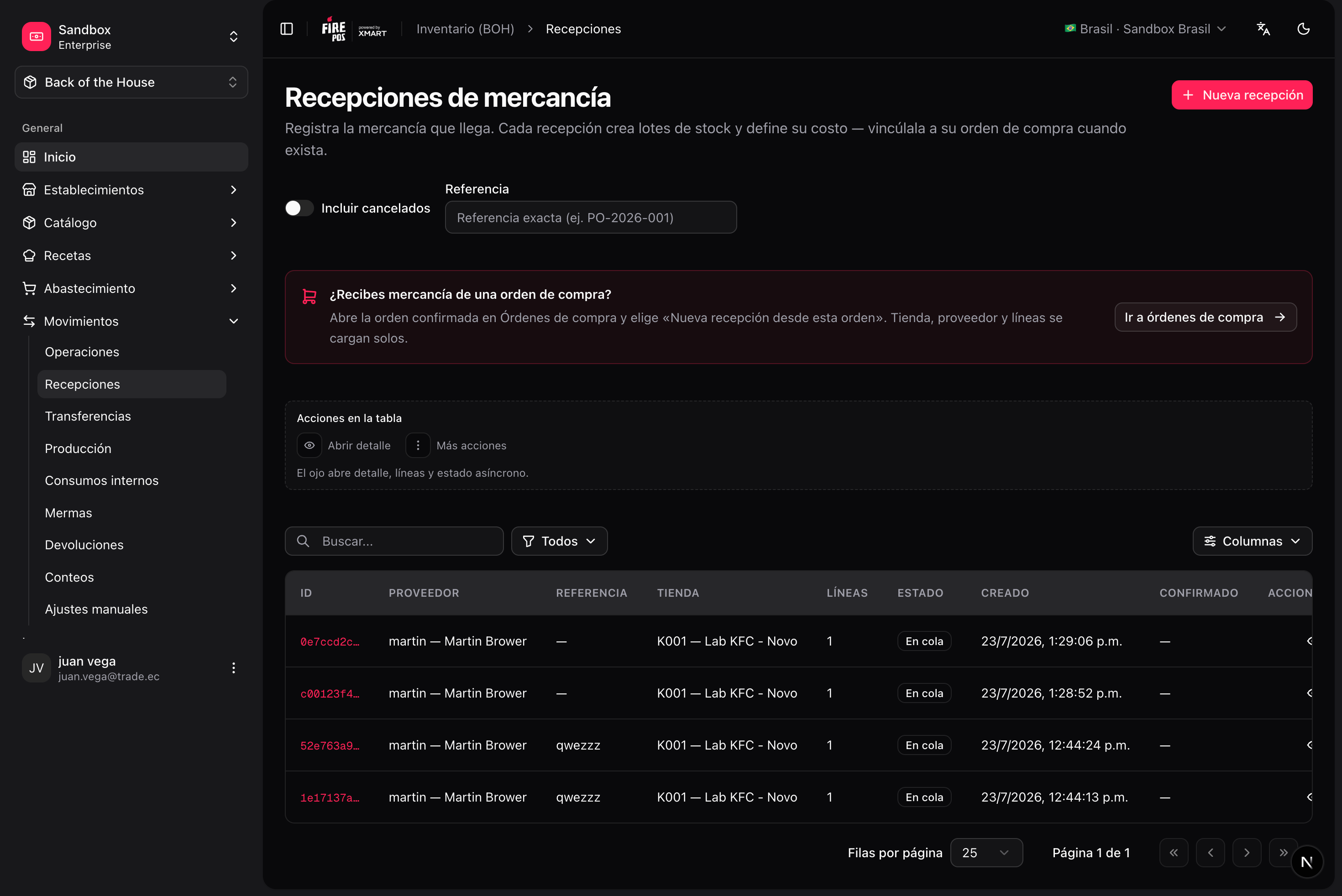 ### Record a receipt
**Movements → Goods receipts → Create** (`/boh/admin/operations/goods-receipts/new`).
Optionally link the receipt to a confirmed [purchase order](/en/manuals/boh/procurement#purchase-orders) — lines are pre-filled from the pending PO quantities.
Quantity in the unit you actually received (e.g. "1 bag of 25 kg"), plus the unit cost. BOH converts to the item's base unit internally.
The receipt is queued for processing; within seconds the stock movements are posted and balances update.
### Record a receipt
**Movements → Goods receipts → Create** (`/boh/admin/operations/goods-receipts/new`).
Optionally link the receipt to a confirmed [purchase order](/en/manuals/boh/procurement#purchase-orders) — lines are pre-filled from the pending PO quantities.
Quantity in the unit you actually received (e.g. "1 bag of 25 kg"), plus the unit cost. BOH converts to the item's base unit internally.
The receipt is queued for processing; within seconds the stock movements are posted and balances update.
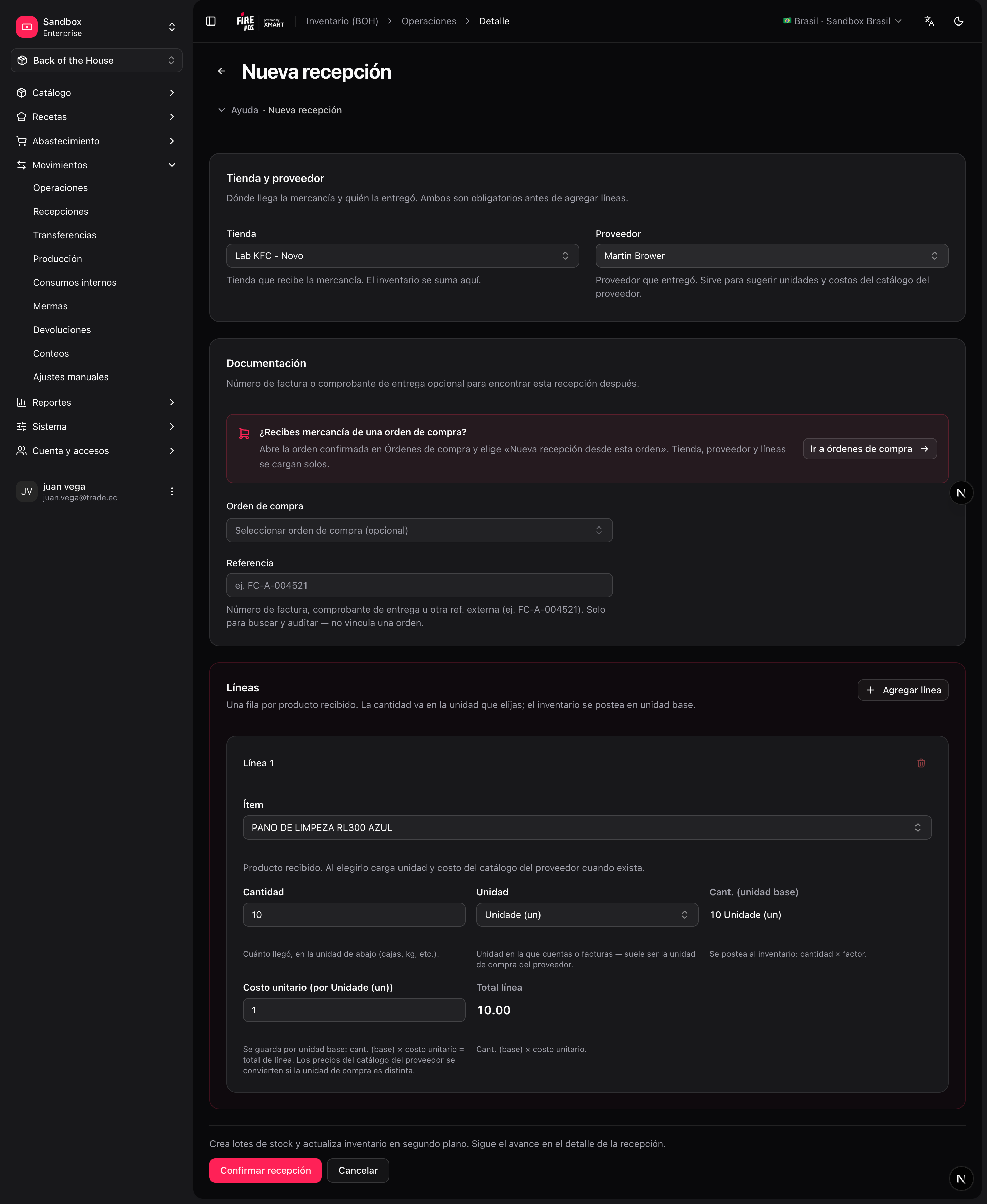 Receiving against a PO allows **over-receiving** (more than ordered) — the difference is simply recorded. When every PO line is fully received, the PO moves to **Received** automatically.
### Cancel a receipt
From the receipt detail (`/boh/admin/operations/goods-receipts/{id}`) you can **cancel** it: BOH posts the opposite movements and the stock leaves inventory again. Use this for receipts recorded by mistake; if the merchandise is physically going back to the supplier, prefer a **supplier return**.
## Supplier returns
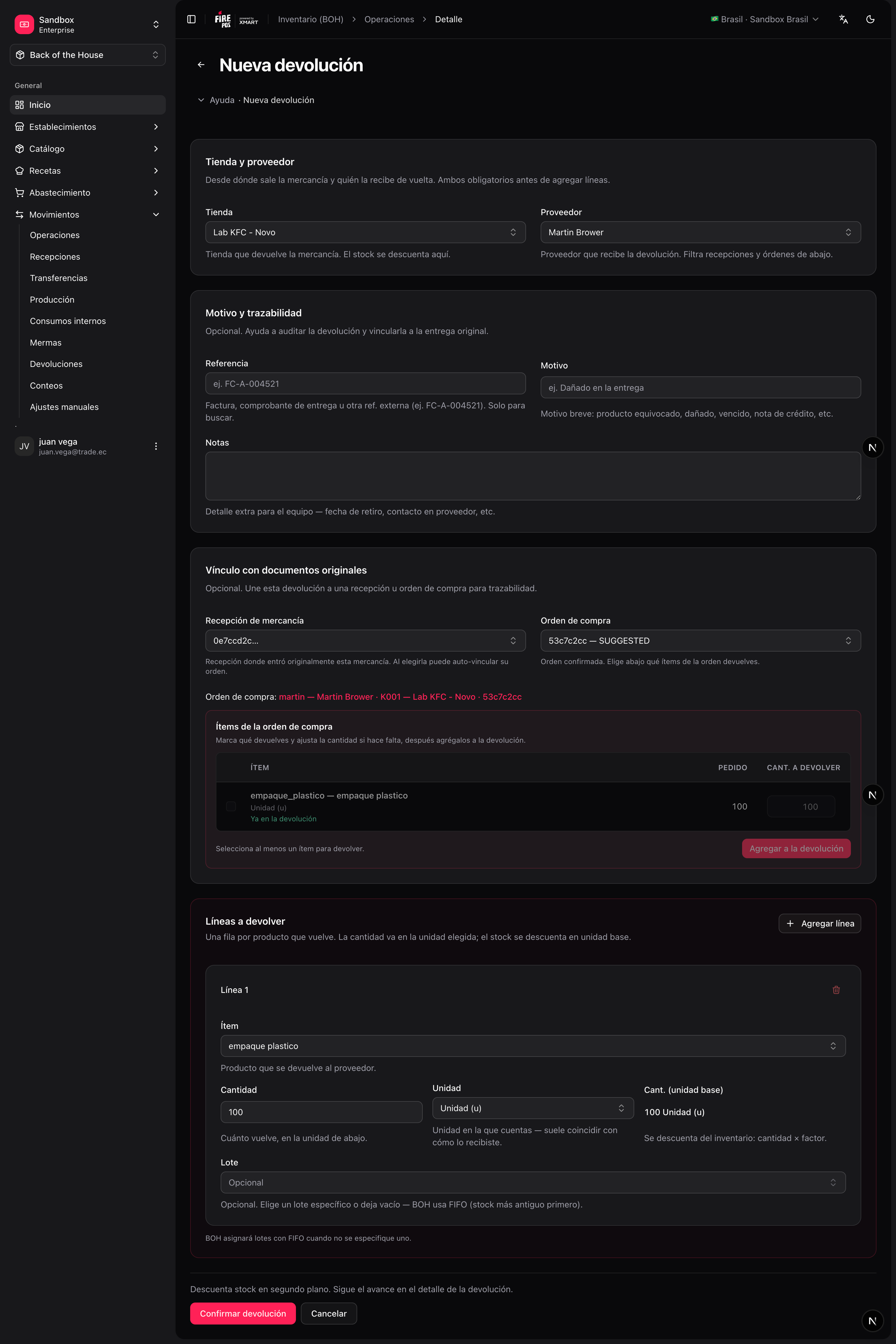
A supplier return records merchandise you send back — wrong product, damaged goods, quality issues. Each line indicates the item, the quantity, and its condition (good or damaged); you can also point at the original receipt for traceability.
**Movements → Supplier returns → Create** (`/boh/admin/operations/supplier-returns/new`).
Item, quantity, condition, and optionally the source receipt/lot.
Stock is deducted from the corresponding lots (oldest first if you did not pick a specific lot).
Receiving against a PO allows **over-receiving** (more than ordered) — the difference is simply recorded. When every PO line is fully received, the PO moves to **Received** automatically.
### Cancel a receipt
From the receipt detail (`/boh/admin/operations/goods-receipts/{id}`) you can **cancel** it: BOH posts the opposite movements and the stock leaves inventory again. Use this for receipts recorded by mistake; if the merchandise is physically going back to the supplier, prefer a **supplier return**.
## Supplier returns
A supplier return records merchandise you send back — wrong product, damaged goods, quality issues. Each line indicates the item, the quantity, and its condition (good or damaged); you can also point at the original receipt for traceability.
**Movements → Supplier returns → Create** (`/boh/admin/operations/supplier-returns/new`).
Item, quantity, condition, and optionally the source receipt/lot.
Stock is deducted from the corresponding lots (oldest first if you did not pick a specific lot).
 Record returns at the moment the truck leaves, not at the end of the week. Stock reports (and the suggested order) are only as accurate as the timing of your documents.
Next: [Waste and internal consumption](/en/manuals/boh/waste-consumption).
Record returns at the moment the truck leaves, not at the end of the week. Stock reports (and the suggested order) are only as accurate as the timing of your documents.
Next: [Waste and internal consumption](/en/manuals/boh/waste-consumption).