> ## Documentation Index
> Fetch the complete documentation index at: https://docs.fire.rest/llms.txt
> Use this file to discover all available pages before exploring further.
# Overview and concepts
> How a KDS kitchen is structured in the Fire backoffice: stores, stations, screens, routing, and the kitchen patterns to choose from.
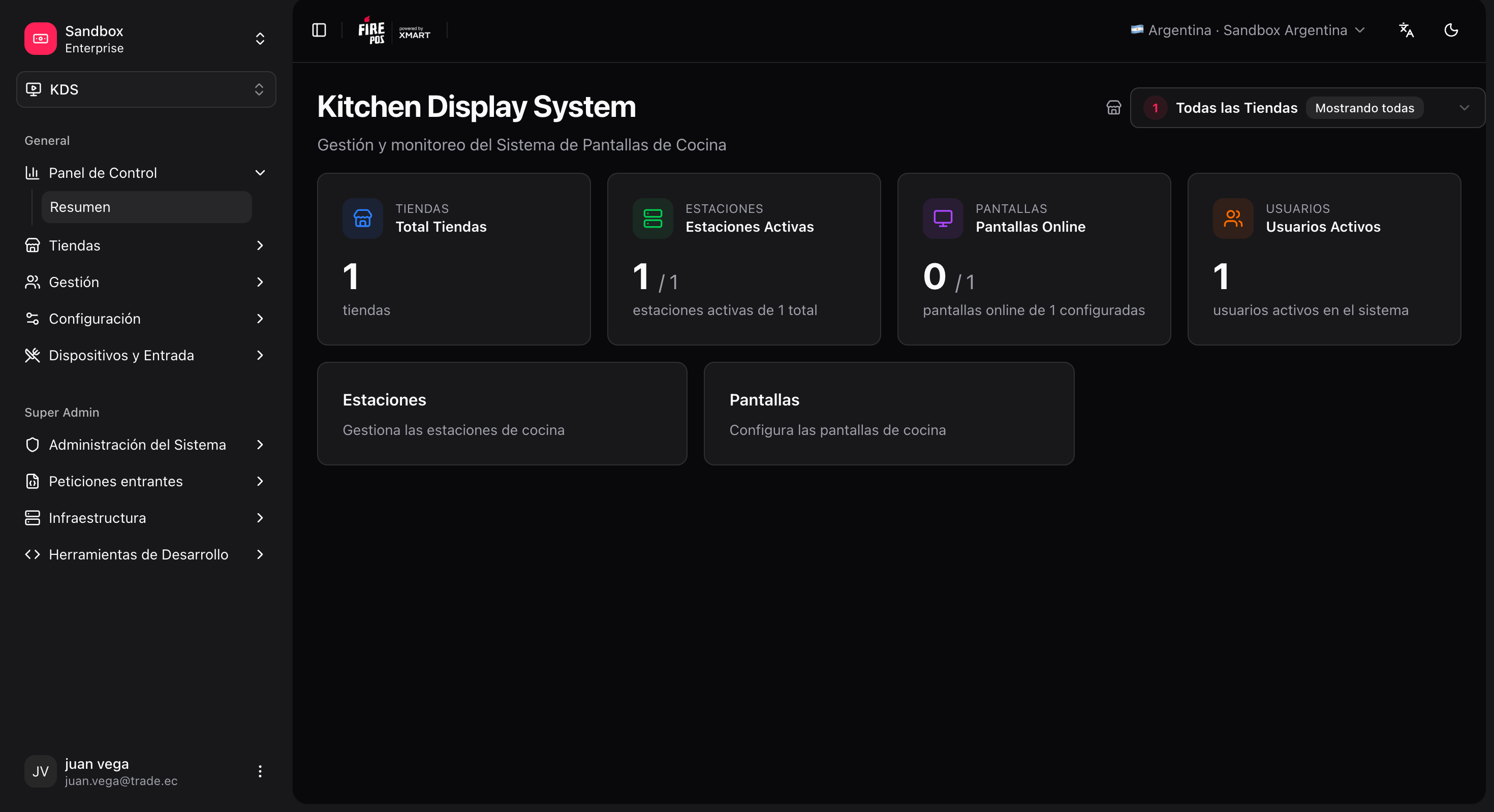
This section explains how to set up and administer a digital kitchen (KDS) **from the Fire backoffice**, without going into code. It is meant for operations, store rollout, and product support.
**Where you work:** the **KDS** menu, under `/kds/admin`.
For the day-to-day operator actions on the kitchen screen, see [Screen actions](/en/manuals/kds/screen-actions) and [Order display](/en/manuals/kds/waitlist). To enroll kitchen TVs without email, see [Pair a kitchen device](/en/manuals/kds/device-pairing). Supervisors monitoring the whole store use the [Operator board](/en/manuals/kds/operator-board).
## Before you begin
### What you need
| Requirement | Detail |
| ---------------------------- | ----------------------------------------------------------------------------------------------------------------------------------------------------------------------- |
| Access to the KDS module | A role with KDS permissions on the account. |
| A KDS store created | **KDS → All Stores → Create store**. When you create a new store, the system can take you to the initial setup wizard. |
| A physical screen (fire-kds) | Each kitchen TV/tablet runs **fire-kds**. Prefer [device pairing](/en/manuals/kds/device-pairing) (6-digit code) so the device joins the store without an email invite. |
For most stores the **default configuration** is enough: generic stations, routing that falls back to all active stations, and station rules set to "accept everything". Fine-tuning by `item_type`, channel, or service is optional and covered later.
### How the pieces fit together
```text theme={null}
Store
├── Stations → logical kitchen "queues" (Grill, Fry, Assembly, Dispatch…)
├── Screens → physical devices that show tickets
│ └── Assignment → which stations each screen shows (screen ↔ station)
├── Routing strategy → which station each line goes to (default: fallback to all)
├── Keyboard device → USB/BT keyboard linked to a screen
│ └── Keyboard layout → which key runs which action (bump, recall, etc.)
└── Ready-pickup printing → optional; a single screen per store
```
Mental rule: **routing** decides *which production station* each item goes to; the **screen** decides *which stations* the operator sees on that monitor.
 ## Two types of stations
Not every station is configured the same way:
| Type | Workflow stage | Chosen by item\_type in routing? | What it receives |
| --------------- | ---------------------------- | ------------------------------------------ | --------------------------------------------------------------------- |
| **Production** | `PRODUCTION`, `PRE_ASSEMBLY` | **Yes** — mappings + fallback | Each **line** of the order (item by item). |
| **Convergence** | `ASSEMBLY`, `DISPATCH` | **No** — they never appear in mapping rows | The **whole ticket** once production has advanced (convergence flow). |
In **Routing → Mappings**, the backoffice only lets you pick **production / pre-assembly** stations. Assembly and dispatch are **not item-routable**: you cannot set "`BURGER` → ASSEMBLY" in a mapping row.
Instead:
* **ASSEMBLY / DISPATCH** receive the **whole ticket**, not line by line. With **Production required = Yes**, that happens when the production lines are completed (convergence gates). With **Production required = No** (assembly-only kitchen), the ticket appears **as soon as the order arrives**.
* You set **convergence distribution** in the strategy (which assembly or dispatch station receives the ticket when there are several).
* On the assembly/dispatch **station** you can filter by **sales channel** (`POS`, `KIOSK`, `UBER_EATS`…) or **fulfillment type** (`DINE_IN`, `DELIVERY`, `TAKEOUT`…) — **not** by `item_type`.
## Kitchen patterns
### Simple kitchen (single queue)
There are two valid patterns for a small kitchen. The one running **in production** today is **B** (assembly-only).
Minimal real kitchen: **1 ASSEMBLY station + 1 screen + Production required = No**.
| Step | What to do |
| ---- | --------------------------------------------------- |
| 1 | **Store settings:** **Production required = No**. |
| 2 | Create **one** `ASSEMBLY` station (convergence on). |
| 3 | Create **one screen**; assign only `ASSEMBLY`. |
| 4 | Active routing (empty mappings are fine). |
| 5 | (Optional) Ready-pickup printing on that screen. |
| 6 | Order display at `/waitlist/{storeId}`. |
```text theme={null}
Order → ASSEMBLY (immediate) → cook → bump ticket → order display "Ready" + optional printing
```
Model the kitchen as pure "production" (no ASSEMBLY stage):
| Step | What to do |
| ---- | ------------------------------------------------------------------------------------- |
| 1 | Create **one station** with stage `PRODUCTION` (e.g. code `KITCHEN`). |
| 2 | Create **one screen** and assign only that station. |
| 3 | Create routing **with no mappings** and **fallback** pointing to that single station. |
| 4 | Station rules set to **Accept all item types**. |
| 5 | **Production required = Yes** (default). |
```text theme={null}
Order → (no mapping) → fallback → KITCHEN station → single screen → bump per line
```
If the kitchen grows later, add production stations, turn **Production required = Yes**, and map by `item_type`. ASSEMBLY then becomes the expo where the ticket converges once production is done.
### Operational flow (assembly-only)
This is the setup used in small stores **in production today**: one assembly station, one screen, no separate grill/fry/dispatch.
1. **Order arrives** — the POS/kiosk sends the order to the KDS. A ticket is created with its lines.
2. **Order display: "Preparing"** — while the order is `SENT_TO_KITCHEN`, its code shows in the preparing area.
3. **Ticket on screen** — with **Production required = No**, the ticket enters the `ASSEMBLY` column directly.
4. **Operator cooks** — sees the whole ticket: code, channel, service, items, and modifiers. Can **hold** if needed.
5. **Bump** — in ASSEMBLY this is **one bump per order** (whole ticket).
6. **Kitchen cycle closes** — with no `DISPATCH` station, the assembly bump is the final step: order → **ready for pickup**, KDS ticket → **DONE**.
7. **"Sent" snackbar** — appears briefly with **Undo** (configurable window, \~3 min).
8. **Order display: "Ready"** — the same code jumps to the ready-for-pickup area.
9. **Printing** (if configured) — fiscal slip and/or delivery ticket.
10. **Customer collects** — using the on-screen code or the printed ticket.
For the full operator experience of these steps, see [Screen actions](/en/manuals/kds/screen-actions).
### Multi-station kitchen (reference)
For kitchens with grill + assembly + dispatch, the flow is longer:
```text theme={null}
Order
└─► Routing by item_type → PRODUCTION stations (GRILL, FRY, KITCHEN…)
└─► Optional rules (channel / service / item)
└─► Production screen → bump PER LINE
└─► Convergence gate opens when production finished
└─► ASSEMBLY (whole ticket) → bump
└─► DISPATCH (optional) → bump
└─► READY_FOR_PICKUP + order display + printing
```
### Store-level KDS options (fire-kds)
After the backoffice layout exists, store managers can tune kitchen behaviour in **fire-kds → Settings → KDS** (and per-screen overrides on the production screen):
| Option | What it controls |
| ---------------------------- | ----------------------------------------------------------------------------------------------------------- |
| **Display defaults** | Font scale, card size, new-order alert (visual ± sound). Screens can follow the store or keep local values. |
| **Line strike** | Require tapping each parent line before bump, optionally limited to certain stations. |
| **Customer name on tickets** | Show or hide the customer name, optionally only for selected channels / fulfillment types. |
| **Order display filters** | Hide fulfillment types (e.g. delivery) from the customer-facing turnero. |
| **Cancellation reasons** | Which Fire cancellation reasons operators may pick when cancelling from KDS / operator board. |
Next: [Set up a store](/en/manuals/kds/store-setup) · [Pair a kitchen device](/en/manuals/kds/device-pairing) · [Operator board](/en/manuals/kds/operator-board).
## Two types of stations
Not every station is configured the same way:
| Type | Workflow stage | Chosen by item\_type in routing? | What it receives |
| --------------- | ---------------------------- | ------------------------------------------ | --------------------------------------------------------------------- |
| **Production** | `PRODUCTION`, `PRE_ASSEMBLY` | **Yes** — mappings + fallback | Each **line** of the order (item by item). |
| **Convergence** | `ASSEMBLY`, `DISPATCH` | **No** — they never appear in mapping rows | The **whole ticket** once production has advanced (convergence flow). |
In **Routing → Mappings**, the backoffice only lets you pick **production / pre-assembly** stations. Assembly and dispatch are **not item-routable**: you cannot set "`BURGER` → ASSEMBLY" in a mapping row.
Instead:
* **ASSEMBLY / DISPATCH** receive the **whole ticket**, not line by line. With **Production required = Yes**, that happens when the production lines are completed (convergence gates). With **Production required = No** (assembly-only kitchen), the ticket appears **as soon as the order arrives**.
* You set **convergence distribution** in the strategy (which assembly or dispatch station receives the ticket when there are several).
* On the assembly/dispatch **station** you can filter by **sales channel** (`POS`, `KIOSK`, `UBER_EATS`…) or **fulfillment type** (`DINE_IN`, `DELIVERY`, `TAKEOUT`…) — **not** by `item_type`.
## Kitchen patterns
### Simple kitchen (single queue)
There are two valid patterns for a small kitchen. The one running **in production** today is **B** (assembly-only).
Minimal real kitchen: **1 ASSEMBLY station + 1 screen + Production required = No**.
| Step | What to do |
| ---- | --------------------------------------------------- |
| 1 | **Store settings:** **Production required = No**. |
| 2 | Create **one** `ASSEMBLY` station (convergence on). |
| 3 | Create **one screen**; assign only `ASSEMBLY`. |
| 4 | Active routing (empty mappings are fine). |
| 5 | (Optional) Ready-pickup printing on that screen. |
| 6 | Order display at `/waitlist/{storeId}`. |
```text theme={null}
Order → ASSEMBLY (immediate) → cook → bump ticket → order display "Ready" + optional printing
```
Model the kitchen as pure "production" (no ASSEMBLY stage):
| Step | What to do |
| ---- | ------------------------------------------------------------------------------------- |
| 1 | Create **one station** with stage `PRODUCTION` (e.g. code `KITCHEN`). |
| 2 | Create **one screen** and assign only that station. |
| 3 | Create routing **with no mappings** and **fallback** pointing to that single station. |
| 4 | Station rules set to **Accept all item types**. |
| 5 | **Production required = Yes** (default). |
```text theme={null}
Order → (no mapping) → fallback → KITCHEN station → single screen → bump per line
```
If the kitchen grows later, add production stations, turn **Production required = Yes**, and map by `item_type`. ASSEMBLY then becomes the expo where the ticket converges once production is done.
### Operational flow (assembly-only)
This is the setup used in small stores **in production today**: one assembly station, one screen, no separate grill/fry/dispatch.
1. **Order arrives** — the POS/kiosk sends the order to the KDS. A ticket is created with its lines.
2. **Order display: "Preparing"** — while the order is `SENT_TO_KITCHEN`, its code shows in the preparing area.
3. **Ticket on screen** — with **Production required = No**, the ticket enters the `ASSEMBLY` column directly.
4. **Operator cooks** — sees the whole ticket: code, channel, service, items, and modifiers. Can **hold** if needed.
5. **Bump** — in ASSEMBLY this is **one bump per order** (whole ticket).
6. **Kitchen cycle closes** — with no `DISPATCH` station, the assembly bump is the final step: order → **ready for pickup**, KDS ticket → **DONE**.
7. **"Sent" snackbar** — appears briefly with **Undo** (configurable window, \~3 min).
8. **Order display: "Ready"** — the same code jumps to the ready-for-pickup area.
9. **Printing** (if configured) — fiscal slip and/or delivery ticket.
10. **Customer collects** — using the on-screen code or the printed ticket.
For the full operator experience of these steps, see [Screen actions](/en/manuals/kds/screen-actions).
### Multi-station kitchen (reference)
For kitchens with grill + assembly + dispatch, the flow is longer:
```text theme={null}
Order
└─► Routing by item_type → PRODUCTION stations (GRILL, FRY, KITCHEN…)
└─► Optional rules (channel / service / item)
└─► Production screen → bump PER LINE
└─► Convergence gate opens when production finished
└─► ASSEMBLY (whole ticket) → bump
└─► DISPATCH (optional) → bump
└─► READY_FOR_PICKUP + order display + printing
```
### Store-level KDS options (fire-kds)
After the backoffice layout exists, store managers can tune kitchen behaviour in **fire-kds → Settings → KDS** (and per-screen overrides on the production screen):
| Option | What it controls |
| ---------------------------- | ----------------------------------------------------------------------------------------------------------- |
| **Display defaults** | Font scale, card size, new-order alert (visual ± sound). Screens can follow the store or keep local values. |
| **Line strike** | Require tapping each parent line before bump, optionally limited to certain stations. |
| **Customer name on tickets** | Show or hide the customer name, optionally only for selected channels / fulfillment types. |
| **Order display filters** | Hide fulfillment types (e.g. delivery) from the customer-facing turnero. |
| **Cancellation reasons** | Which Fire cancellation reasons operators may pick when cancelling from KDS / operator board. |
Next: [Set up a store](/en/manuals/kds/store-setup) · [Pair a kitchen device](/en/manuals/kds/device-pairing) · [Operator board](/en/manuals/kds/operator-board).