> ## Documentation Index
> Fetch the complete documentation index at: https://docs.fire.rest/llms.txt
> Use this file to discover all available pages before exploring further.
# Fire API credentials
> Give fire-kds the Fire host and key it needs to print fiscal slips and cancel orders — without mixing vendors.
Fiscal print and cancel talk to Fire with a host and an API key. If the kitchen uses the account default on a store that belongs to another vendor, the slip never prints and the cancel never lands — and the ticket still looks “done” on the screen.
This page is for the person who configures **KDS → Fire credentials**. Operators on the kitchen TV do not see this form.
**The minimum you need to know**
* Empty **Vendor ID** = **Account default**. A row with a vendor ID overrides that default for that vendor only.
* **Base URL** is the Fire host only (`https://br.app.fire.rest`). No path, query, or hash — fire-kds appends print and cancel paths itself.
* The same stored key is used for both jobs: fiscal print sends it as Bearer; cancel sends it as `x-api-key`.
## The simple path
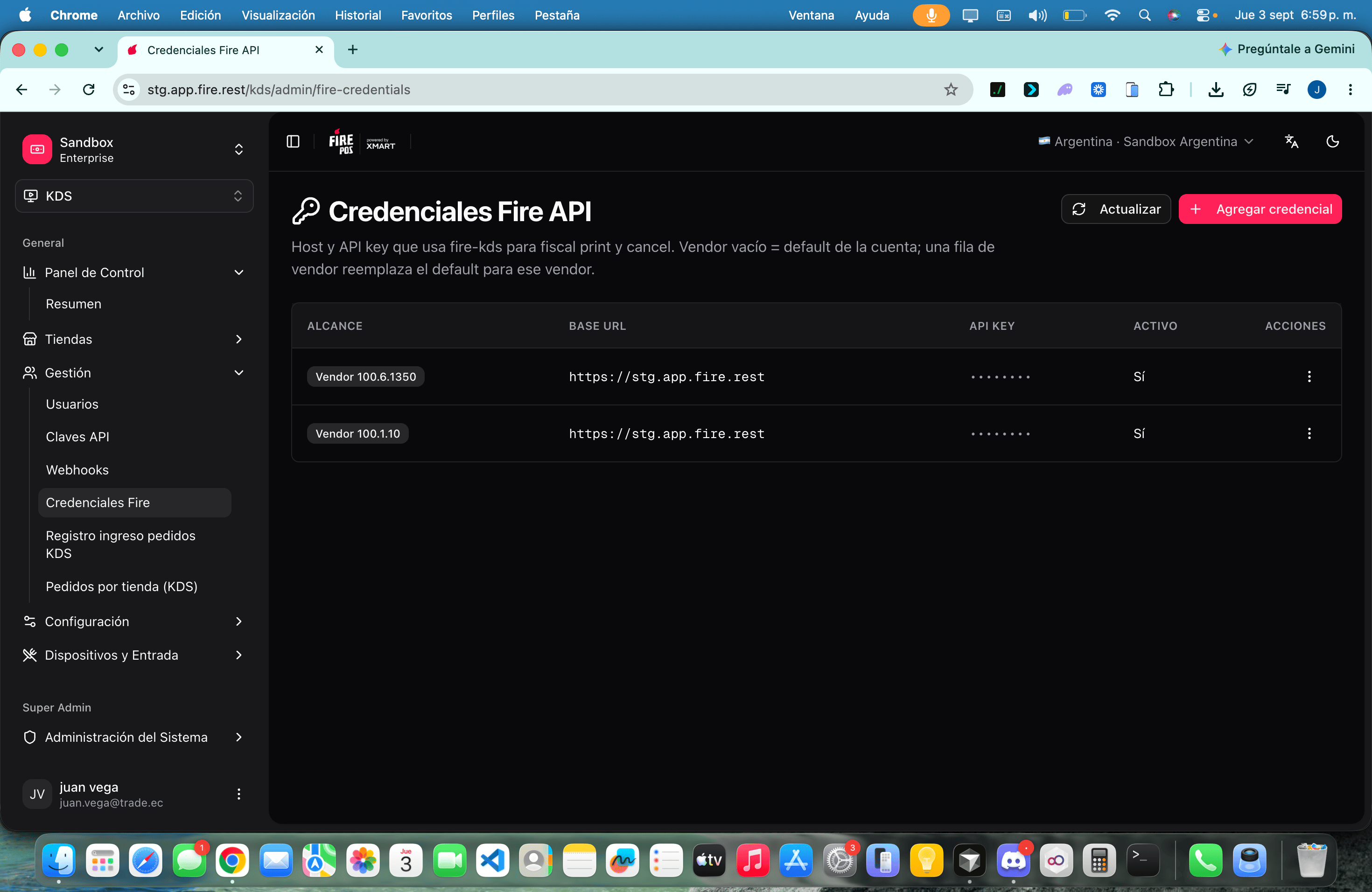
Go to **KDS → Fire credentials** (`/kds/admin/fire-credentials`).
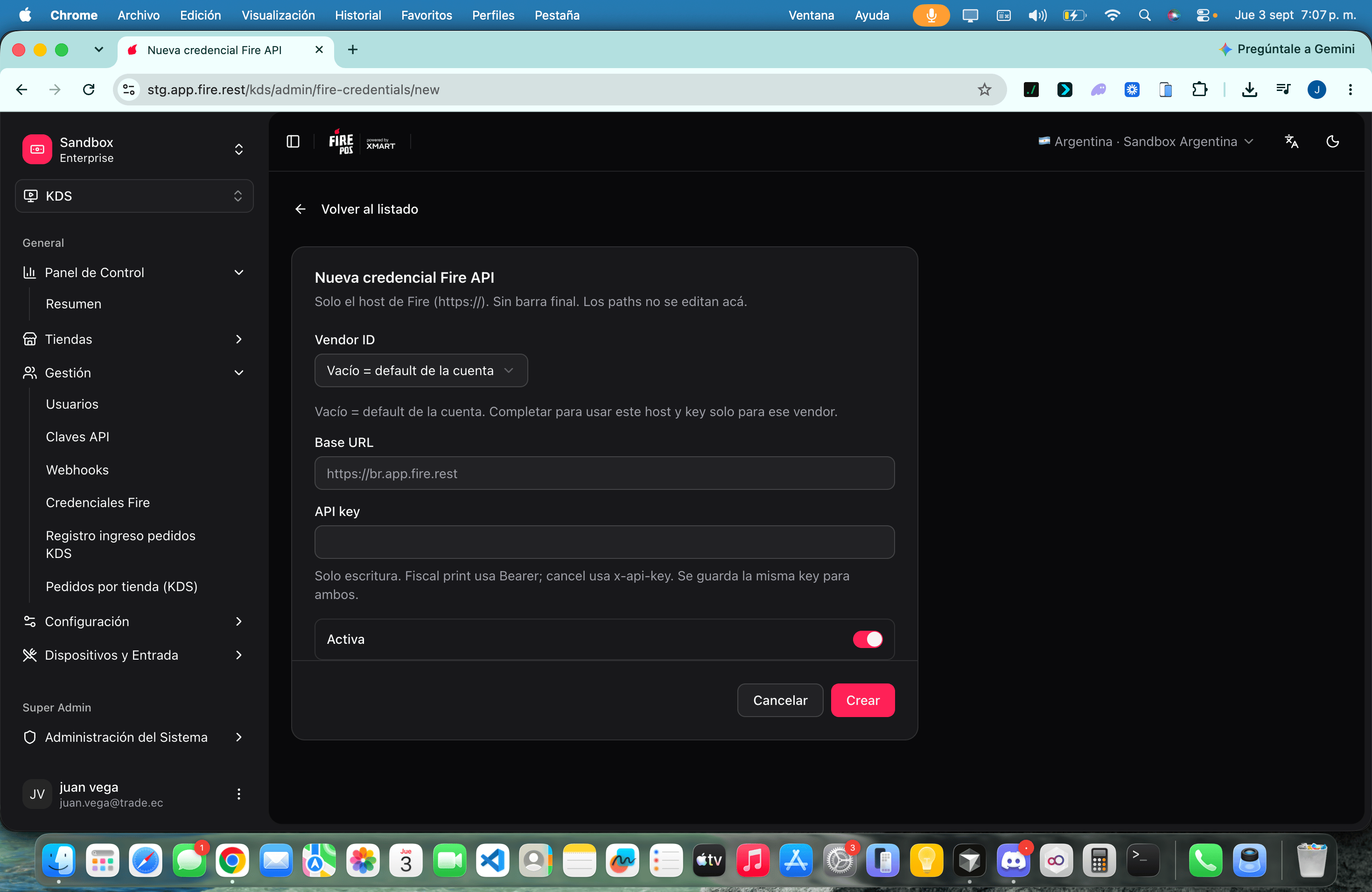
Click **Add credential**. Leave **Vendor ID** empty. Paste the **Base URL** (https host only) and the **API key**. Leave **Active** on. Click **Create**.
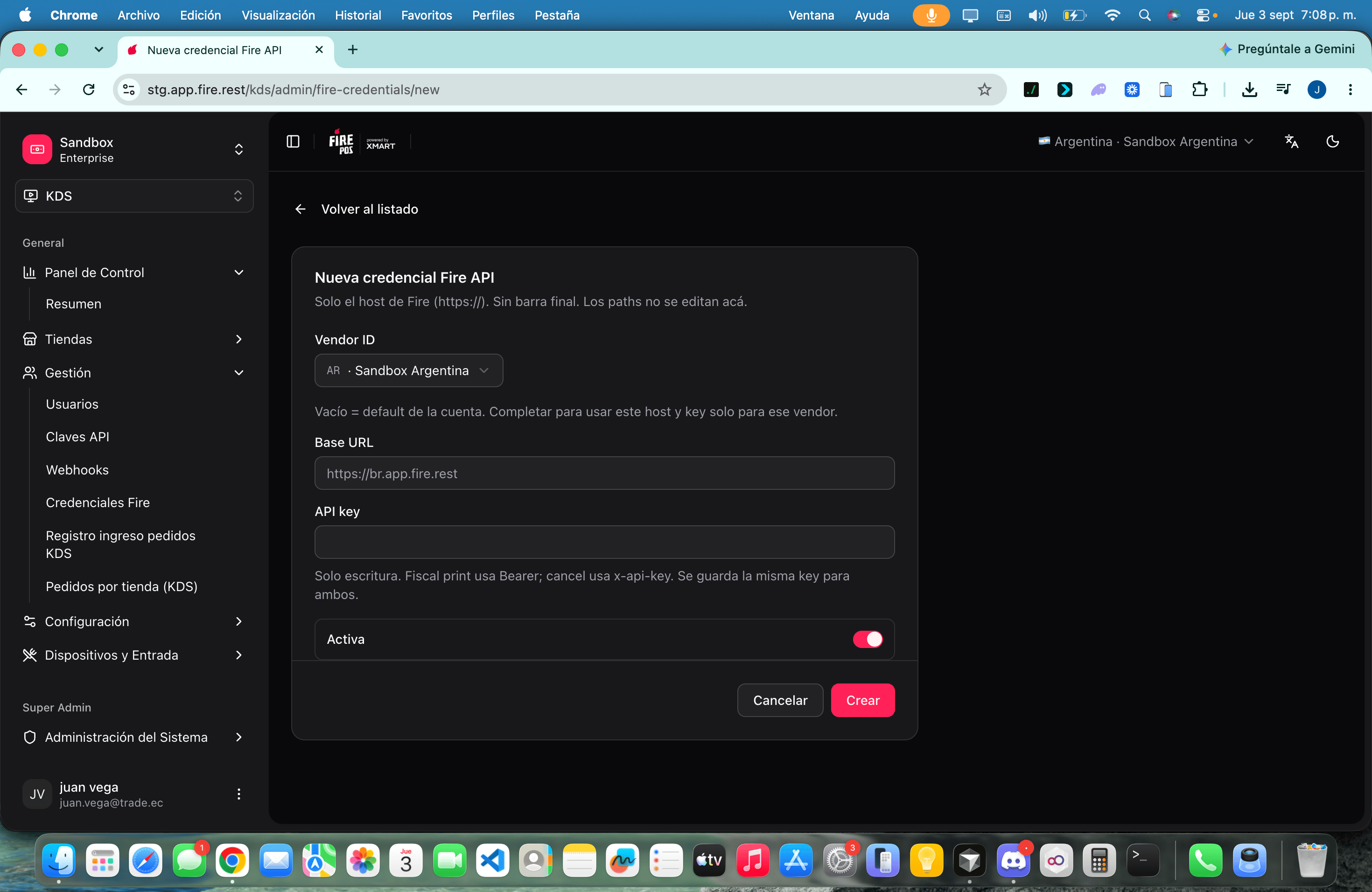
If a brand talks to a different Fire host or key, create a second row and fill **Vendor ID**. That row wins for that vendor; every other store still uses the account default.
 If every store in the account uses the same Fire environment, the account default is enough. You can stop here.
## Account default vs vendor override
| Scope | When fire-kds uses it |
| ---------------------------------- | --------------------------------------------------- |
| **Account default** (empty vendor) | No active vendor row exists for the order’s vendor. |
| **Vendor** | There is an **Active** row for that vendor ID. |
Resolution at runtime is always: **vendor row → account default → environment variables** (`FISCAL_PRINT_*` for print; cancel may fall back to `FIRE_*`). Print never reads `FIRE_API_*`.
If every store in the account uses the same Fire environment, the account default is enough. You can stop here.
## Account default vs vendor override
| Scope | When fire-kds uses it |
| ---------------------------------- | --------------------------------------------------- |
| **Account default** (empty vendor) | No active vendor row exists for the order’s vendor. |
| **Vendor** | There is an **Active** row for that vendor ID. |
Resolution at runtime is always: **vendor row → account default → environment variables** (`FISCAL_PRINT_*` for print; cancel may fall back to `FIRE_*`). Print never reads `FIRE_API_*`.
 ## Fields
| Field | What it is for |
| ------------- | ----------------------------------------------------------------------------------------------- |
| **Vendor ID** | Empty = account default. Set to restrict this host and key to one vendor. |
| **Base URL** | Fire host only. Example: `https://br.app.fire.rest`. No trailing slash. |
| **API key** | Write-only. On edit, leave it blank to keep the current key. The list shows a masked hint only. |
| **Active** | Inactive rows are ignored. Runtime falls through to the next level. |
## Recipes
1. Create a single row with an empty **Vendor ID**.
2. Use the host of that country (for example `https://br.app.fire.rest`).
3. Keep it **Active**.
4. Do not create vendor rows unless a brand really uses another key.
1. Keep the account default for the rest of the stores.
2. **Add credential**, paste that franchise **Vendor ID**, and its own key.
3. Confirm the list shows **Vendor** for that id and **Account default** for the rest.
1. Open **Edit** on the row.
2. Paste the new **API key** (the old one is never shown).
3. Save. The next print or cancel uses the new key.
1. **Deactivate** or **Delete** the vendor row.
2. Delete is permanent: runtime falls through to the account default, then env.
3. Confirm a test print still works on a store of that vendor.
## Worked example
| Situation | Row to create | What the kitchen gets |
| ------------- | ----------------------------------------------- | ----------------------------------------- |
| Chain default | Vendor empty, `https://br.app.fire.rest`, key A | Every store without an override |
| Brand “Norte” | Vendor `vnd_norte`, same host, key B | Only Norte stores print/cancel with key B |
## Errors that cost money
**A path in the Base URL.** Values like `https://br.app.fire.rest/v1/print` are rejected. fire-kds composes `/fiscal-print` and cancel itself. If you force a path, print and cancel miss the endpoint.
**Account default on the wrong vendor.** A store of vendor B that falls through to key A gets `401` / `403`. Fiscal slips stay queued and cancel shows **Fire rejected the cancellation**.
**http\:// or a URL with query or hash.** Only `https://` host (optional port) is accepted. Userinfo (`user:pass@`) is also rejected.
## Glossary
| Term | Meaning |
| ------------------- | ---------------------------------------------------------------------------- |
| **Account default** | Credential with empty vendor. Fallback for every vendor without its own row. |
| **Vendor override** | Credential tied to one vendor ID. Wins over the account default. |
| **Base URL** | Fire origin only. Not a print path. |
| **Cascade** | Vendor row → account default → env vars. |
## FAQ
No. Only the host. Paths are not edited on this screen.
No. One stored key. Print sends Bearer; cancel sends `x-api-key`.
Runtime uses environment variables on the fire-kds server, if they are set. If they are not, print and cancel fail until you add a row again.
No. The backoffice returns a conflict: a credential already exists for that account default or vendor.
## What this page does not do
* It does not configure Fire Agent (local printer). See [Peripherals, printing and validation](/en/manuals/kds/peripherals-printing).
* It does not choose Brazil v1 vs Ecuador v2 — fire-kds picks the version from the store country.
* It does not show the kitchen operator a form. They only see print/cancel outcomes.
For the cascade and the HTTP call, see [KDS Fire credentials (technical)](/en/guides/kds-fire-credentials).
## Fields
| Field | What it is for |
| ------------- | ----------------------------------------------------------------------------------------------- |
| **Vendor ID** | Empty = account default. Set to restrict this host and key to one vendor. |
| **Base URL** | Fire host only. Example: `https://br.app.fire.rest`. No trailing slash. |
| **API key** | Write-only. On edit, leave it blank to keep the current key. The list shows a masked hint only. |
| **Active** | Inactive rows are ignored. Runtime falls through to the next level. |
## Recipes
1. Create a single row with an empty **Vendor ID**.
2. Use the host of that country (for example `https://br.app.fire.rest`).
3. Keep it **Active**.
4. Do not create vendor rows unless a brand really uses another key.
1. Keep the account default for the rest of the stores.
2. **Add credential**, paste that franchise **Vendor ID**, and its own key.
3. Confirm the list shows **Vendor** for that id and **Account default** for the rest.
1. Open **Edit** on the row.
2. Paste the new **API key** (the old one is never shown).
3. Save. The next print or cancel uses the new key.
1. **Deactivate** or **Delete** the vendor row.
2. Delete is permanent: runtime falls through to the account default, then env.
3. Confirm a test print still works on a store of that vendor.
## Worked example
| Situation | Row to create | What the kitchen gets |
| ------------- | ----------------------------------------------- | ----------------------------------------- |
| Chain default | Vendor empty, `https://br.app.fire.rest`, key A | Every store without an override |
| Brand “Norte” | Vendor `vnd_norte`, same host, key B | Only Norte stores print/cancel with key B |
## Errors that cost money
**A path in the Base URL.** Values like `https://br.app.fire.rest/v1/print` are rejected. fire-kds composes `/fiscal-print` and cancel itself. If you force a path, print and cancel miss the endpoint.
**Account default on the wrong vendor.** A store of vendor B that falls through to key A gets `401` / `403`. Fiscal slips stay queued and cancel shows **Fire rejected the cancellation**.
**http\:// or a URL with query or hash.** Only `https://` host (optional port) is accepted. Userinfo (`user:pass@`) is also rejected.
## Glossary
| Term | Meaning |
| ------------------- | ---------------------------------------------------------------------------- |
| **Account default** | Credential with empty vendor. Fallback for every vendor without its own row. |
| **Vendor override** | Credential tied to one vendor ID. Wins over the account default. |
| **Base URL** | Fire origin only. Not a print path. |
| **Cascade** | Vendor row → account default → env vars. |
## FAQ
No. Only the host. Paths are not edited on this screen.
No. One stored key. Print sends Bearer; cancel sends `x-api-key`.
Runtime uses environment variables on the fire-kds server, if they are set. If they are not, print and cancel fail until you add a row again.
No. The backoffice returns a conflict: a credential already exists for that account default or vendor.
## What this page does not do
* It does not configure Fire Agent (local printer). See [Peripherals, printing and validation](/en/manuals/kds/peripherals-printing).
* It does not choose Brazil v1 vs Ecuador v2 — fire-kds picks the version from the store country.
* It does not show the kitchen operator a form. They only see print/cancel outcomes.
For the cascade and the HTTP call, see [KDS Fire credentials (technical)](/en/guides/kds-fire-credentials).