> ## Documentation Index
> Fetch the complete documentation index at: https://docs.fire.rest/llms.txt
> Use this file to discover all available pages before exploring further.
# Routing
> How the KDS routing strategy decides which station each order line goes to: default vs custom mappings, decision layers, and distribution modes.
The **routing strategy** decides, for each order line, **which station(s)** it goes to.
There can be only **one active strategy** per store. Activating a new one automatically deactivates the others for that store.
## Default vs custom mappings
* **Production required = No** in Store settings.
* **One** `ASSEMBLY` station + **one** screen.
* Active routing (empty mappings); item mappings are not used because there is no prior production.
* **One** `PRODUCTION` station (e.g. `KITCHEN`) + **one** screen.
* Routing **with no mappings**; **fallback** = that station (or "all active" if there is only one).
* **Production required = Yes**; everything lands in the default station.
* Several `PRODUCTION` / `PRE_ASSEMBLY` stations.
* Mappings **item\_type → kitchen stations** (production only).
* Optional: `ASSEMBLY` / `DISPATCH` stations + **convergence distribution** for expo/dispatch.
If there is no mapping for an `item_type`, the line goes to **fallback** (ideally a production station, not assembly).
## Decision order
1. **Routing (layer 1):** picks candidate **production** stations by `item_type` + fallback.
2. **Station rules (layer 2):** channel, service type (`DINE_IN`, `DELIVERY`…), item types — can **reject** the line.
3. **Distribution (layer 3):** if several production candidates remain, picks one according to the mode.
4. **Convergence (runtime):** when production advances, the **ticket** appears in ASSEMBLY/DISPATCH according to gates and **convergence distribution**; there, channel/service station filters apply.
Layer 2 example: routing sends an item to `GRILL`, but the station has **Exclude channels: UBER\_EATS** → that line is not shown on the grill even though the mapping includes it.
## How production routing works
Line routing (layers 1–3) applies only to **production** stations:
1. Reads the line's **`item_type`**.
2. Looks for a **mapping** (production stations only in the form).
3. If no match → **fallback stations** (your default station).
4. Applies station **rules** (channel, service, item).
5. If several candidates → **distribution**.
**Assembly and dispatch** do not take part in these steps. They receive the ticket when the matching production is completed (convergence), not because you put `BURGER` → `ASSEMBLY` in a mapping.
## Distribution modes (when 2+ candidate stations)
| Mode | Behavior |
| ------------------------ | ---------------------------------------------- |
| **ALL** | Sends to all candidates (broadcast). |
| **ROUND\_ROBIN** | Rotates between candidates in order. |
| **LEAST\_LOADED** | Prefers the station with fewer active tickets. |
| **LEAST\_LOADED\_ITEMS** | Prefers the station with fewer queued items. |
If the mapping has a **single** station, the distribution mode does not change the result.
## Multi-station example
**Stations:**
| Code | Stage | Role |
| ---------- | ---------- | ------------------------------------------------------ |
| `GRILL` | PRODUCTION | Burgers — **item\_type routable** |
| `FRY` | PRODUCTION | Fries — **item\_type routable** |
| `ASSEMBLY` | ASSEMBLY | Assembly — **whole ticket**, no item mapping |
| `DISPATCH` | DISPATCH | Dispatch — **whole ticket**; e.g. `DELIVERY` rule only |
**Screens:**
| Screen | Assigned stations |
| ------------------- | ------------------------------------------ |
| "Grill" | `GRILL`, `FRY` |
| "Assembly" | `ASSEMBLY` |
| "Delivery dispatch" | `DISPATCH` (rules: fulfillment `DELIVERY`) |
**Routing strategy — production only in mappings:**
| item\_type | Target stations | Distribution |
| ------------ | --------------- | --------------------------------------------------- |
| `BURGER` | `GRILL` | — |
| `FRIES` | `FRY`, `GRILL` | `LEAST_LOADED` |
| *(fallback)* | `GRILL` | Unlisted types → grill (default production station) |
**Convergence (outside mappings):** when the lines in `GRILL`/`FRY` complete, the ticket appears in `ASSEMBLY` and then `DISPATCH` according to **convergence distribution** and those stations' channel/service rules.
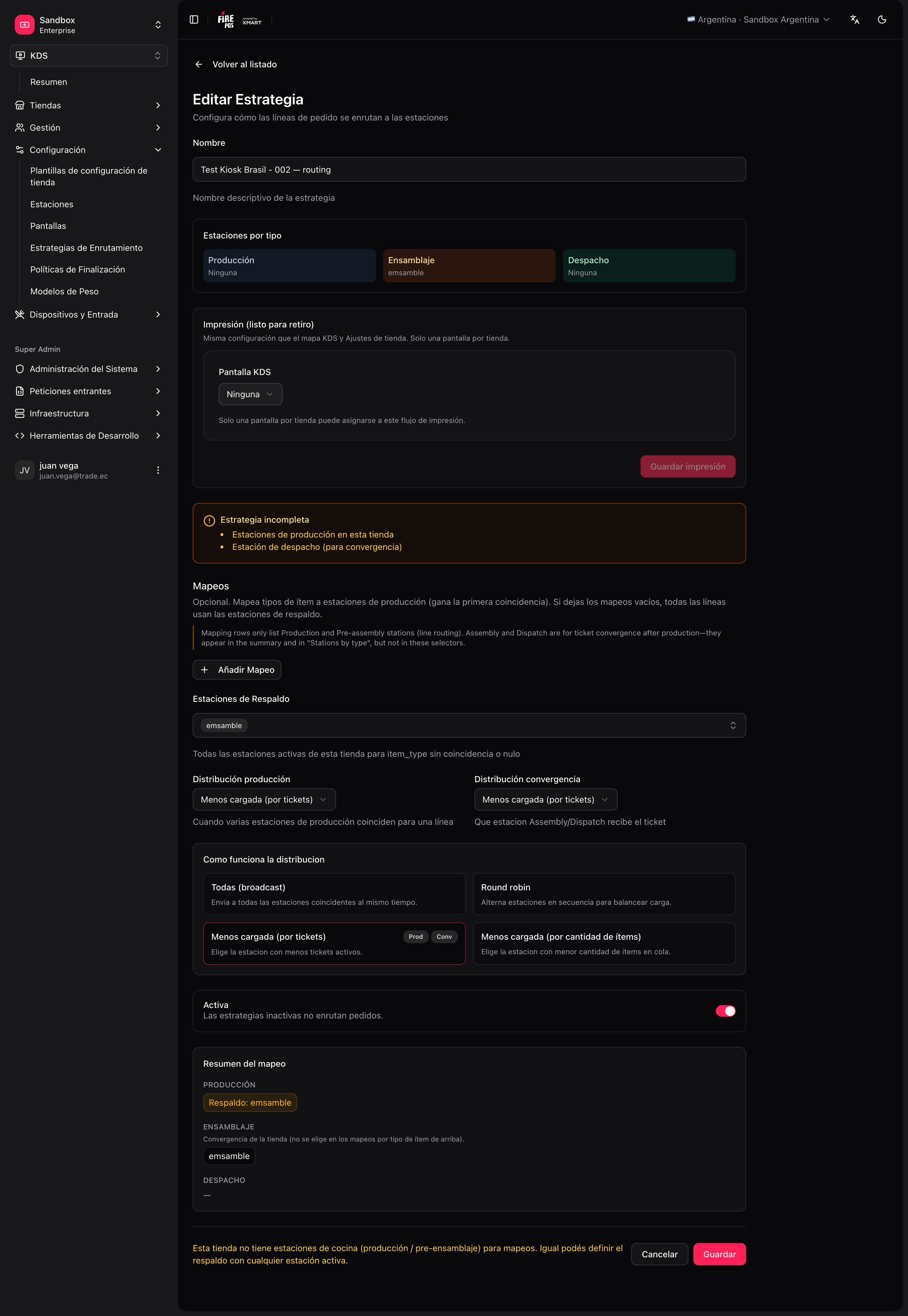 ## Create the strategy
**KDS → Routing → Create** (`/kds/admin/routing/new`).
For example, "Default routing".
One `KITCHEN` station, fallback = `KITCHEN`, no mappings, **Active**.
Mappings only to **production** stations; **convergence distribution** if there are ASSEMBLY/DISPATCH stations; fallback = default production station.
In the routing list you can see the **active strategy** card and a conceptual station ↔ screen map.
Next: [Peripherals, printing and validation](/en/manuals/kds/peripherals-printing).
## Create the strategy
**KDS → Routing → Create** (`/kds/admin/routing/new`).
For example, "Default routing".
One `KITCHEN` station, fallback = `KITCHEN`, no mappings, **Active**.
Mappings only to **production** stations; **convergence distribution** if there are ASSEMBLY/DISPATCH stations; fallback = default production station.
In the routing list you can see the **active strategy** card and a conceptual station ↔ screen map.
Next: [Peripherals, printing and validation](/en/manuals/kds/peripherals-printing).