> ## Documentation Index
> Fetch the complete documentation index at: https://docs.fire.rest/llms.txt
> Use this file to discover all available pages before exploring further.
# Stations
> Create and configure KDS stations: fields, optional station rules by channel, service or item type, and step-by-step creation.
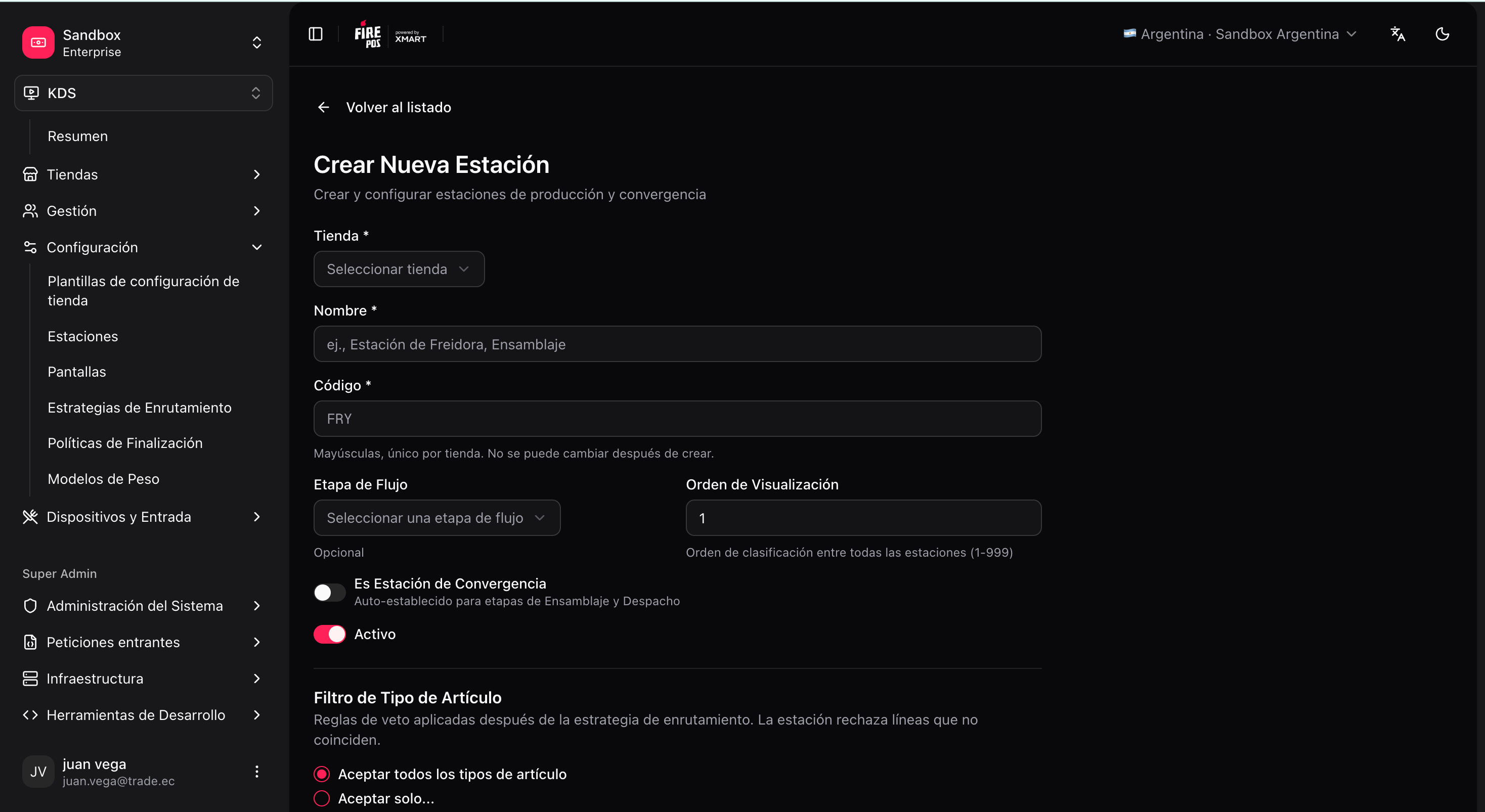
A **station** is a work queue in the kitchen. Tickets and lines arrive according to the active routing strategy; then the station rules can filter by channel, service, or item type.
## Important fields
| Field | What it is for |
| ------------------ | -------------------------------------------------------------------------------------------------------------------------- |
| **Store** | The store the station belongs to. |
| **Code** | Short identifier, unique within the store (e.g. `GRILL`, `FRY`, `ASSEMBLY`). Used in routing and screens. |
| **Name** | Visible name for operators/admins. |
| **Workflow stage** | Conceptual stage: `PRODUCTION`, `PRE_ASSEMBLY`, `ASSEMBLY`, `DISPATCH`. Helps organize the map and the routing form. |
| **Workflow order** | Relative order within the stage (display). |
| **Convergence** | Marks **assembly/dispatch** stations where the whole ticket converges (they do not receive lines via `item_type` mapping). |
| **Rules** | Optional filters applied **after** routing (see below). |
| **Timer** | Visual thresholds (warn / danger in seconds) for tickets in that station. |
 ## Station rules (optional)
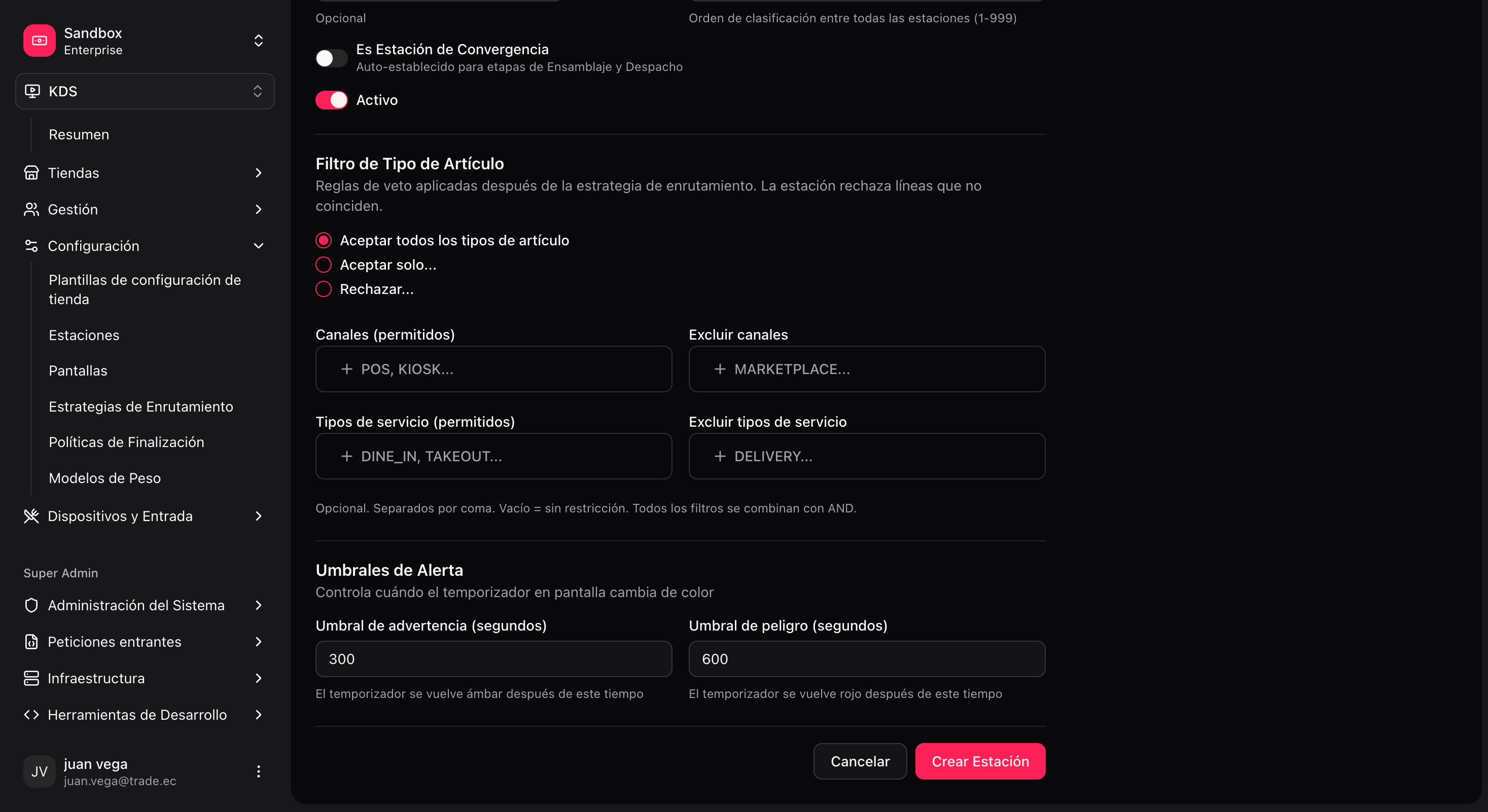
By default, each station **accepts every line** that routing assigns to it. **Rules** are extra "veto" filters that narrow which tickets that station shows:
| Filter | What it does | Example |
| ------------------------ | ---------------------------------------- | ----------------------------------------------------------------- |
| **Item types** | Allow only certain types, or reject some | Only `BURGER` on the grill; exclude `BEVERAGE` from the hot line. |
| **Channels (allowlist)** | Only orders from certain sales channels | Only `POS` and `KIOSK` on the counter station. |
| **Exclude channels** | Exclude channels | Exclude `UBER_EATS` from a dine-in station. |
| **Fulfillment types** | Allow or exclude service types | Only `DINE_IN`, or exclude `DELIVERY`. |
You cannot use **Channels** and **Exclude channels** at the same time in one station (pick allowlist **or** blocklist). The same applies to fulfillment: allowlist **or** exclude, not both.
* Channel and fulfillment codes must match the values the order carries (e.g. `POS`, `KIOSK`, `DINE_IN`, `TAKEOUT`). If the store is linked to Restaurant OS, the backoffice can suggest tags from the store's effective config.
* If you leave everything empty and pick **Accept all item types**, the station does not filter anything extra — **default** behavior.
**When to use it:**
* **Production:** filter items (e.g. exclude drinks from the grill) or channels (e.g. hide delivery from the hot line).
* **Assembly / Dispatch:** most useful to filter by **channel** or **service type** (e.g. one dispatch only for `DELIVERY`, another for the counter). Here you do **not** define which items arrive — production already resolved that; here you define **which orders** that expo or dispatch station sees.
You do not need to touch rules in an initial single-station default setup.
## Station rules (optional)
By default, each station **accepts every line** that routing assigns to it. **Rules** are extra "veto" filters that narrow which tickets that station shows:
| Filter | What it does | Example |
| ------------------------ | ---------------------------------------- | ----------------------------------------------------------------- |
| **Item types** | Allow only certain types, or reject some | Only `BURGER` on the grill; exclude `BEVERAGE` from the hot line. |
| **Channels (allowlist)** | Only orders from certain sales channels | Only `POS` and `KIOSK` on the counter station. |
| **Exclude channels** | Exclude channels | Exclude `UBER_EATS` from a dine-in station. |
| **Fulfillment types** | Allow or exclude service types | Only `DINE_IN`, or exclude `DELIVERY`. |
You cannot use **Channels** and **Exclude channels** at the same time in one station (pick allowlist **or** blocklist). The same applies to fulfillment: allowlist **or** exclude, not both.
* Channel and fulfillment codes must match the values the order carries (e.g. `POS`, `KIOSK`, `DINE_IN`, `TAKEOUT`). If the store is linked to Restaurant OS, the backoffice can suggest tags from the store's effective config.
* If you leave everything empty and pick **Accept all item types**, the station does not filter anything extra — **default** behavior.
**When to use it:**
* **Production:** filter items (e.g. exclude drinks from the grill) or channels (e.g. hide delivery from the hot line).
* **Assembly / Dispatch:** most useful to filter by **channel** or **service type** (e.g. one dispatch only for `DELIVERY`, another for the counter). Here you do **not** define which items arrive — production already resolved that; here you define **which orders** that expo or dispatch station sees.
You do not need to touch rules in an initial single-station default setup.
 ## Create a station
**KDS → Stations → Create** (`/kds/admin/stations/new`).
For example, code `GRILL`, name "Grill".
For example, `PRODUCTION` for the hot line.
Define all your production, assembly, and dispatch stations **before** creating screens or routing.
Next: [Screens](/en/manuals/kds/screens).
## Create a station
**KDS → Stations → Create** (`/kds/admin/stations/new`).
For example, code `GRILL`, name "Grill".
For example, `PRODUCTION` for the hot line.
Define all your production, assembly, and dispatch stations **before** creating screens or routing.
Next: [Screens](/en/manuals/kds/screens).