> ## Documentation Index
> Fetch the complete documentation index at: https://docs.fire.rest/llms.txt
> Use this file to discover all available pages before exploring further.
# Payment methods
> Declare the payment methods your account charges with, and the data each one needs before a store can use it.
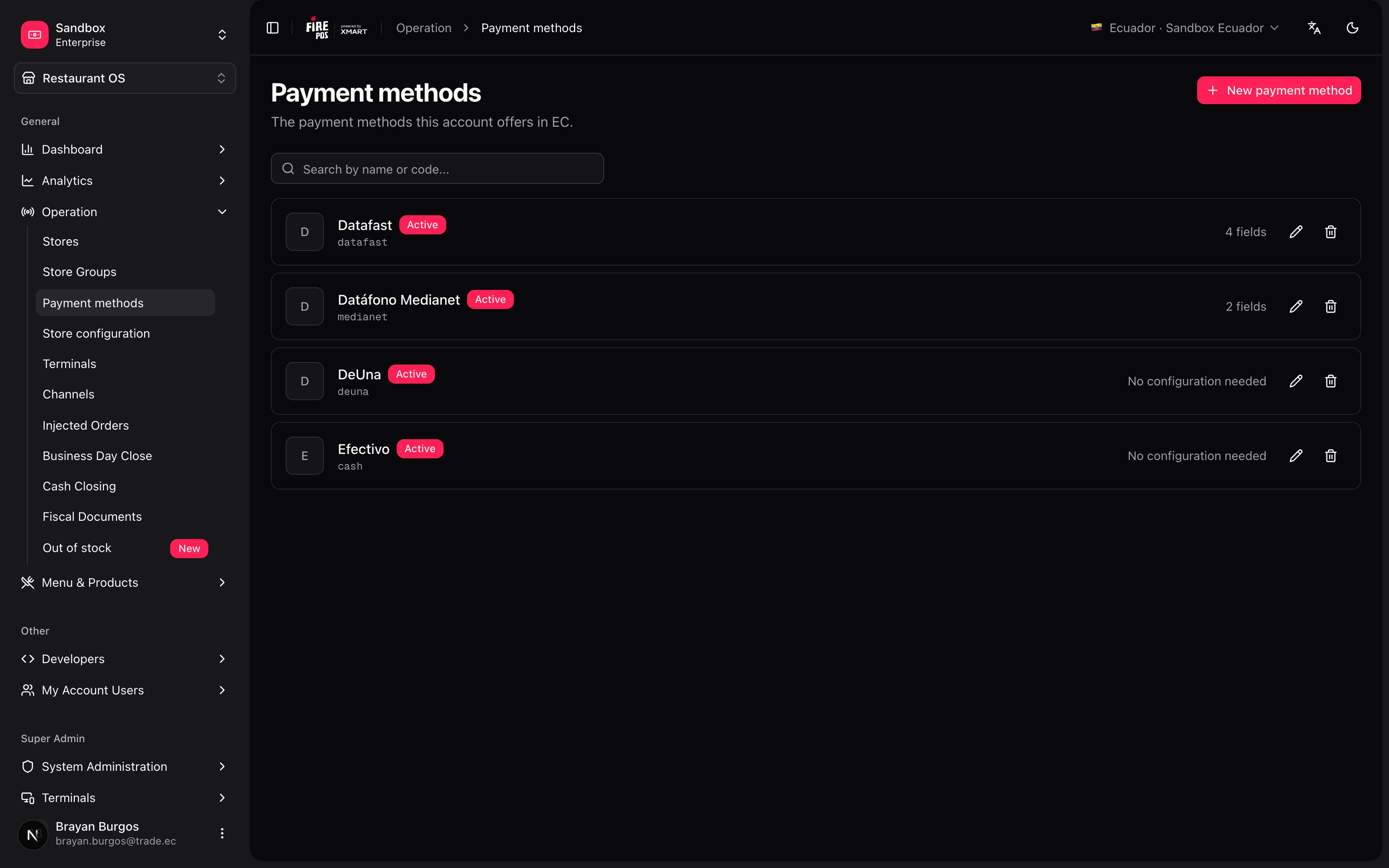
Fire does not ship a catalog of payment methods. Your account declares its own, one set per country — and, more importantly, it declares **what each method needs in order to charge and who is supposed to fill that in**.
That second part is what this screen is really for. A card processor needs a merchant ID from the bank, a code per store and the IP of the pinpad sitting next to each kiosk. Those three things are filled in by three different people at three different moments. If the method doesn't say so, the store screen either asks for data nobody has or never asks for the one that matters — and the payment fails at the counter, with a customer waiting.
Navigate to **Operation → Payment methods**.
 ***
## The short version
**1. The code is a contract, and it's permanent.** Channels reference the method by its `code`, so once you save it you can't change it. The name you can rename any time.
**2. Every method declares its own fields, and at which level each one is filled.** *Account*, *Store* or *Terminal*. That decision is what the store screen reads to know what to ask for.
**3. Turning a method off is reversible. Deleting it is not.** *Active* off stops charging everywhere and keeps everything. Delete cannot be undone: creating the method again starts from an empty configuration.
***
## The simple path
If you only take cash, this takes a minute.
1. **New payment method**.
2. **Name**: `Cash`. The **Code** fills itself in as `cash` while you type.
3. Check **This method does not take cards**.
4. **Save**.
No configuration fields, no card brands, nothing else. The method now exists and the [store configuration](/en/manuals/payments/store-configuration) screen can turn it on wherever you charge cash.
If cash is all you take, you're done. Everything below is for the day a processor shows up.
***
## The code is the contract
While you type the name, Fire derives the **Code** from it: lowercase, no accents, no spaces, underscores instead. You can overwrite it — a provider may demand an exact spelling — but the moment you save, **the code is locked**.
That's deliberate. The code is the identifier channels use to refer to the method: kiosks, the POS, aggregators. Renaming *Datafast* to *Datafast EC* changes what the customer reads on screen and nothing else. The code stays `datafast` and everything downstream keeps working.
Two consequences worth knowing before you save:
* **A typo in the code is permanent.** Getting `datafst` in production means creating a new method and reconfiguring every store that used the old one.
* **The code is unique per country.** Trying to reuse one gets you *"A payment method with that code already exists in this country"*. The same code in Ecuador and in Brazil is fine — they're separate methods.
***
## Configuration fields: what the method needs, and who fills it in
This is the section that pays for itself. Under **Configuration fields** you declare, one row per piece of data, what this method needs in order to charge.
***
## The short version
**1. The code is a contract, and it's permanent.** Channels reference the method by its `code`, so once you save it you can't change it. The name you can rename any time.
**2. Every method declares its own fields, and at which level each one is filled.** *Account*, *Store* or *Terminal*. That decision is what the store screen reads to know what to ask for.
**3. Turning a method off is reversible. Deleting it is not.** *Active* off stops charging everywhere and keeps everything. Delete cannot be undone: creating the method again starts from an empty configuration.
***
## The simple path
If you only take cash, this takes a minute.
1. **New payment method**.
2. **Name**: `Cash`. The **Code** fills itself in as `cash` while you type.
3. Check **This method does not take cards**.
4. **Save**.
No configuration fields, no card brands, nothing else. The method now exists and the [store configuration](/en/manuals/payments/store-configuration) screen can turn it on wherever you charge cash.
If cash is all you take, you're done. Everything below is for the day a processor shows up.
***
## The code is the contract
While you type the name, Fire derives the **Code** from it: lowercase, no accents, no spaces, underscores instead. You can overwrite it — a provider may demand an exact spelling — but the moment you save, **the code is locked**.
That's deliberate. The code is the identifier channels use to refer to the method: kiosks, the POS, aggregators. Renaming *Datafast* to *Datafast EC* changes what the customer reads on screen and nothing else. The code stays `datafast` and everything downstream keeps working.
Two consequences worth knowing before you save:
* **A typo in the code is permanent.** Getting `datafst` in production means creating a new method and reconfiguring every store that used the old one.
* **The code is unique per country.** Trying to reuse one gets you *"A payment method with that code already exists in this country"*. The same code in Ecuador and in Brazil is fine — they're separate methods.
***
## Configuration fields: what the method needs, and who fills it in
This is the section that pays for itself. Under **Configuration fields** you declare, one row per piece of data, what this method needs in order to charge.
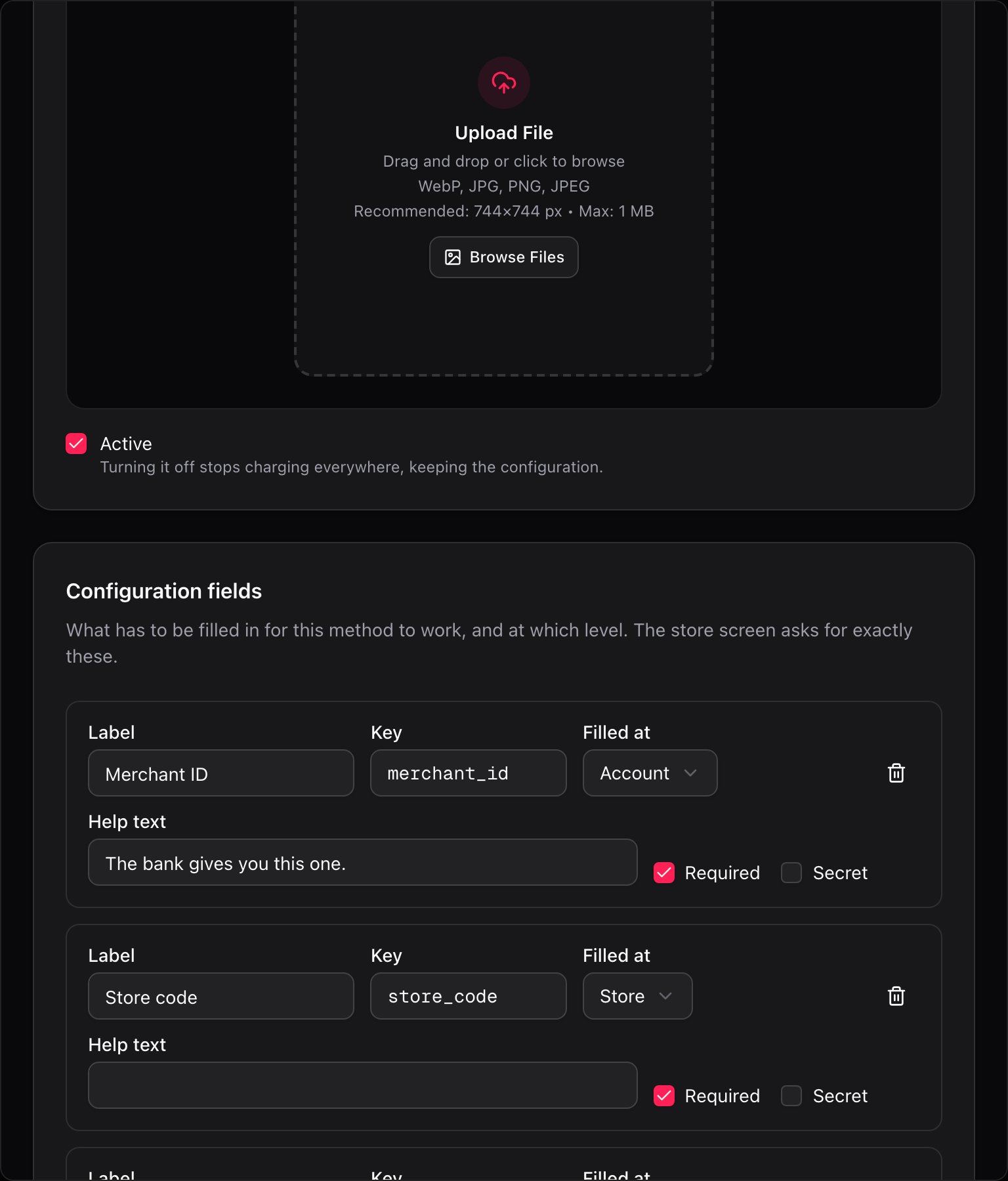 Each field has:
| Field | What it's for |
| ------------- | ---------------------------------------------------------------------------------------------------------------------------------------- |
| **Label** | What the person filling it in reads. *"Merchant ID"*. |
| **Key** | What travels to the channel. Derived from the label, editable — a provider may require an exact name. Lowercase, numbers and underscore. |
| **Filled at** | The level. This is the important one — see below. |
| **Help text** | Optional. Where to get the value: *"The bank gives you this one."* |
| **Required** | On by default. Without it, the combination shows as **Setup required**. |
| **Secret** | Hides the value on screen while it's typed. |
### The three levels
**Filled at** decides who gets asked for the value, and where:
| Level | Filled in once per | Typical example | Where it's entered |
| ------------ | ------------------ | ------------------------------ | ---------------------------------------------------- |
| **Account** | The whole account | The processor's API key | Store configuration, *Account configuration* section |
| **Store** | Each store | The store's code with the bank | Store configuration, *Store configuration* section |
| **Terminal** | Each device | The pinpad's IP | Store configuration or the kiosk's own detail |
At charge time the three levels are merged and **the most specific one wins**: terminal over store, store over account. That's what lets one kiosk have its own pinpad IP without erasing the store's.
**A repeated key breaks the merge silently.** Two fields with the same **Key** means one overwrites the other and no error is raised at charge time. Fire won't let you save it — the duplicate key turns red and **Save** stays disabled — but the border is the only warning you get, so it's worth reading it as what it is.
***
## Card brands
Each field has:
| Field | What it's for |
| ------------- | ---------------------------------------------------------------------------------------------------------------------------------------- |
| **Label** | What the person filling it in reads. *"Merchant ID"*. |
| **Key** | What travels to the channel. Derived from the label, editable — a provider may require an exact name. Lowercase, numbers and underscore. |
| **Filled at** | The level. This is the important one — see below. |
| **Help text** | Optional. Where to get the value: *"The bank gives you this one."* |
| **Required** | On by default. Without it, the combination shows as **Setup required**. |
| **Secret** | Hides the value on screen while it's typed. |
### The three levels
**Filled at** decides who gets asked for the value, and where:
| Level | Filled in once per | Typical example | Where it's entered |
| ------------ | ------------------ | ------------------------------ | ---------------------------------------------------- |
| **Account** | The whole account | The processor's API key | Store configuration, *Account configuration* section |
| **Store** | Each store | The store's code with the bank | Store configuration, *Store configuration* section |
| **Terminal** | Each device | The pinpad's IP | Store configuration or the kiosk's own detail |
At charge time the three levels are merged and **the most specific one wins**: terminal over store, store over account. That's what lets one kiosk have its own pinpad IP without erasing the store's.
**A repeated key breaks the merge silently.** Two fields with the same **Key** means one overwrites the other and no error is raised at charge time. Fire won't let you save it — the duplicate key turns red and **Save** stays disabled — but the border is the only warning you get, so it's worth reading it as what it is.
***
## Card brands
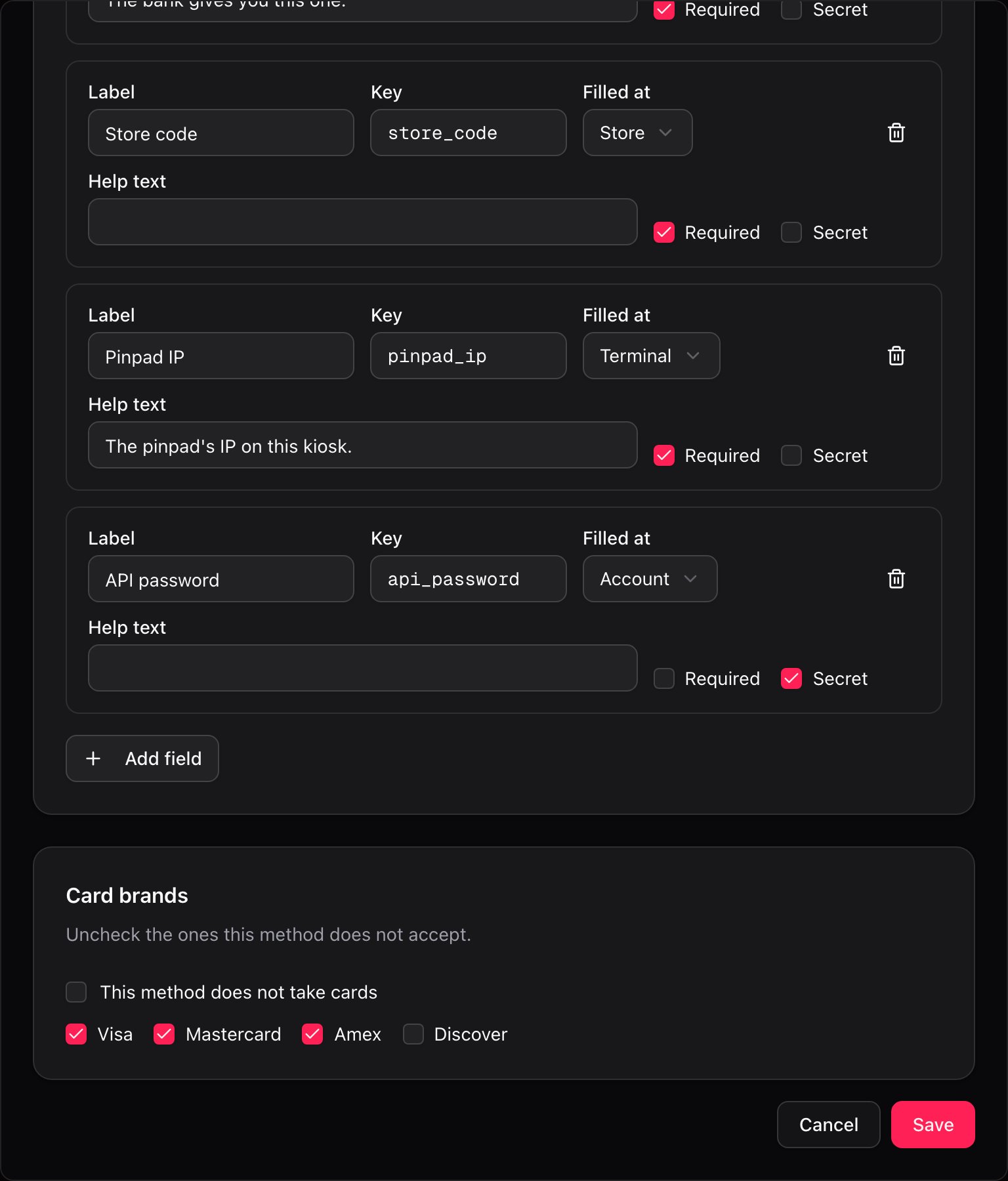 A new method is born accepting **all four** brands: Visa, Mastercard, Amex, Discover. You uncheck the ones it doesn't take. That way the common case needs no work and the exception is one click.
For a method that has nothing to do with cards — cash, a bank transfer, a wallet — check **This method does not take cards** and the grid disappears. There's no separate "is it a card?" flag: an empty list of brands already says it.
***
## The logo
The logo is what the customer sees at checkout on channels that render it. You upload it by **opening a method that already exists** — the field isn't there while you're creating it.
A new method is born accepting **all four** brands: Visa, Mastercard, Amex, Discover. You uncheck the ones it doesn't take. That way the common case needs no work and the exception is one click.
For a method that has nothing to do with cards — cash, a bank transfer, a wallet — check **This method does not take cards** and the grid disappears. There's no separate "is it a card?" flag: an empty list of brands already says it.
***
## The logo
The logo is what the customer sees at checkout on channels that render it. You upload it by **opening a method that already exists** — the field isn't there while you're creating it.
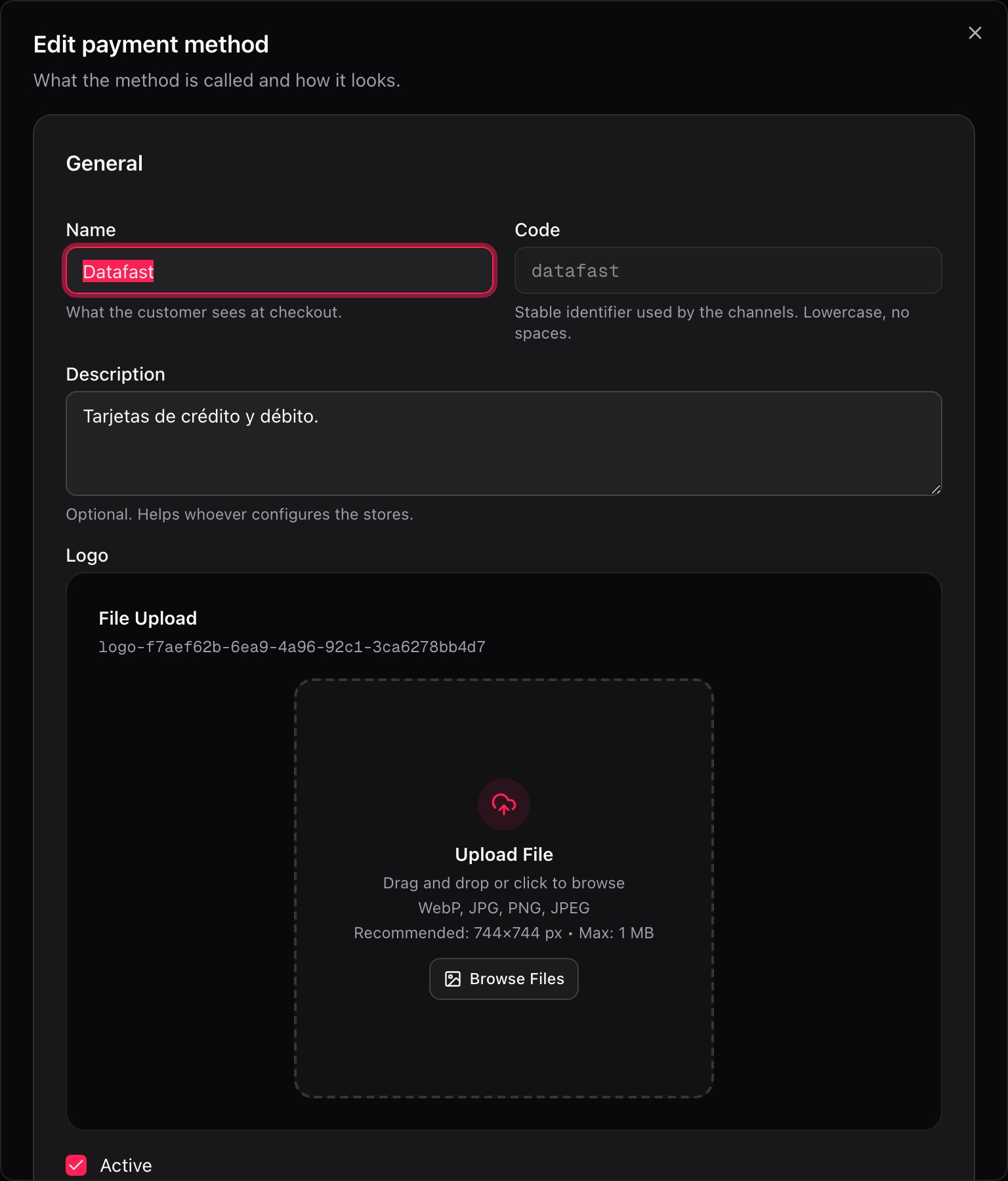 WebP, JPG, PNG or SVG, up to 1 MB, ideally 744×744 px. Anything that isn't an SVG is converted to WebP on the way in; SVGs are kept as-is because they're vector and converting them would cost quality.
***
## Turning it off is not deleting it
Two different actions that people confuse under pressure, when a processor has just gone down.
**Unchecking Active** stops that method from charging everywhere, and keeps every store's configuration exactly as it was. When you check it again, Fire brings back **only what the deactivation switched off** — anything that was already paused by hand stays paused. It's the reversible one, and it's the right one for an outage.
**Delete** removes the method from the list for good.
WebP, JPG, PNG or SVG, up to 1 MB, ideally 744×744 px. Anything that isn't an SVG is converted to WebP on the way in; SVGs are kept as-is because they're vector and converting them would cost quality.
***
## Turning it off is not deleting it
Two different actions that people confuse under pressure, when a processor has just gone down.
**Unchecking Active** stops that method from charging everywhere, and keeps every store's configuration exactly as it was. When you check it again, Fire brings back **only what the deactivation switched off** — anything that was already paused by hand stays paused. It's the reversible one, and it's the right one for an outage.
**Delete** removes the method from the list for good.
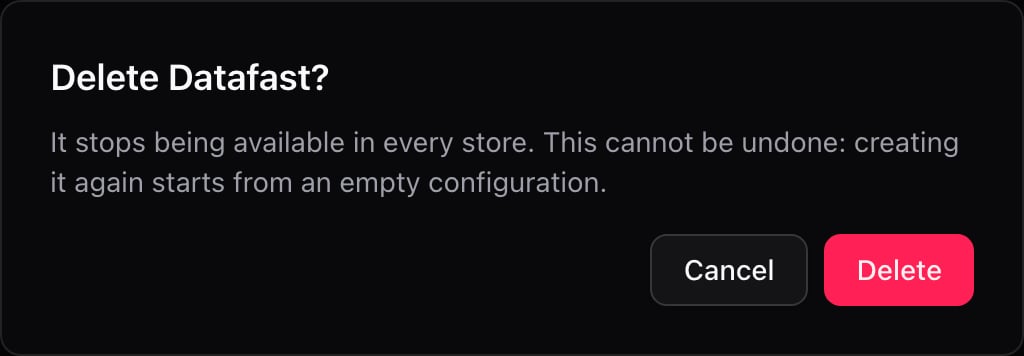 **Delete cannot be undone.** The dialog says so: creating the method again starts from an empty configuration. It's a new method, with a new identity — the values loaded across your stores, the terminal credentials, none of it comes back, even if you reuse the same code. If what you want is a pause, use **Active** off.
***
## Recipes: how to handle real-world cases
1. **New payment method** → Name `Cash`.
2. Check **This method does not take cards**.
3. **Save**.
No configuration fields: there's nothing to fill in for cash to work. In [store configuration](/en/manuals/payments/store-configuration) it goes straight to **Ready to charge** the moment you enable it.
The bank gives you one merchant ID, each store has its own code and each kiosk has its own pinpad.
1. **New payment method** → Name `Datafast`, code `datafast`.
2. Leave the card brands the processor takes checked.
3. **Add field** three times:
* `merchant_id` — **Filled at** *Account*, **Required**
* `store_code` — **Filled at** *Store*, **Required**
* `pinpad_ip` — **Filled at** *Terminal*, **Required**, help text *"The pinpad's IP on this kiosk."*
4. **Save**.
From here on the store screen asks for exactly those three, each at its own level, and nobody has to remember which is which.
A gateway that authenticates once for the whole account and needs nothing per store.
1. Create the method with its name and brands.
2. **Add field** twice, both **Filled at** *Account*:
* `api_key` — **Required**, **Secret**
* `api_password` — **Secret**
3. **Save**.
Loading those two values once in the store screen leaves every store that offers the method ready.
1. Open the method.
2. Uncheck **Active**.
3. **Save**.
It stops charging in every store, channel and fulfillment at once, and every configuration stays put. When the provider is back, check **Active** again: what the deactivation switched off comes back on its own.
Whatever someone had paused by hand before the outage stays paused. Reactivating doesn't undo human decisions.
If the new provider needs different data but you'd rather not touch every channel that references the code:
1. Open the method and edit its **Configuration fields** — add what the new provider asks for, remove what it no longer uses.
2. Rename it if the customer-facing name changes.
3. Reload the values in [store configuration](/en/manuals/payments/store-configuration).
The code doesn't change, so nothing downstream needs to be touched. Deleting the method and creating another one with the same code would work too, but you'd lose every configured value.
***
## One method, followed end to end
`datafast`, with its four fields, across a chain with two stores and three kiosks:
| Field | Filled at | Times it's entered | Who enters it |
| -------------- | ---------------------- | ------------------ | ----------------------------------------- |
| `merchant_id` | **Account** | 1 | Whoever set up the contract with the bank |
| `api_password` | **Account** *(secret)* | 1 | Same person |
| `store_code` | **Store** | 2 — one per store | Whoever opens each store |
| `pinpad_ip` | **Terminal** | 3 — one per kiosk | Whoever installs the hardware |
Six values in total. Had all four been declared at **Store** level, the same setup would take eight, two of them copy-pasted identically and one of them wrong the day someone mistypes it. Had `pinpad_ip` been declared at **Account** level, the three kiosks would share one IP and two of them would never charge.
**The level isn't a formality: it's how many times someone has to type the value, and how many chances there are to get it wrong.**
***
## Mistakes that cost money
**Saving with a typo in the code.** It's locked from that moment on. The fix is a new method plus reconfiguring every store that used the old one.
**Deleting instead of deactivating.** Delete cannot be undone and the configuration doesn't come back with the method. For a temporary outage, uncheck **Active**.
**Declaring a per-device field at Store level.** All the kiosks in that store end up sharing one value. If it's a pinpad IP, only one of them charges.
**Leaving Required off on a field that really is required.** The combination shows as ready in store configuration, the method travels to the kiosk with incomplete data, and the failure shows up at the counter instead of on the screen where it could have been fixed.
***
## Glossary
| Term | What it means |
| ----------------------- | -------------------------------------------------------------------------------------------- |
| **Code** | The method's stable identifier. Channels reference it. Locked after saving. |
| **Configuration field** | A piece of data the method needs to charge. It has a key, a level and whether it's required. |
| **Filled at** | The level at which a field's value is entered: *Account*, *Store* or *Terminal*. |
| **Key** | The name of the field that travels to the channel. Not necessarily the same as the label. |
| **Secret** | A field whose value is hidden on screen while it's typed. |
| **Active** | Whether the method charges. Off pauses it everywhere without losing anything. |
| **Card brands** | The brands the method accepts. Empty means it isn't a card method. |
***
## Frequently asked questions
No. It's locked because channels already reference it. What you can change is the **Name**, as often as you like — that's what the customer sees.
Not from the app. Creating it again — even with the same code — produces a new method with an empty configuration: the values loaded across your stores and terminals are not reconnected. If you needed a pause, the reversible action was unchecking **Active**.
Existing here isn't the same as being offered there. Availability is decided per store, channel and fulfillment in [store configuration](/en/manuals/payments/store-configuration). Check as well that the method is **Active** and that its country matches the store's.
It hides the value on screen while it's typed, the way a password field does. It's a display aid for whoever is loading it, not an encryption guarantee — treat it as such when you decide what to put in there.
No. A method belongs to an account **and a country**. The screen always shows the methods for the country selected in the header, which is why the same code can exist in two countries as two separate methods.
Not yet. The list is ordered alphabetically by name. If order matters to you, the name is the lever you have.
***
## What's coming
Things this screen does **not** do today, so nobody promises them:
* **No restore of a deleted method.** Deleting is final, as the dialog says.
* **No duplicating a method**, and no copying methods from one country to another.
* **No manual ordering** of the list.
* **No data types on configuration fields**: everything is captured as text. There's no number, boolean, dropdown or format validation.
* **Card brands are the four listed ones.** Local brands can't be added.
* **The logo is uploaded by editing**, never while creating the method.
* **Changes here don't tell you whether every kiosk received them.** If a kiosk was offline when you renamed or deactivated a method, the warning shows up in [store configuration](/en/manuals/payments/store-configuration), not here.
**Delete cannot be undone.** The dialog says so: creating the method again starts from an empty configuration. It's a new method, with a new identity — the values loaded across your stores, the terminal credentials, none of it comes back, even if you reuse the same code. If what you want is a pause, use **Active** off.
***
## Recipes: how to handle real-world cases
1. **New payment method** → Name `Cash`.
2. Check **This method does not take cards**.
3. **Save**.
No configuration fields: there's nothing to fill in for cash to work. In [store configuration](/en/manuals/payments/store-configuration) it goes straight to **Ready to charge** the moment you enable it.
The bank gives you one merchant ID, each store has its own code and each kiosk has its own pinpad.
1. **New payment method** → Name `Datafast`, code `datafast`.
2. Leave the card brands the processor takes checked.
3. **Add field** three times:
* `merchant_id` — **Filled at** *Account*, **Required**
* `store_code` — **Filled at** *Store*, **Required**
* `pinpad_ip` — **Filled at** *Terminal*, **Required**, help text *"The pinpad's IP on this kiosk."*
4. **Save**.
From here on the store screen asks for exactly those three, each at its own level, and nobody has to remember which is which.
A gateway that authenticates once for the whole account and needs nothing per store.
1. Create the method with its name and brands.
2. **Add field** twice, both **Filled at** *Account*:
* `api_key` — **Required**, **Secret**
* `api_password` — **Secret**
3. **Save**.
Loading those two values once in the store screen leaves every store that offers the method ready.
1. Open the method.
2. Uncheck **Active**.
3. **Save**.
It stops charging in every store, channel and fulfillment at once, and every configuration stays put. When the provider is back, check **Active** again: what the deactivation switched off comes back on its own.
Whatever someone had paused by hand before the outage stays paused. Reactivating doesn't undo human decisions.
If the new provider needs different data but you'd rather not touch every channel that references the code:
1. Open the method and edit its **Configuration fields** — add what the new provider asks for, remove what it no longer uses.
2. Rename it if the customer-facing name changes.
3. Reload the values in [store configuration](/en/manuals/payments/store-configuration).
The code doesn't change, so nothing downstream needs to be touched. Deleting the method and creating another one with the same code would work too, but you'd lose every configured value.
***
## One method, followed end to end
`datafast`, with its four fields, across a chain with two stores and three kiosks:
| Field | Filled at | Times it's entered | Who enters it |
| -------------- | ---------------------- | ------------------ | ----------------------------------------- |
| `merchant_id` | **Account** | 1 | Whoever set up the contract with the bank |
| `api_password` | **Account** *(secret)* | 1 | Same person |
| `store_code` | **Store** | 2 — one per store | Whoever opens each store |
| `pinpad_ip` | **Terminal** | 3 — one per kiosk | Whoever installs the hardware |
Six values in total. Had all four been declared at **Store** level, the same setup would take eight, two of them copy-pasted identically and one of them wrong the day someone mistypes it. Had `pinpad_ip` been declared at **Account** level, the three kiosks would share one IP and two of them would never charge.
**The level isn't a formality: it's how many times someone has to type the value, and how many chances there are to get it wrong.**
***
## Mistakes that cost money
**Saving with a typo in the code.** It's locked from that moment on. The fix is a new method plus reconfiguring every store that used the old one.
**Deleting instead of deactivating.** Delete cannot be undone and the configuration doesn't come back with the method. For a temporary outage, uncheck **Active**.
**Declaring a per-device field at Store level.** All the kiosks in that store end up sharing one value. If it's a pinpad IP, only one of them charges.
**Leaving Required off on a field that really is required.** The combination shows as ready in store configuration, the method travels to the kiosk with incomplete data, and the failure shows up at the counter instead of on the screen where it could have been fixed.
***
## Glossary
| Term | What it means |
| ----------------------- | -------------------------------------------------------------------------------------------- |
| **Code** | The method's stable identifier. Channels reference it. Locked after saving. |
| **Configuration field** | A piece of data the method needs to charge. It has a key, a level and whether it's required. |
| **Filled at** | The level at which a field's value is entered: *Account*, *Store* or *Terminal*. |
| **Key** | The name of the field that travels to the channel. Not necessarily the same as the label. |
| **Secret** | A field whose value is hidden on screen while it's typed. |
| **Active** | Whether the method charges. Off pauses it everywhere without losing anything. |
| **Card brands** | The brands the method accepts. Empty means it isn't a card method. |
***
## Frequently asked questions
No. It's locked because channels already reference it. What you can change is the **Name**, as often as you like — that's what the customer sees.
Not from the app. Creating it again — even with the same code — produces a new method with an empty configuration: the values loaded across your stores and terminals are not reconnected. If you needed a pause, the reversible action was unchecking **Active**.
Existing here isn't the same as being offered there. Availability is decided per store, channel and fulfillment in [store configuration](/en/manuals/payments/store-configuration). Check as well that the method is **Active** and that its country matches the store's.
It hides the value on screen while it's typed, the way a password field does. It's a display aid for whoever is loading it, not an encryption guarantee — treat it as such when you decide what to put in there.
No. A method belongs to an account **and a country**. The screen always shows the methods for the country selected in the header, which is why the same code can exist in two countries as two separate methods.
Not yet. The list is ordered alphabetically by name. If order matters to you, the name is the lever you have.
***
## What's coming
Things this screen does **not** do today, so nobody promises them:
* **No restore of a deleted method.** Deleting is final, as the dialog says.
* **No duplicating a method**, and no copying methods from one country to another.
* **No manual ordering** of the list.
* **No data types on configuration fields**: everything is captured as text. There's no number, boolean, dropdown or format validation.
* **Card brands are the four listed ones.** Local brands can't be added.
* **The logo is uploaded by editing**, never while creating the method.
* **Changes here don't tell you whether every kiosk received them.** If a kiosk was offline when you renamed or deactivated a method, the warning shows up in [store configuration](/en/manuals/payments/store-configuration), not here.